How to Sell on Amazon UK 2026: A Step-by-Step Guide for Beginners
From registration to your first reviews: the documents Amazon UK asks for, which selling plan to pick, how listings work, what Amazon takes from a sale, FBA vs posting orders yourself, and the VAT and tax basics. Checked against Amazon UK and GOV.UK on 17 October 2026.
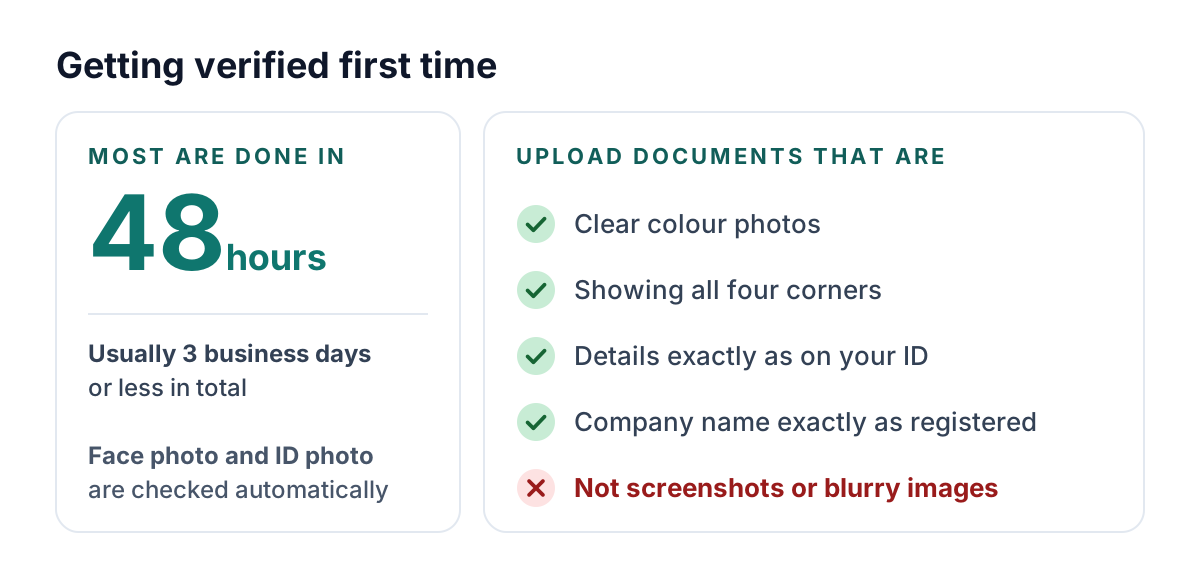
To sell on Amazon UK, you register a Seller Central account, choose a selling plan, list your products and decide who posts the orders. You'll need photo ID, proof of address, a credit or debit card, a bank account and a phone number. Amazon says most verifications are completed within 48 hours.
The Individual plan costs 75p per item sold and Professional £25 a month, both plus VAT. Every sale also pays a referral fee, mostly 8% to 15% of what the buyer pays.
Every fee in detail: our Amazon seller fees guide. What you'd keep from a sale: the free Amazon fee calculator.
How to sell on Amazon UK in 7 steps
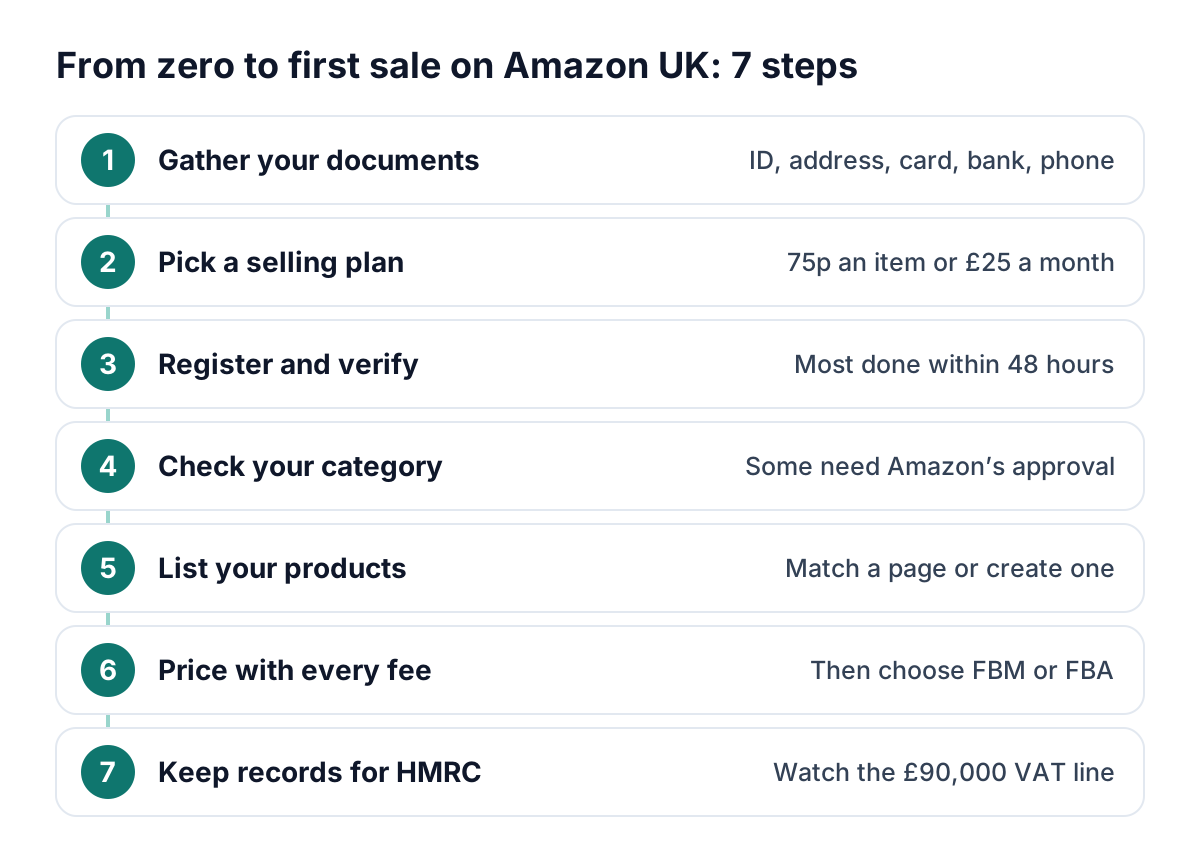
- Gather your documents
- Pick a plan: Individual or Professional
- Register and verify in Seller Central, Amazon's seller dashboard
- Check your category's rules
- List your products
- Price with every fee counted, then choose who posts: you, or Amazon (FBA)
- Keep records for HMRC and watch the £90,000 VAT threshold
What you need before you register
Amazon's UK registration guide and verification page list what to have ready.
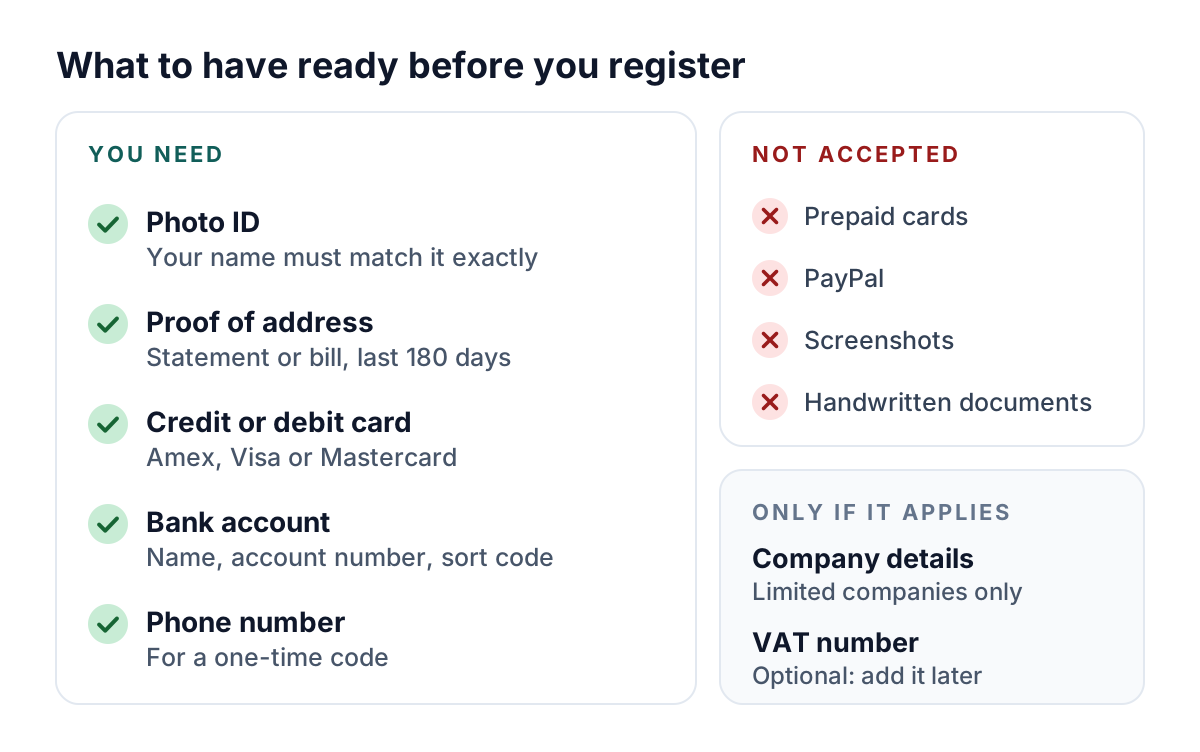
- Photo ID: a passport, national identity card, driving licence (regional differences may apply) or residence permit. Enter your name exactly as shown, middle name included.
- Proof of address: a bank, credit card or building society statement, a utility bill or similar, from the last 180 days.
- Bank account: if it can't be verified automatically, Amazon asks for a statement from the last 180 days.
- Companies add their legal name, registration number, registered address and proof of registration.
Sole trader? Choose “None, I am an individual”
Pick this business type if you aren't incorporated: no business licence, just proof of your home address. It's not the same thing as the Individual selling plan.
Individual or Professional: which selling plan?
Prices exclude VAT, which Amazon adds at 20% for UK-established sellers.
| Feature | Individual | Professional |
|---|---|---|
| Plan fee | 75p per item sold (90p with VAT) | £25 a month (£30 with VAT) |
| Amazon suggests it if you | Sell under 35 items a month, no ads | Sell over 35 a month, advertise or need restricted categories |
| Restricted categories | No | Yes, after approval where required |
| Bulk listing, reports and APIs | No | Yes |
| Delivery charges on orders you post | Amazon's set rates | Your own, except books, music, video and DVD |
| Ads, promotions, extra users, new-seller incentives | No | Yes |
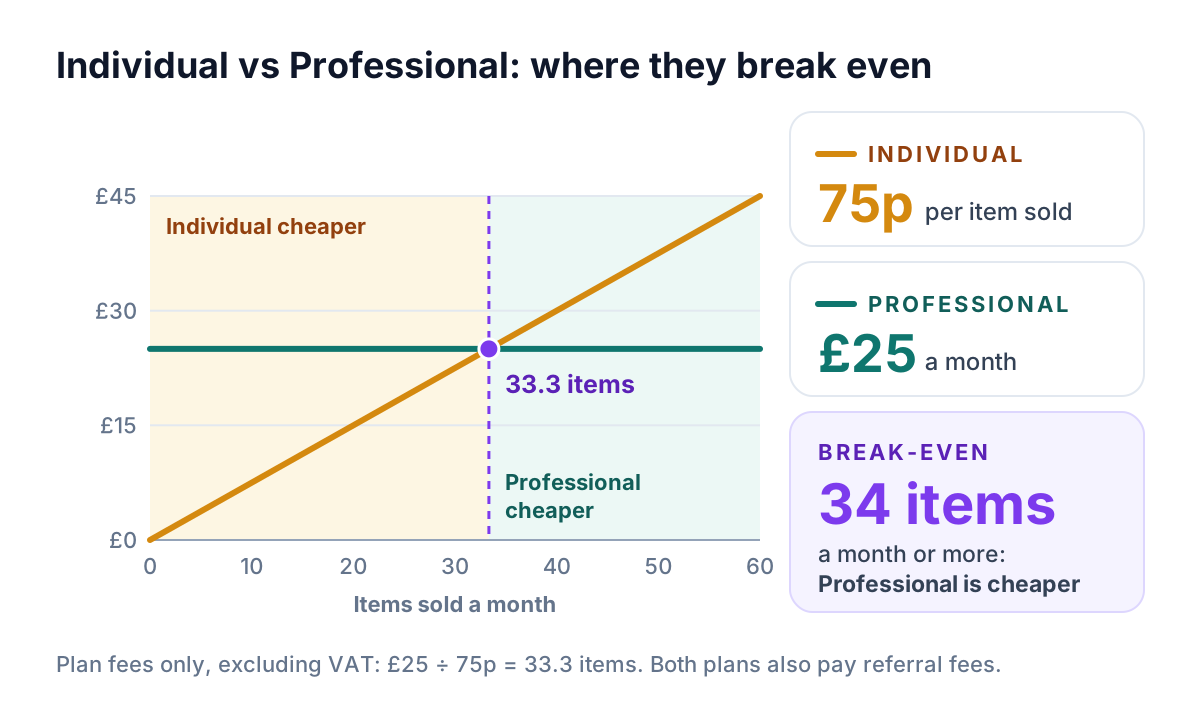
On plan fees alone, Professional is cheaper from 34 items a month. Below that, Individual avoids a monthly bill.
- Both plans can add new products and use FBA, and you can switch plan in Seller Central after verification.
- Professional billing: first charged once you're verified, then only in months with active listings. Approved Amazon Handmade sellers have it waived after their first month.
- Individual postage: on orders you post, Amazon's rates apply: £4.00 plus 50p per kg for standard UK delivery on most items, even if your postage costs more.
About the “over £42,000 in incentives”
Amazon's new-seller incentives are Professional-only. Most of the headline is a Brand Registry bonus (10% back on your first £40,000 of branded sales, then 5% up to £800,000 in year one), which only reaches £42,000 at £800,000 of sales.
How to register a Seller Central account, step by step
Start from the sign-up button for your plan on Amazon's UK pricing page. Then:
- Login: name, email, password and a one-time code sent to your phone.
- Business information: location and business type; companies give their exact registered name, number and address.
- Seller information: your details as on your ID, proof of address and, for a company, proof of your role.
- Billing: card details and billing address.
- Store: a unique store name (it needn't match your business), barcodes and brand ownership.
- Bank account: holder name, account number and sort code.
- Identity verification: photos of your face and ID, checked automatically, then a document review.
Choosing what to sell: open, restricted and approval categories
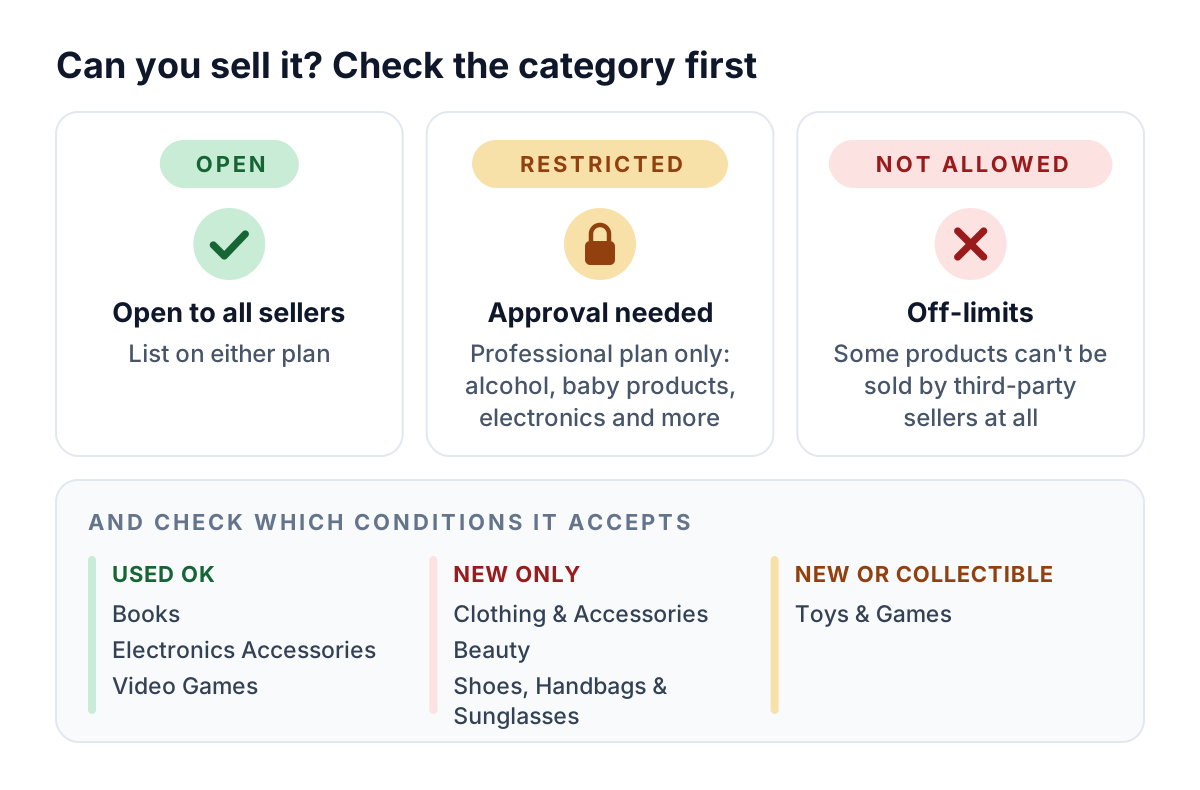
- Restricted (Professional only): Amazon's category overview lists alcohol, baby products, beauty topicals, dietary supplements, electronics, grocery, health and personal care, jewellery and precious gems, lighting and medical devices.
- Approval: request it in Seller Central. Amazon may set performance checks, fees or other qualifications and can ask for documents for any product, so keep supplier invoices.
- Condition: Books, Electronics Accessories and Video Games take used items. Clothing & Accessories, Beauty, and Shoes, Handbags & Sunglasses are new only, and Toys & Games new or collectible.
- Referral fees run from 5% to 45% by category: see our referral fee table.
Listing products: match an existing page or create a new one
Every product has an ASIN (Amazon Standard Identification Number), and every seller's offer for it shares one product detail page.
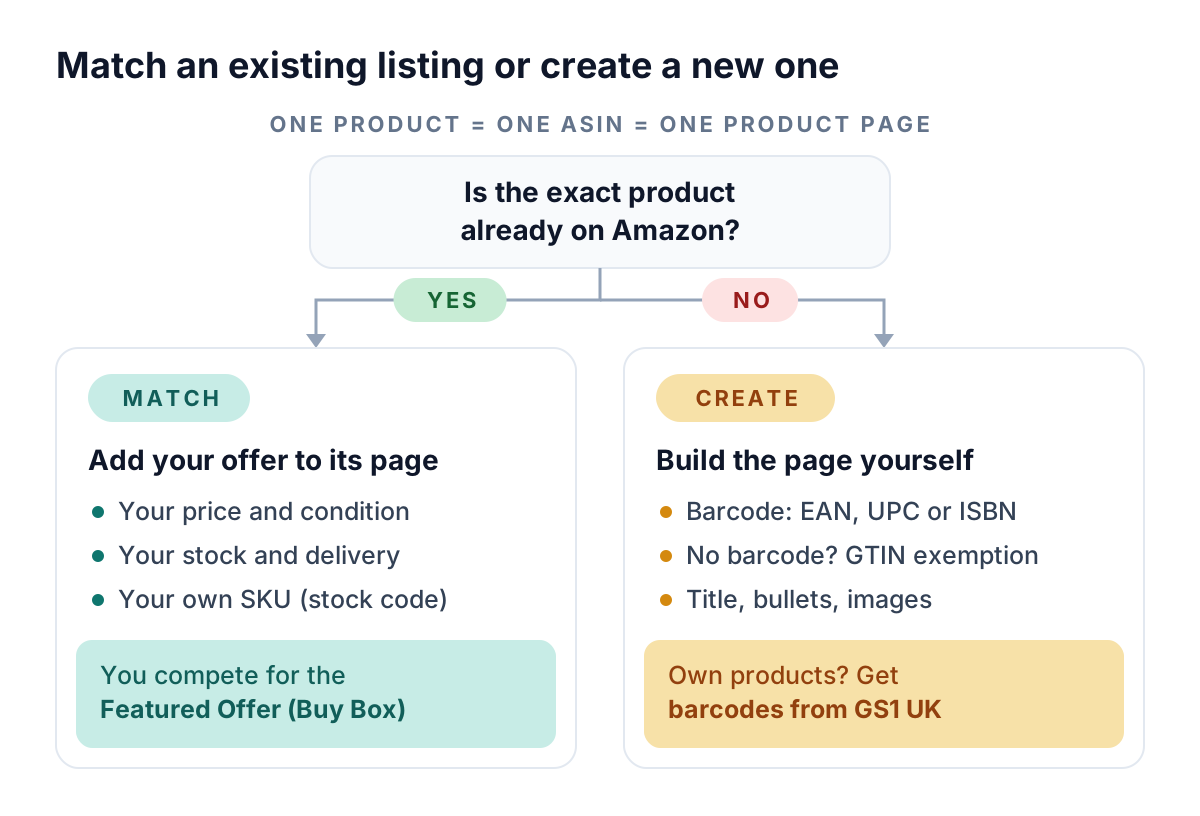
Already listed? Add your offer with your price, condition, quantity, delivery options and SKU (stock reference). First to sell it? Create the page with a GTIN, EAN, UPC or ISBN.
On a shared page, shoppers buy from one Featured Offer (the Buy Box); Amazon says customised repricing rules can improve your chances of winning it.
Barcodes (GTINs) and exemptions
Use the manufacturer's barcode if the product has one. For your own products, get codes from GS1 (GS1 UK here), or request a GTIN exemption if there's no barcode.
Our product identifier glossary explains GTIN, EAN, UPC and ISBN. It's written for eBay, but the codes are the same.
What goes into a new listing
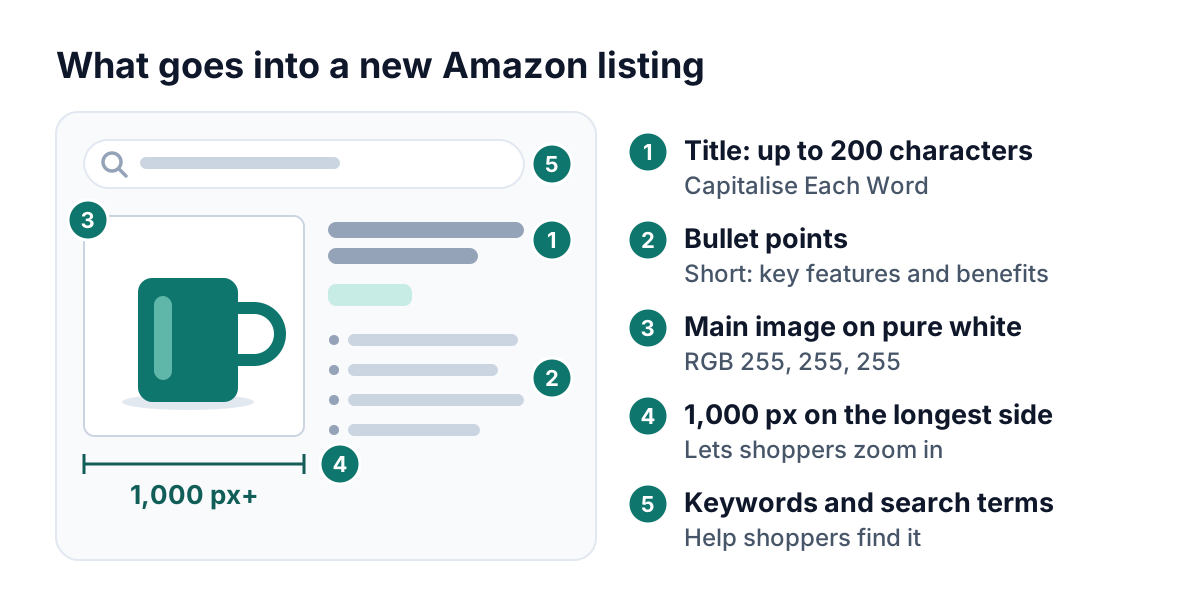
Amazon's guide asks for a title of up to 200 characters, short bullet points, search keywords and a pure white main image; 1,000 pixels or more on the longest side enables zoom.
Pricing with Amazon's fees in mind
- Referral fee: a percentage of the total the buyer pays, delivery and gift wrapping included, with a 25p minimum in most categories.
- Closing fee: 50p per item on books, music, video, DVDs, video games and software.
- Digital services fee: 2% on Amazon's referral and FBA fees for UK-established sellers (Amazon's notice).
- VAT on fees: 20% on Amazon's fees. If you can't reclaim it, a 15% referral fee costs about 18.4% of the sale.
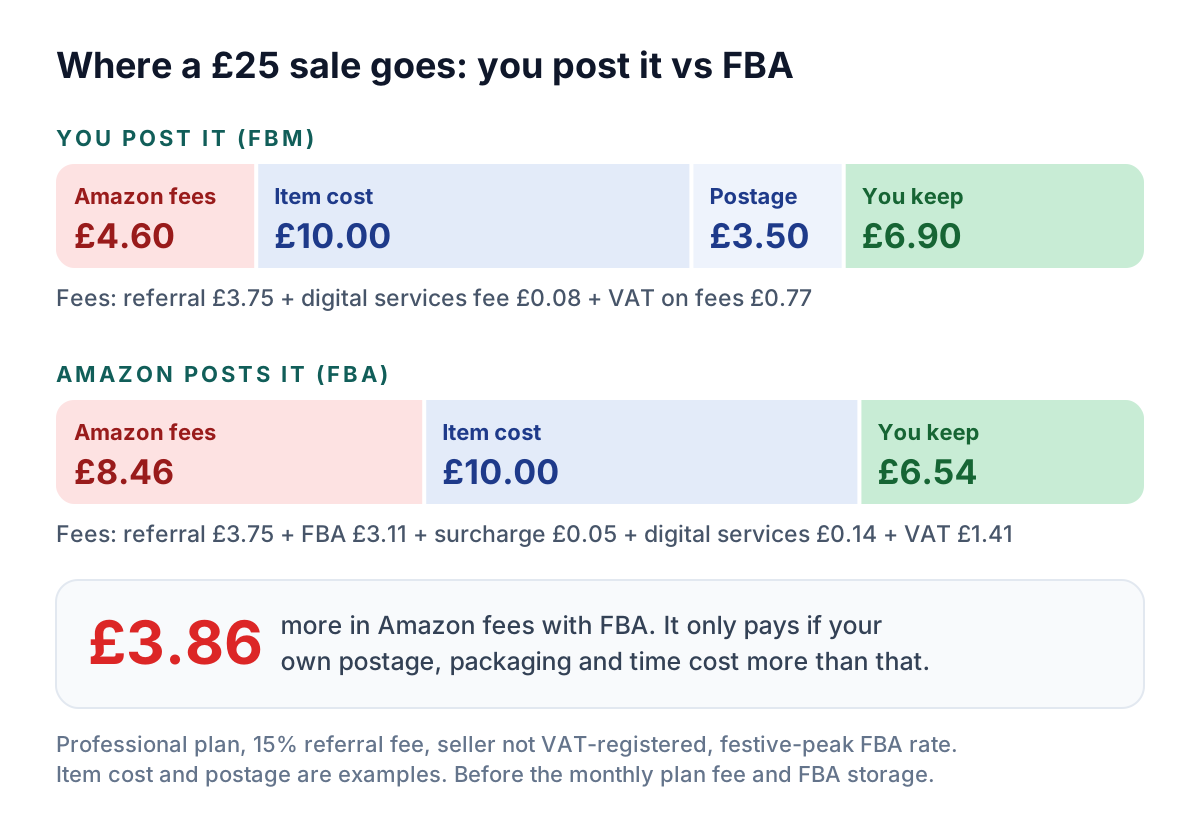
The £25 example: Professional plan, free delivery, seller not VAT-registered, fee lines rounded to the penny, and VAT assumed on the digital services fee (Amazon doesn't spell it out). FBA uses the small-parcel peak rate (to 14 January 2027) and only wins if your own postage, packaging and time cost more than £3.86, before storage and getting stock to Amazon.
The £30 monthly plan adds 60p a sale at 50 sales a month; on Individual, add 90p (75p plus VAT) per item. On a refund, Amazon keeps 20% of the referral fee, capped at £5 (media items differ). Try our Amazon fee calculator or Amazon's Revenue Calculator, and our fees guide's worked examples.
Fulfilment: post orders yourself or use FBA
Post orders yourself, have Amazon do it, or mix the two across your products.
Fulfilled by Merchant (FBM): you post it
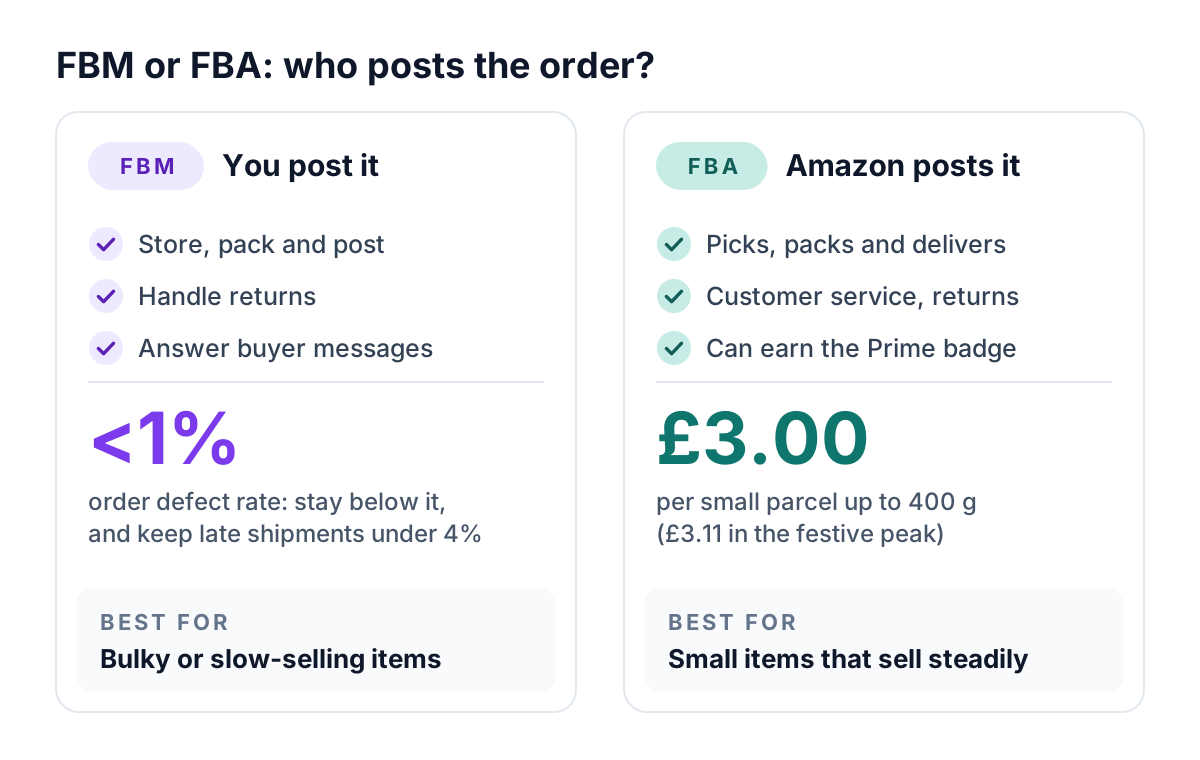
With FBM you store, pack and post each order, handle returns and answer buyers through Amazon's messaging; you can buy postage labels in Seller Central.
Amazon's UK account health guide says to keep order defects below 1% and late shipments below 4%; it also tracks cancellations and valid tracking. FBM suits bulky or slow-selling items that would run up FBA storage fees.
Fulfilment by Amazon (FBA): Amazon posts it
With FBA you send stock to Amazon, which picks, packs, delivers, answers customers and handles returns; items can qualify for Prime. UK rates from the FBA rate card:
- Fulfilment: from £1.83 per unit (light envelope up to 20 g); £3.00 for a small parcel up to 400 g, or £3.11 in the festive peak, 15 October 2026 to 14 January 2027.
- Low-Price FBA: from £1.46 for items priced £20 or less including VAT (£10 in seven categories), with no peak fee.
- Storage: £0.76 per cubic foot a month for most standard-size items (£1.51 October to December), plus surcharges after 241 days.
- Surcharge: 1.5% fuel and logistics surcharge on fulfilment fees since 17 April 2026, no end date announced.
Our fees guide has the full FBA rate card.
Seller Fulfilled Prime: not a starting point
Seller Fulfilled Prime lets you deliver Prime orders yourself, but needs a Professional account, a domestic warehouse and a passed trial. Then you must ship over 99% of orders on time, keep cancellations below 0.5%, use Amazon's Buy Shipping on at least 98% of orders and let Amazon handle customer service. Build a track record with FBM first.
VAT and tax basics for UK Amazon sellers
Income tax: are you trading?
HMRC says you probably don't pay Income Tax on selling your own personal possessions. But you're probably trading if you sell goods you bought to resell, or made yourself.
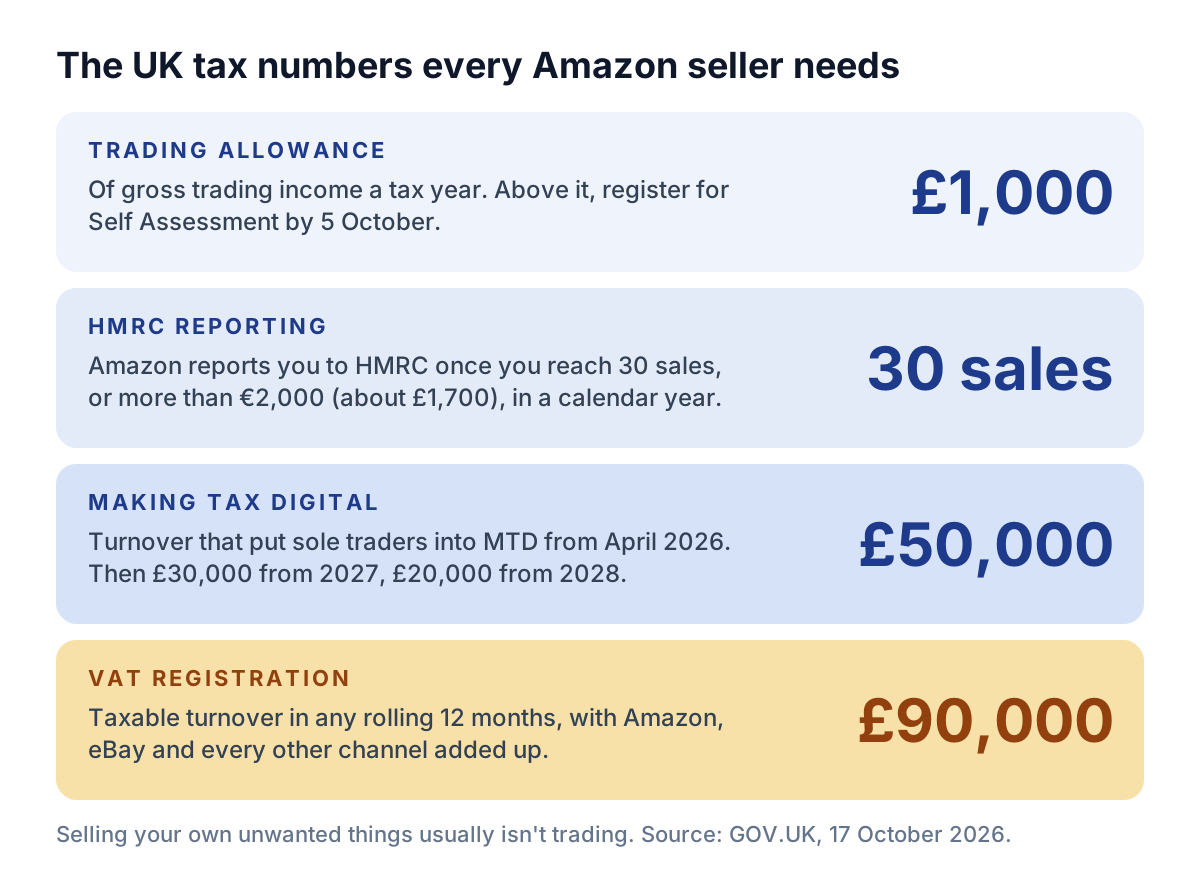
The £1,000 trading allowance is measured on gross income each tax year; above it, register for Self Assessment by 5 October after the tax year ends. Our guide to HMRC's trading test uses eBay examples, but the test is the same.
HMRC reporting by Amazon
Since 1 January 2024, Amazon reports sellers to HMRC by 31 January after each calendar year once they make 30 or more sales of goods or receive more than €2,000 (about £1,700). You get a copy; HMRC says it doesn't automatically mean you owe tax.
Making Tax Digital
Sole traders with qualifying income (turnover, before expenses) over £50,000 in 2024/25 have used MTD for Income Tax since 6 April 2026. The threshold falls to £30,000 from April 2027 and £20,000 from April 2028.
VAT: the £90,000 threshold
You must register for VAT if your taxable turnover for the last 12 months goes over £90,000, or you expect it to in the next 30 days. Amazon, eBay and other sales count together.
Some Amazon pages still quote the old £85,000; GOV.UK's £90,000 is current. Not VAT-registered? Then the 20% VAT on Amazon's fees is a straight cost. More in our £90k VAT threshold guide.
Getting your first sales and reviews, within the rules
New listings start with no reviews, and the temptation is to buy some. Don't.
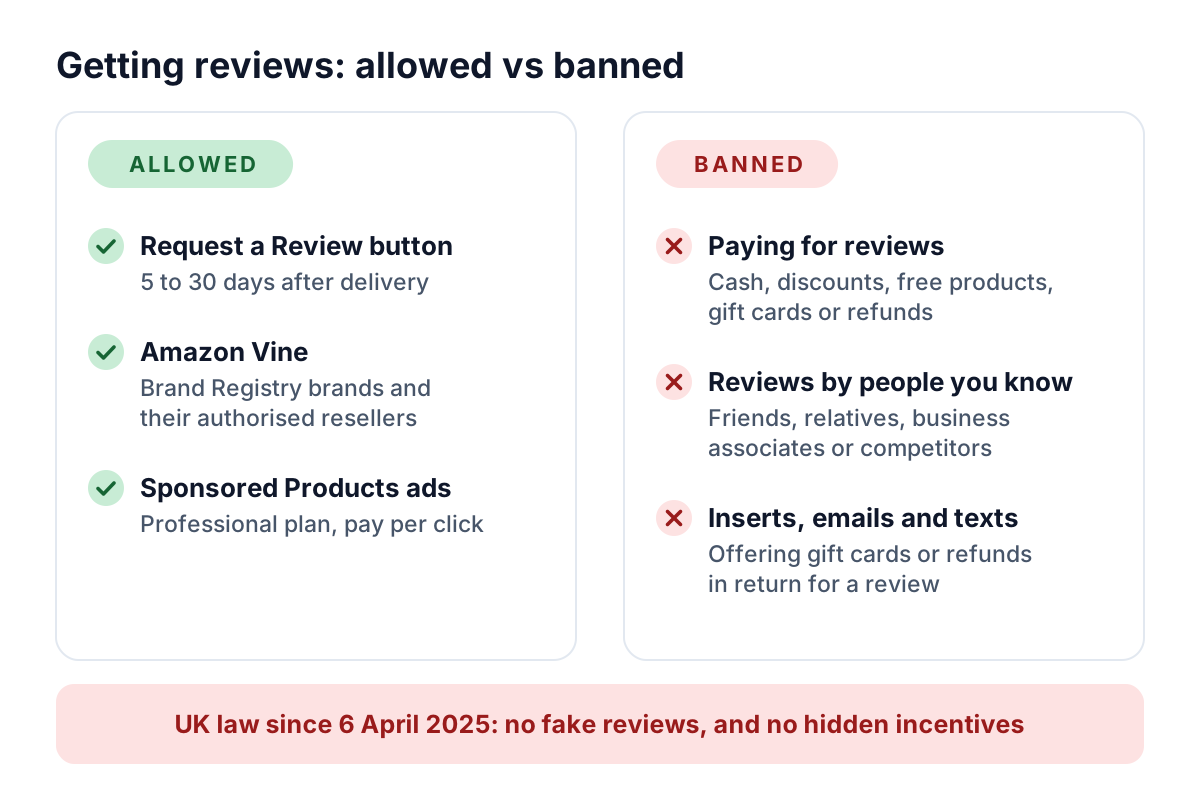
Under its Community Guidelines, Amazon can remove reviews and products, suspend or close accounts and withhold payments. Since 6 April 2025, UK law has also banned submitting or commissioning fake reviews, or reviews that hide an incentive (CMA guidance).
Inserts, emails and texts count too
Amazon's examples: a gift card in the parcel redeemable only after a positive review, an email offering a refund to change or remove a negative review, and a text promising full reimbursement for a purchase and review.
What you can do instead
- Request a Review: a button on the order's page asks for a review and seller feedback, 5 to 30 days after delivery (Amazon's forum post).
- Amazon Vine: selected reviewers get free units and their reviews are labelled “Vine Customer Review of Free Product”. It's for Brand Registry owners (free, but you need a pending or registered trademark) and resellers they authorise.
- £160 Vine credit: for new Professional sellers who join Brand Registry within six months of listing their first eligible product, then enrol in Vine within 90 days. Check current terms.
- Sponsored Products ads (Professional only): pay per click, with matched ad credits of up to £750 if you launch your first campaign within 90 days of listing your first buyable product.
Common beginner mistakes
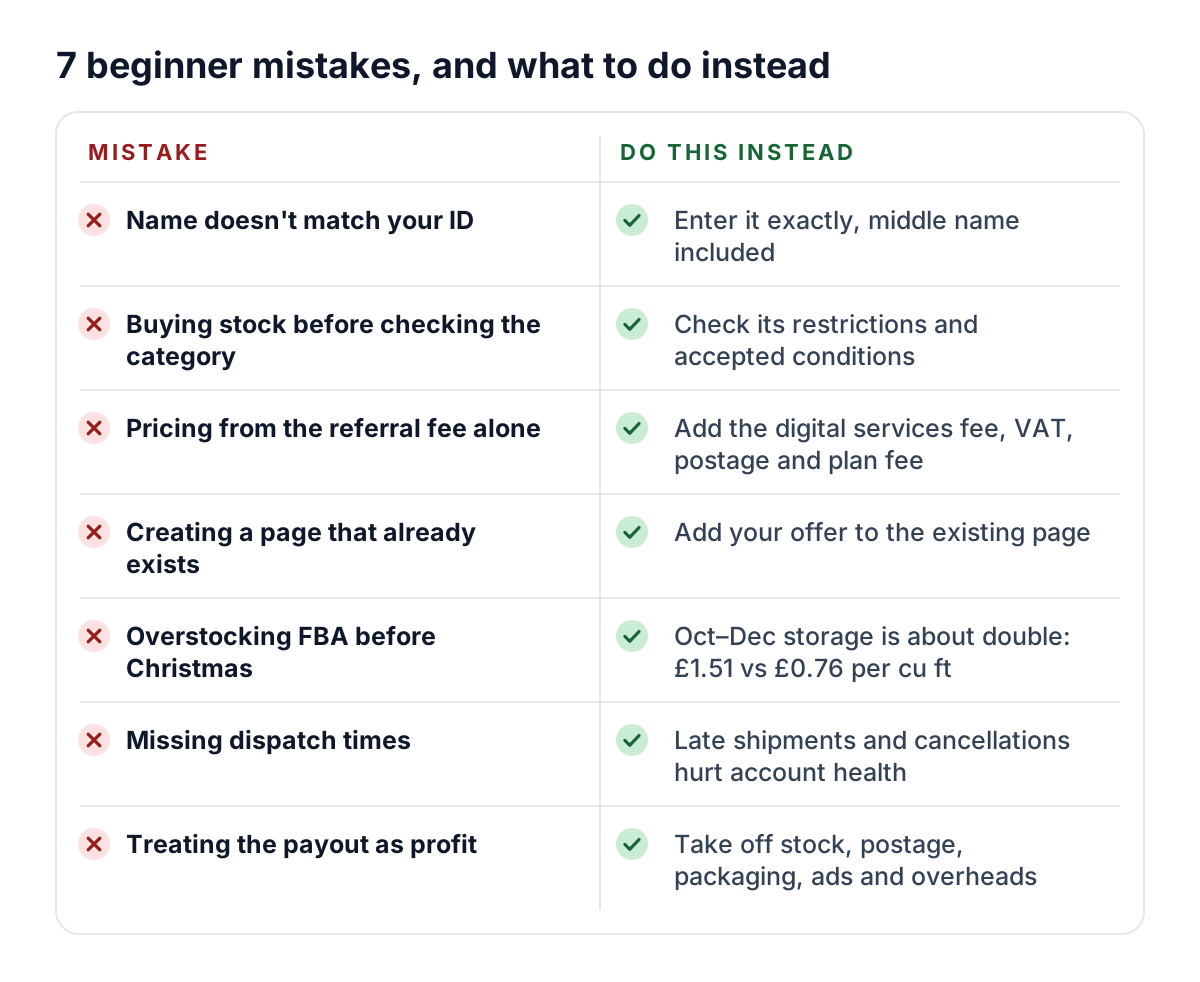
- Registering with details that don't match your documents
- Buying stock before checking the category's rules and accepted conditions
- Pricing from the referral fee alone
- Creating a new page for a product that's already listed
- Overstocking FBA before Christmas, when storage roughly doubles
- Missing dispatch times on orders you post
- Treating Amazon's payout, every two weeks, as profit
Selling on Amazon and eBay
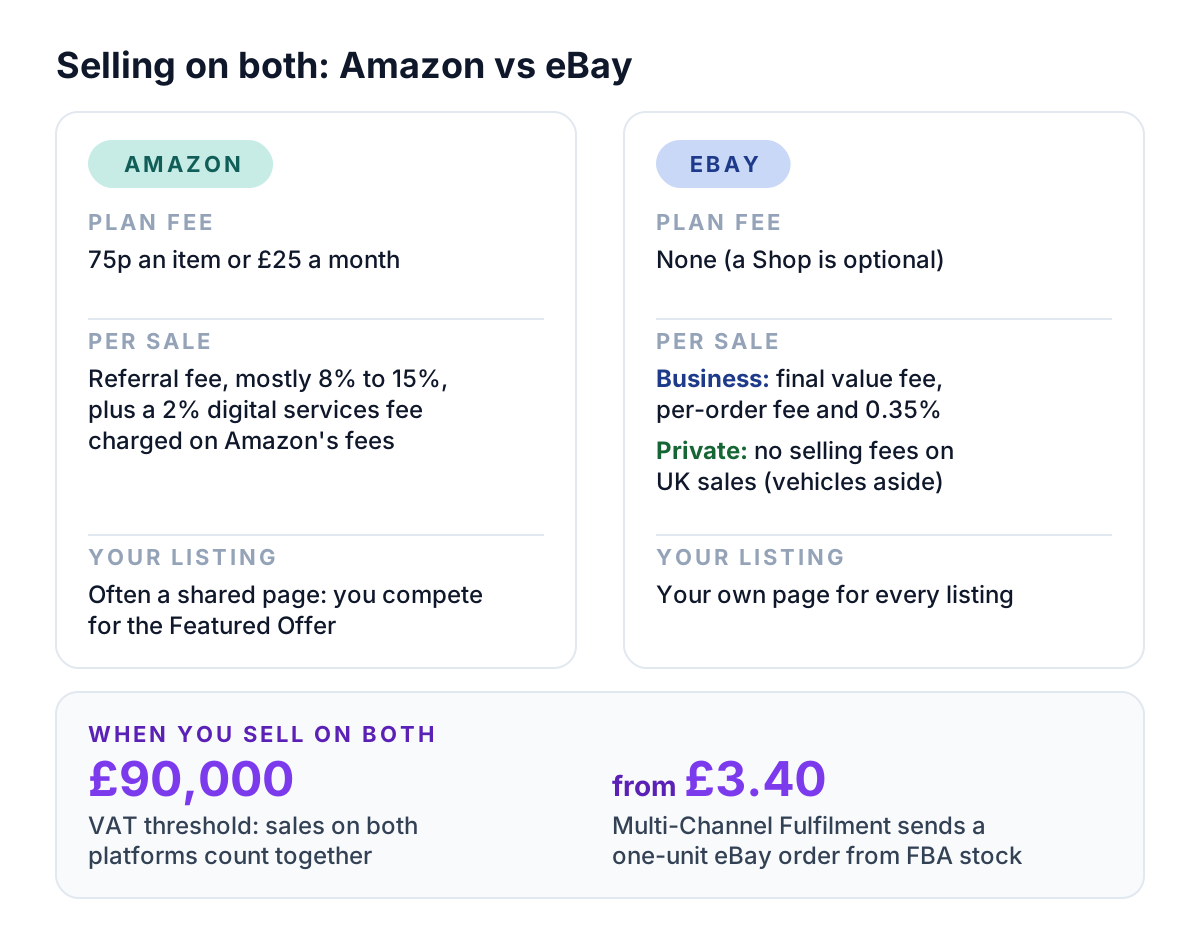
eBay has no selling plan. Business sellers pay a final value fee, a per-order fee and a 0.35% regulatory fee on each sale, plus 30p per listing without a Shop; private sellers pay no selling fees on UK sales, vehicles aside.
Which is cheaper depends on category and price: our Amazon vs eBay fees comparison works through £15, £60 and £400 sales.
- Fulfilment: Amazon's Multi-Channel Fulfilment can ship eBay orders from FBA stock, from £3.40 for a one-unit order in the smallest envelope tier, plus the 1.5% surcharge (MCF rate card).
- Profit: DashVue tracks the eBay side today, showing what each order really made after eBay's fees, postage and item cost. Amazon support is in development, so for now use Amazon's own reports for that side.
Selling on Amazon UK: FAQ
How much does it cost to sell on Amazon UK?
75p per item sold (Individual) or £25 a month (Professional), plus VAT. Each sale also pays a referral fee, mostly 8% to 15%, plus 2% on Amazon's fees; FBA adds fulfilment and storage fees.
Can I sell on Amazon UK without a registered business?
Yes: choose “None, I am an individual” and register with photo ID and proof of address. Buying goods to resell, or making items to sell, can still count as trading for HMRC.
Do I need to be VAT-registered to sell on Amazon UK?
No, and you don't need a VAT number to register. You must register for VAT once your taxable turnover goes over £90,000 in a rolling 12 months, across all your sales channels.
How long does Amazon seller verification take?
Amazon says most verifications are completed within 48 hours, and the process usually takes three business days or less.
Do I need a barcode to sell on Amazon?
To create a new product page, usually: a GTIN, EAN, UPC or ISBN, or a GTIN exemption if the product has none. To sell something already listed, you add your offer to its existing page.
When does Amazon pay sellers?
Amazon collects payment from the buyer and says it pays your available funds every two weeks, into the bank account you registered.
Official sources
This guide was checked on 17 October 2026 against:
- Amazon UK: registration guide, verification requirements and beginner's guide and category overview
- Amazon UK: selling plans, referral fees and shipping credits, new-seller incentives, Amazon Handmade and Brand Registry
- Amazon UK: Fulfilled by Merchant, Fulfilment by Amazon, Seller Fulfilled Prime, the FBA rate card effective 1 July 2026 and the Multi-Channel Fulfilment rate card
- Amazon UK: account health guide and the amazon.co.uk Community Guidelines
- Amazon Seller Forum posts by Amazon on the digital services fee, VAT on Amazon fees, the fuel and logistics surcharge, 2026 peak fees, Request a Review and Vine for resellers
- GOV.UK: register for VAT, income from online platforms, trading allowance, selling on a digital platform and Making Tax Digital for Income Tax
- CMA: unfair commercial practices guidance (CMA207), including the ban on fake and concealed incentivised reviews