How to Sell on eBay UK in 2026: The Complete Beginner's Guide (Account, First Listing, Fees, Postage)
Everything a new UK seller needs in one place: setting up and verifying your account, private vs business, creating your first listing, photos, pricing, Simple Delivery vs your own courier, exactly what eBay charges (with worked GBP examples), when the money lands in your bank, feedback, and the tax thresholds that actually matter.
Quick answer
To sell on eBay UK, create an account at ebay.co.uk, verify your identity and link a bank account, then select Sell at the top of any page and follow the listing form: photos, condition, price, postage. Selling is free for UK private sellers (300 free listings a month, no final value fees), and when an eligible item sells eBay sends you a prepaid Simple Delivery label to drop off at Royal Mail, Evri or InPost. Once delivery is confirmed, the money is released to your eBay balance and you withdraw it to your bank.
Skim mode
If you are skimming this because time is short, do the first checklist above, then return here for the edge-case notes only.
Most “how to sell on eBay” guides were written for the US site, or for a UK that no longer exists: one where private sellers paid final value fees and printed their own Royal Mail labels. Both of those things changed. UK private sellers now pay no final value fees at all, and postage on most private listings runs through eBay’s prepaid Simple Delivery programme whether you like it or not.
This guide walks you through the whole journey on today’s rules: account setup, choosing private or business, your first listing, photos, pricing, postage, exactly what eBay charges (with worked examples in pounds), when you actually get paid, feedback, the tax thresholds HMRC cares about, and what changes when you scale up. Every policy claim is drawn from eBay’s own UK help pages, linked in the sources at the end.
Selling on eBay UK at a glance
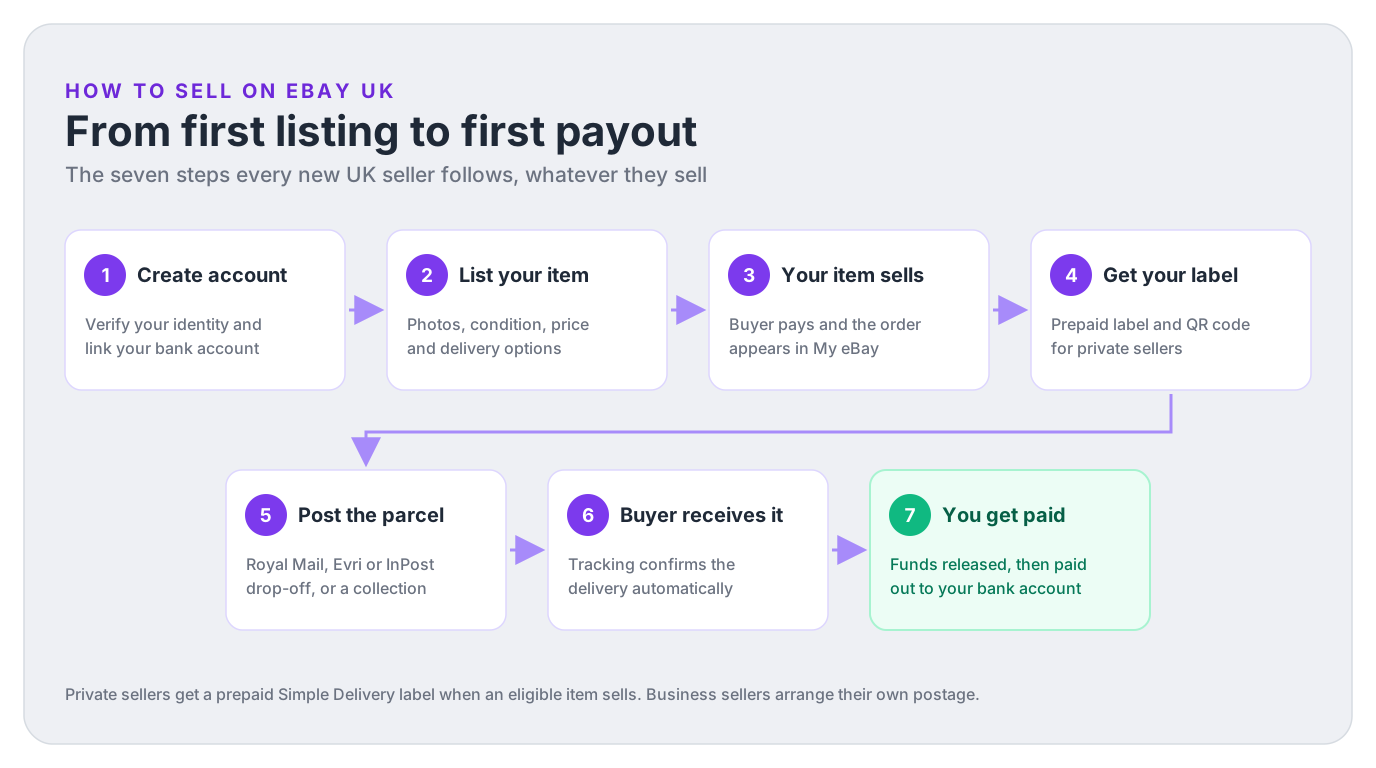
Here is the whole process, condensed:
- Create your account at ebay.co.uk and pass identity and bank verification (this is what unlocks payouts).
- List your item: photos, honest condition, a price based on what similar items actually sold for.
- It sells. The buyer pays and the order appears in My eBay or Seller Hub.
- Get your label. Private sellers receive a prepaid Simple Delivery label and QR code; business sellers buy their own postage.
- Post it within your handling time: drop-off at a parcel shop or locker, or book a collection.
- Delivery is confirmed by tracking, which Simple Delivery uploads for you automatically.
- You get paid. Funds are released to your eBay balance (private) or paid out to your bank (business).
Realistic expectations for a first-timer: the account takes minutes, verification can add a few days if eBay asks for documents, your first listing takes half an hour (they get much faster), and your first payout typically lands a few days after the item is delivered. None of it is hard. The mistakes that cost money are almost always in pricing, postage and fees, which is why those sections below are the longest.
Step 1: Create and verify your eBay seller account
You can register to sell on eBay UK if you have a verified address in the UK (or one of the many other eligible countries eBay lists). Registration itself is the easy part; the bit that trips people up is seller verification, which eBay runs before you can receive payouts.
- Sign up at ebay.co.uk with your email, or download the eBay app. If you already shop on eBay, your existing account can sell too.
- Choose personal or business registration. Get this right first time: it decides your fees, your postage options and your legal obligations (full comparison in the next section).
- Confirm your identity. As an individual you’ll provide your full name, nationality, address and date of birth. Registered businesses also provide the legal business name, company registration number and details of directors or beneficial owners. In some cases eBay asks for a photo of a passport or photocard driving licence.
- Link your bank account. You’ll give the account name, bank name, sort code and account number. Payouts go here, so eBay checks it carefully.
- Verify the bank account. The fastest route is logging in to your bank through eBay’s flow. The fallback is two microdeposits, small payments that take up to 5 business days to arrive, which you then confirm on the verification banner. If neither works, eBay may ask for a recent bank statement (under 3 months old, showing your name, address and at least the last 4 digits of the account).
- Select Sell at the top of any eBay page. You’re in.
The #1 verification mistake: mismatched names
The name on your bank account must match the name on your eBay account: first and last name for a personal account, exact business name for a business account (a business eBay account also needs a business bank account). eBay states plainly that payouts can be blocked if the names don’t match. Fix this before you list, not after your first sale is stuck.
Private vs business seller: which account should you pick?
This is the most consequential choice in the whole setup, because the two account types now live under genuinely different rules. The short version: selling your own unwanted things = private; buying or making things in order to sell them = business. HMRC uses the same logic for tax (more in the tax section).
| Private seller | Business seller | |
|---|---|---|
| Who it's for | Selling your own possessions, decluttering, one-offs | Buying to resell, making items to sell, trading regularly |
| Final value fees | None for UK private sellers (vehicles excluded) | Category rate (mostly 9.9% to 12.9%) plus a 30p or 40p per-order fee |
| Regulatory operating fee | None | 0.35% of the total sale |
| Buyer Protection fee | Paid by the buyer, added on top of your price | Included at no cost, nothing added to your price |
| Free listings | 300 per month, then 35p each | 30p per fixed price listing without a Shop; Shop packages include allowances |
| Postage | Simple Delivery prepaid labels on eligible listings | Your choice of carrier, rates and business policies |
| Getting paid | eBay balance, released around delivery (faster with history) | Bank payouts on a daily to monthly schedule |
| Extra obligations | Fewer than a business seller; accurate descriptions and applicable tax rules still matter | Consumer law returns, DSA verification for EU sales, VAT on fees |
Two traps worth calling out. First, registering as private while you’re obviously trading doesn’t hide you from HMRC: eBay reports high-volume sellers regardless of account type, and eBay itself can reclassify you. Second, if you switch from private to business, any existing listings that sell after the change are charged at business rates, so switch deliberately, not mid-flight on your best listings.
Deep dive on the fee differences: the complete eBay selling fees UK guide.
What to sell first on eBay, and how to price it
Your first ten sales should be things you already own. Not because they’re the most profitable, but because they’re free stock: you learn photography, postage, handling times and buyer messages with zero downside if you underprice something. Phone upgrades, clothes that no longer fit, video games, old tools, books with an ISBN: all of it moves on eBay.
If you plan to buy stock rather than declutter, use Product Research to shortlist categories, then verify demand for the exact product before spending money.
Price from sold listings, not asking prices
The single best pricing habit on eBay: ignore what other sellers are asking and look at what buyers actually paid. eBay’s own guidance points you at completed listings:
- Go to eBay’s Advanced Search.
- Enter keywords that describe your item (brand, model, size).
- Tick Completed listings and search.
Sold prices show what the market clears at; unsold listings at higher prices show you the ceiling. Price at or slightly under the recent sold median for your item’s condition, and you’ll sell in days rather than months.
For repeat sourcing, eBay’s Product Research tool adds longer-range sold prices and sell-through data inside Seller Hub. This Terapeak Product Research guide explains where to find it and how to read the results.
Auction vs fixed price (Buy It Now)
- Fixed price is the default for most items in 2026: you set the price, optionally accept Best Offers, and the listing stays live until it sells. Use it whenever sold listings show a stable price.
- Auctions shine for rare, collectible or hard-to-value items where demand sets the price. A low starting price creates bidding interest, but it’s also a real risk: one bidder means one bid wins. In certain categories you can add a reserve price (minimum £50), though the reserve fee is 4% of the reserve, capped at £150, charged whether or not the item sells.
- You can add a Buy It Now price to an auction, but eBay requires it to be at least 40% higher than the starting price.
If you’re buying stock to resell, sanity-check the margin before you buy: run the numbers through the free eBay fee calculator with your expected sale price, category and postage. Plenty of “profitable” flips die in the gap between gross and net.
Creating your first eBay listing, step by step
Select Sell at the top of any eBay page (or the app, which lets you upload photos straight from your phone and is honestly the fastest way to do a first listing). Then work through the form:
- Start with the barcode or a short description. If your item matches eBay’s catalogue, the form pre-fills the title, specifics and stock photo. For branded items you may need product identifiers like an EAN or MPN; here’s the full identifier guide. For used or unbranded items, “Does not apply” is the accepted answer.
- Write a keyword-led title. You get 80 characters: spend them on brand, model, size, colour and condition words buyers actually search (“Levi’s 501 Jeans Men’s W34 L32 Dark Blue Straight”), not on “WOW L@@K RARE”.
- Add photos (see below; this is where listings are won).
- Pick the honest condition. eBay’s condition options run from New and New (other) through the refurbished grades to Pre-owned Excellent / Good / Fair and For parts or not working. Accuracy here prevents returns and defends you in disputes.
- Fill the item specifics. Brand, size, type, colour and so on. Some are required, but fill the recommended ones too: eBay says complete specifics maximise visibility on eBay and on Google Shopping.
- Describe it like you’re answering questions. What exactly is included (cables? box?), measurements, and every flaw, photographed. Full sentences, correct spelling: it reads as trustworthy because it is.
- Choose format and price from your sold-listings research above.
- Confirm delivery. On most private listings eBay recommends the parcel size, weight and Simple Delivery service for you; you choose who pays. Business sellers pick services and prices here.
- Set your handling time, the number of working days you need to dispatch. Keep it short and honest; it feeds the estimated delivery date buyers see.
- List it. New listings can take up to 24 hours to appear fully in search results, so don’t panic if yours isn’t findable in the first hour.
Photos that sell (no studio required)
- Daylight, plain background. A window, a white wall or an ironed sheet beats any flash. Avoid busy carpets.
- Every angle plus the boring bits: labels, soles, serial numbers, inside pockets, ports. Buyers of used items are buying the photos, not the description.
- Photograph the flaws deliberately. A close-up of the scratch you described converts better than a suspiciously perfect gallery, and it kills “not as described” claims before they start.
- Fill the frame and shoot square-ish: the first photo becomes your search thumbnail, and a small item lost in a wide shot is invisible at thumbnail size.
Three form features beginners miss
You can save drafts and finish later (drafts expire 75 days after the last edit). You can schedule a listing to go live at a set time. And new sellers have monthly selling limits: check yours under Monthly limits in Seller Hub’s Overview tab. eBay reviews limits monthly and raises them automatically as you sell and collect feedback, or you can request an increase.
Selling clothes or shoes? New 2026 rule
From July 2026, apparel and footwear listings with unclear or missing size or condition details may be hidden from search until updated, and eBay is standardising size values (“small” becomes “S”). Fill the size specifics properly on every fashion listing.
Postage options: Simple Delivery, Royal Mail and Evri explained
Postage is where the UK site diverges hardest from old guides, so here is the current state of play.
If you’re a private seller, Simple Delivery is the default and, for most listings, the only option. eBay states it’s the only delivery method for private sellers listing eligible items on eBay.co.uk. The opt-out (choosing Custom postage) exists only for specific categories of items priced £20 and under, typically letter or large-letter sized and 100g or under. Eligible items are those priced £750 or less, with some electronics such as smartphones excluded above £300.
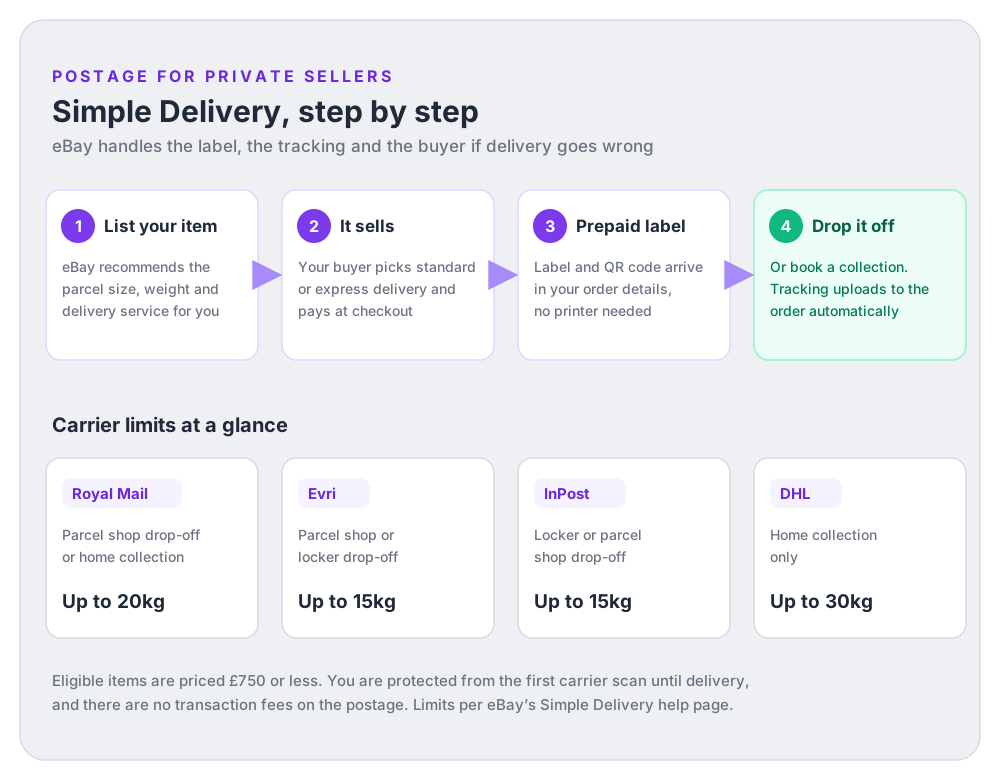
How it plays out in practice:
- When you create the listing, eBay recommends the parcel size and service. If the recommendation looks wrong, change it to another pre-set size: get this right, because if your parcel exceeds the label’s limits you pay the cost difference plus a £1 admin fee.
- You choose who pays: buyer pays (they pay the delivery cost at checkout) or seller pays (you offer free postage and the standard label cost is deducted from your account).
- When it sells, you get a prepaid label and QR code from the order details. Royal Mail and Evri parcel shops will print the label from the QR code, so you don’t need a printer. You can book a Royal Mail or DHL collection instead if dropping off is awkward.
- Tracking uploads automatically, and eBay deals directly with the buyer if the parcel is delayed or lost. You’re protected from the moment the carrier scans the parcel until it’s delivered, and there are no transaction fees on the postage amount.
Two protections worth knowing: if the carrier scans your parcel within your stated handling time, late deliveries won’t hurt your seller performance, and you can ask for negative or neutral feedback about delivery to be removed. Also note the label is valid for 7 days after you create it.
Estimate what a given parcel will cost the buyer with the free Simple Delivery calculator, and see the full Simple Delivery guide for edge cases (multi-item orders, Click & Collect, opting out, refunds on unused labels).
Business sellers: pick your own carriers
Business accounts arrange their own postage: you set the services and prices on each listing (or once, via business policies), buy labels wherever you like, and upload the tracking number to the order. To stay protected against “item not received” claims under eBay Money Back Guarantee, use a carrier from eBay’s integrated list, which includes Royal Mail (Tracked 24 and Tracked 48, Signed For, Special Delivery), Evri, Yodel, Parcelforce, DPD, DHL and InPost among others. For overseas buyers, the Global Shipping Programme lets you post to a UK shipping centre and eBay handles the international leg and customs paperwork.
eBay selling fees UK: what you’ll actually pay (worked example)
Private sellers: free, with two asterisks
Since eBay UK made private selling free, UK-based private sellers pay no final value fees and no regulatory operating fee when items sell (vehicles excluded). The costs that remain:
- Listing fees above the free allowance: 300 free listings a month (400 with a £19.99/month private Shop), then 35p per extra listing. Automatic relists don’t count against the allowance; manual relists do.
- Optional upgrades like a subtitle (£2) or Gallery Plus (£2.50, free in some categories).
- The international fee: 3% of the total sale if the buyer’s delivery address is outside the UK.
The second asterisk is the Buyer Protection fee. Buyers of UK private listings pay a fee that eBay builds into the price they see: £0.10 per item, plus 7% of the price up to £20, plus 4% of the portion from £20 to £300, plus 2% of the portion from £300 to £4,000 (nothing above that). You don’t pay it, but your item displays at a higher price than you set. List a jacket at £25 and buyers see £26.70 plus postage. When you’re pricing against sold listings, remember the sold prices you see already include it.
Business sellers: three fees on every sale
Business sales carry three deductions, taken automatically from your proceeds:
- Final value fee: a category percentage of the total sale (item price + postage + any taxes). Most categories sit between 9.9% and 12.9%: Clothes, Shoes & Accessories is 11.9%, Books 9.9%, mobile phones 6.9% up to £1,000. Plus a per-order fee: 30p on orders of £10 or less, 40p above £10.
- Regulatory operating fee: 0.35% of the total sale.
- International fee when the delivery address is abroad: 1.05% (Eurozone and Northern Europe), 1.8% (US and Canada) or 2% (everywhere else).
Business fee rates are quoted exclusive of VAT. The example below assumes the seller is not VAT-registered, so the 20% VAT added to eBay’s fees is a real cost to the business. Here’s the sale, end to end:
A £40 jacket sold by a non-VAT-registered UK business seller
Clothes, Shoes & Accessories (11.9% final value fee, quoted excluding VAT). Buyer pays £40 for the item plus £3.35 postage: total sale £43.35. Label and packaging costs are illustrative; check your own rates.
| Item price | £40.00 |
| Postage charged to buyer | £3.35 |
| Total sale (fee basis) | £43.35 |
| − Final value fee, 11.9% of £43.35 | −£5.16 |
| − Per-order fee (order over £10) | −£0.40 |
| − Regulatory operating fee, 0.35% | −£0.15 |
| − VAT on eBay fees, 20% | −£1.14 |
| − Tracked postage label (example cost) | −£3.20 |
| − Packaging | −£0.45 |
| − Cost of the jacket (stock) | −£12.00 |
| Illustrative profit before tax | £20.85 |
eBay's fees are £5.71 before VAT and £6.85 including £1.14 VAT. Because this seller is not VAT-registered, that VAT is a cost. After £12.00 stock and £3.65 postage and packaging, the illustrative profit before Income Tax or Corporation Tax is £20.85, a 48.1% margin. The same sale by a private seller clearing their wardrobe would incur no eBay transaction fees. Run your own numbers in the eBay fee calculator before you commit to stock.
Fees compound quietly: promoted listings, refunds, the odd international sale, VAT on fees. eBay reports gross sales prominently and scatters the deductions across reports, which is exactly why I built DashVue’s profit and loss reports: it pulls every fee and label cost against each sale so you see true net profit per item, from £19/month or £179/year with a 7-day free trial. For the full fee schedule, category by category, see the eBay selling fees UK guide.
How and when you get paid on eBay
eBay deducts any fees from the sale automatically and pays the rest to you. The timing depends on your account type:
Private sellers
Sales proceeds show as Pending in the Payments tab, then become available in your eBay balance:
- Tracked orders: typically 2 calendar days after tracking confirms delivery. Delivered Wednesday, funds Friday.
- Untracked orders (or tracked with no delivery scan): 14 calendar days from the order date. One more reason Simple Delivery’s automatic tracking is your friend.
- Faster releases: orders of £10 or less release instantly on positive feedback, and tracked orders up to £750 release instantly if the buyer leaves positive feedback after delivery.
- Established sellers: once you’ve made at least 10 completed sales totalling £150 or more (over the last 5 years) with no more than 2 open issues in 12 months, funds typically arrive within 24 hours of the buyer paying. eBay shows your progress toward this in the Payments tab.
From your eBay balance you withdraw to your linked bank whenever you like; clearing takes 0 to 4 business days. You can also spend pending funds on postage labels and refunds.
Business sellers
Proceeds typically become available for payout 24 hours after eBay confirms the buyer’s payment, unless the transaction is placed on hold. eBay then initiates payouts to your bank daily by default, or on a weekly, fortnightly or monthly schedule you choose. After eBay initiates a payout, it can take up to 4 business days to clear. One honest caveat: new or infrequent business sellers can have transaction holds while they build a selling history. eBay’s current guidance says new business sellers typically receive held funds within 31 days, although sometimes it takes longer. Posting within your handling time and adding tracking can help release eligible holds sooner.
If your funds are 'on hold'
A hold is not one fixed timer. eBay says transaction holds usually resolve within 30 days, but its current new-business-seller examples say held funds typically arrive within 31 days and sometimes take longer. New or infrequent business selling, high-priced items and unusual sales growth can lead to transaction holds; buyer disputes and account-level payout holds follow different timelines. Post within your handling time, add tracking and check the expected availability date in your Payments tab.
After the sale: dispatch, tracking and feedback
- Dispatch within your handling time. Pack securely (a carrier can refuse a badly packaged collection), attach the label or take the QR code to the drop-off, done. Same-day or next-day dispatch is the cheapest reputation boost available to a new seller.
- Tracking: automatic with Simple Delivery. Business sellers add the tracking number and carrier against the order in My eBay or Seller Hub; entering the right carrier name matters, since mismatched carrier/number pairs count as invalid tracking.
- Local collection: if the buyer collects in person, they get a 6-digit code (or QR code); enter or scan it at handover, and your funds follow within 24 hours. Never hand over an item without it.
- Problems: if a buyer opens an “item not received” or return request, respond quickly and keep it inside eBay’s process. Tracking from an integrated carrier is your evidence. If you need to cancel an order or listing, do it properly: here’s how to cancel without collecting a defect.
Feedback: your reputation, built one order at a time
Feedback is public and buyers check it. The mechanics: buyers can leave you positive, neutral or negative feedback; you can only leave positive feedback for buyers (eBay removed seller-to-buyer negatives years ago), within 90 days of the transaction. Leave it promptly, ideally on payment: eBay’s own advice is that buyers who receive feedback are more likely to leave it in return, and you can automate this in your selling preferences.
As a new seller with zero feedback, over-communicate: accurate photos, honest condition, fast dispatch, and a short thank-you message with the order. Feedback also has a direct cash effect for private sellers, since positive feedback triggers the instant fund releases described above. When you do get a rough comment, respond professionally and publicly; these feedback examples and reply templates cover the exact wording.
Tax when selling on eBay UK: the thresholds that matter
Selling your own second-hand possessions is usually not trading income, although separate Capital Gains Tax rules can apply to some valuable personal possessions. Income Tax rules become relevant when you’re trading: buying or making things to sell at a profit. Four numbers to know:
- 30 or more sales, or over €2,000 (about £1,700), in a calendar year: a platform operator normally excludes a goods seller from reporting only when they make fewer than 30 sales andreceive no more than €2,000. Meet either reporting limit and the platform may report your details and income to HMRC. Being reported does not mean you owe tax.
- £1,000 trading allowance: if your annual gross trading income is £1,000 or less, you may not need to tell HMRC. Above £1,000, you must register for Self Assessment by 5 October in the following tax year. If eligible, you can deduct the allowance instead of actual expenses; use the method that produces the lower taxable profit.
- £12,570 personal allowance: this is the standard Personal Allowance for 2026/27. It can be lower at higher incomes, and it does not remove a separate requirement to report trading income where one applies.
- £90,000 VAT threshold: register if taxable turnover for the last 12 months goes over £90,000, or if you expect it to go over £90,000 in the next 30 days. The £90k survival guide covers scheme choice.
eBay’s own position is simple: sellers are responsible for their taxes, and if you’re VAT-registered you must include VAT in your listed prices. For the full picture, worked examples and the record-keeping rules, read how much you can sell on eBay before paying tax. None of this is professional tax advice; a good accountant pays for themselves.
Scaling up: selling limits, eBay Shops and going business
Once the first sales land and you want more, the growth levers in rough order:
- Raise your selling limits. eBay reviews them monthly and lifts them automatically with good performance; when you’re close, you can request an increase from the Monthly limits section of Seller Hub.
- Use Seller Hub properly. It’s free and consolidates orders, listings, performance metrics and reports: switch to it the moment you pass casual volume. The Seller Hub guide explains what each tab does and the workflows worth learning first.
- Consider a Shop subscription when listing fees bite. Private sellers: £19.99/month buys 100 extra free listings (400 total). Business sellers choose Basic (£27), Featured (£77) or Anchor (£437), with bigger free-listing allowances and cheaper additional listings. Find your break-even with the Shop tier calculator.
- Promoted Listings, carefully. Available to Above Standard and Top Rated sellers with recent sales; you pay a percentage or per click. It buys visibility, not margin, so decide your ad ceiling from your net profit per item, not gross.
- Formalise the business. Trading seriously means a business account on eBay, HMRC registration, and eventually the sole trader vs limited company decision: model both structures here. Give your stock proper SKUs early (the free SKU generator helps) so your bookkeeping survives growth.
- Track profit per listing, not revenue. At 10 sales a month you can eyeball it; at 100 you can’t. This is the job DashVue does: every eBay fee, label and refund reconciled against each sale so relist decisions are based on real net profit.
FAQ: selling on eBay UK
Is it free to sell on eBay UK?
For UK private sellers, yes: no final value fees, 300 free listings a month, and 35p per listing after that (vehicles and optional upgrades excluded). Buyers of private listings pay a Buyer Protection fee that eBay adds to your displayed price. Business sellers pay a category final value fee (mostly 9.9% to 12.9%) plus a 30p/40p per-order fee and a 0.35% regulatory operating fee.
Do I need a business account to sell on eBay?
Only if you’re trading: buying or making items in order to sell them, or you’re registered with HMRC as self-employed. Selling your own unwanted possessions is private selling, whatever the volume. If you drift from decluttering into sourcing stock, switch before eBay or HMRC decides for you.
How many items can I list as a new seller?
New sellers get a monthly selling limit, visible under Monthly limits in Seller Hub. eBay reviews it every month and raises it automatically based on your sales and feedback, and you can request an increase when you’re near the cap. Note the limit applies even if you still have free listings remaining.
Can I choose my own courier as a private seller?
Mostly no. Simple Delivery is the only delivery method for eligible private listings on eBay.co.uk; you can exclude specific carriers you dislike in your postage preferences, but the Custom postage opt-out only appears for certain items priced £20 or under (typically letter-sized, 100g or under). Business sellers choose their own carriers freely.
How long does it take to get paid after a sale?
Private sellers: funds usually appear in your eBay balance 2 days after tracked delivery is confirmed (14 days for untracked orders), or within 24 hours of payment once you’ve built a solid history (10+ sales, £150+, few issues). Withdrawals to your bank take 0 to 4 business days. Business sellers’ funds are typically available for payout 24 hours after payment confirmation, unless held, with daily payouts by default. If a new business seller’s transaction is held, eBay says the funds typically arrive within 31 days, although sometimes it takes longer.
Do I need a printer for postage labels?
No. Simple Delivery gives you a QR code, and Royal Mail and Evri parcel shops print the label for you at drop-off. Royal Mail and DHL collections can bring the label to your door. InPost works from a QR or drop-off code at the locker.
How much can I sell on eBay before paying tax?
Selling your own belongings is usually not trading income, although other tax rules can apply to valuable items. If you’re trading and your gross income is more than £1,000 in a tax year, you must register for Self Assessment; you may be able to claim the trading allowance instead of actual expenses. Separately, platforms may report your data to HMRC once you reach 30 sales or receive more than €2,000 (about £1,700) in a calendar year, but being reported is not the same as owing tax. Full breakdown here.
What if my item doesn’t sell?
Check the sold listings again and reprice: an item priced above the recent sold median mostly just sits. Improve the first photo and the title keywords before touching anything else. Note that automatic renewals don’t use up a private seller’s free listing allowance, but manually relisting does count against it.
Sources
- eBay UK: Start selling on eBay and Registering as a seller (eligibility, identity and bank verification, name matching).
- Fees for private sellers, Fees for business sellers and Buyer Protection fee (free private selling, listing allowances, category rates, per-order and regulatory fees, buyer fee formula).
- Simple Delivery and Setting up your postage options (eligibility, carrier limits, prepaid labels, protections, integrated carriers).
- Getting paid for items you’ve sold and Payments on hold (fund availability timelines, payout schedules and hold types).
- Create a listing, Pricing your items and Selling limits (conditions, item specifics, completed-listings research, auction rules, limits).
- GOV.UK: Selling goods or services on a digital platform (the €2,000 and 30-sale reporting limits, and why reporting does not automatically mean tax is due).
- GOV.UK: Tax-free allowances on property and trading income and Check how to register for Self Assessment (gross trading income, the £1,000 allowance and the 5 October deadline).
- GOV.UK: Income Tax rates and Personal Allowances, Register for VAT and Capital Gains Tax on personal possessions (the 2026/27 Personal Allowance, VAT registration tests and tax on valuable possessions).
eBay’s fees, thresholds and programme rules change over time and can vary by category. Figures above reflect eBay’s UK help pages as checked on 6 August 2026; always confirm against the live listing form and eBay’s official pages before relying on a specific number.