What Is an MPN on eBay? UK Product Identifiers Guide (GTIN, EAN, UPC, ISBN) 2026
MPN, EAN, GTIN, UPC, ISBN and ePID explained for UK eBay sellers: what each number means, where to find it on the product or box, when eBay needs it, when “Does not apply” is the right answer, and what happens if you get one wrong.
Quick answer
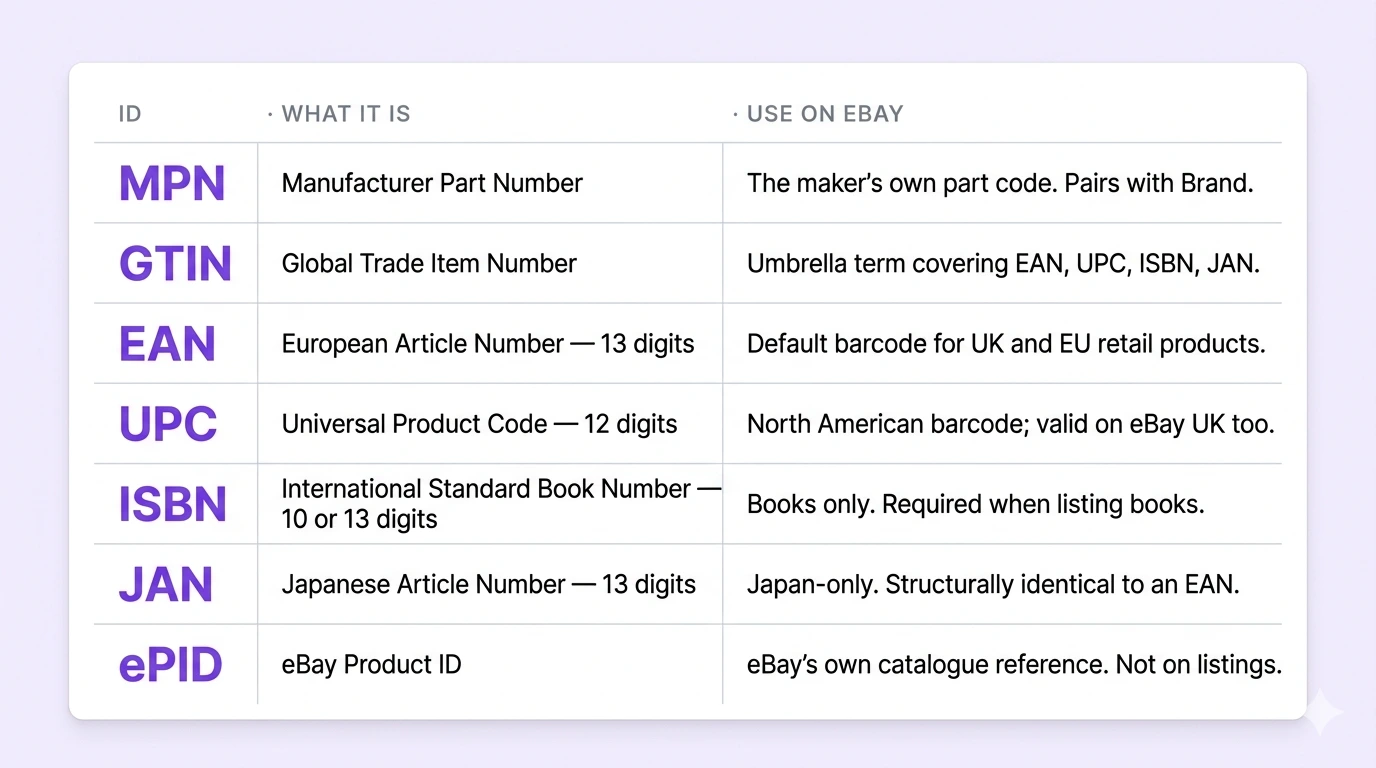
MPN stands for Manufacturer Part Number: the code a manufacturer gives one exact product or part, such as DSC-RX100/B for a Sony RX100 camera. On eBay UK it goes in the item specifics next to Brand, alongside the EAN, the 13-digit number under the barcode on UK packaging (EAN, UPC and ISBN are all types of GTIN). eBay uses these numbers to match your listing to the exact product, fill in details from its catalogue and show your item when buyers filter their search. If the maker never gave your item a number, as with handmade, unbranded or antique items, choose “Does not apply”.
You’ll meet these acronyms the moment you list anything with a brand on it. They overlap, they’re easy to mix up, and eBay requires them in many categories: a new or revised listing that’s missing a required item specific is blocked. This guide covers what each number is, where to find it on the product or box, when eBay needs it, when “Does not apply” is the right answer and what happens if you get one wrong. Every rule below was checked on 17 October 2026 against official sources, mainly eBay’s own help, policy and Seller Centre pages, its developer documentation and GS1, the organisation behind barcode numbers.
TL;DR: what each identifier means and when eBay needs it
- MPN (Manufacturer Part Number): the maker’s own code for the exact product, in whatever format the maker chose. It pairs with Brand.
- EAN (European Article Number): the 13-digit number under the barcode on UK and European packaging. It’s the one most UK sellers have.
- UPC (Universal Product Code): the 12-digit North American barcode number. eBay accepts it too.
- ISBN (International Standard Book Number): the book number, 13 digits starting 978 or 979 (10 digits on books from before 2007).
- GTIN (Global Trade Item Number): the umbrella name for barcode numbers. Your EAN, UPC or ISBN is your GTIN.
- ePID (eBay Product ID): eBay’s own catalogue number. You don’t look it up; it’s attached when you pick a catalogue match.
And the three rules that matter:
- Requirements are set by category. The listing form shows which identifiers are required for yours, and eBay blocks new or revised listings that are missing a required item specific.
- “Does not apply” is for items the maker never numbered. eBay’s policy bans it for a required identifier the manufacturer did provide, whether the item is new or used.
- A wrong number is worse than none. It can match your listing to the wrong catalogue product, and eBay can remove listings with inaccurate item specifics.
What is an MPN on eBay?
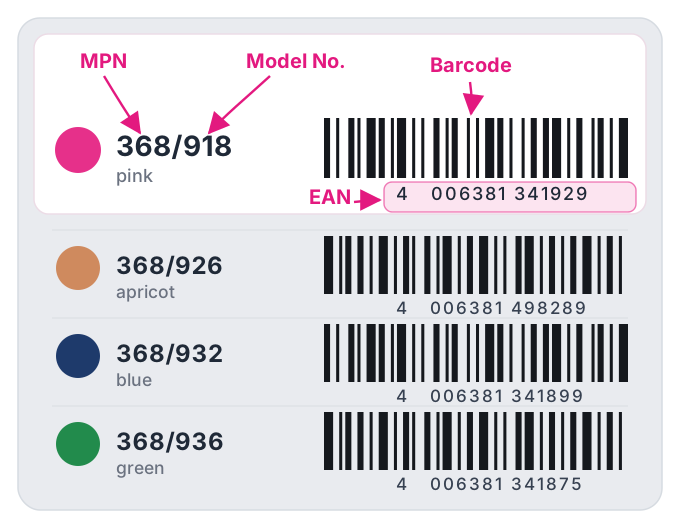
MPN stands for Manufacturer Part Number. It’s the code a manufacturer gives a specific product or part, made of letters, numbers and sometimes symbols. In the STABILO catalogue above, every colour of the same pen has its own MPN (368/918 is pink, 368/926 apricot) and its own EAN, so the MPN pins down not just the product but the exact version you’re holding.
On eBay the MPN works as a pair with the Brand field; eBay’s developer documentation calls the two together BrandMPN. There’s no central register of part numbers, so it’s Brand plus MPN, not the MPN alone, that identifies one product.
MPNs are often the same as the model number, but not always (see MPN vs model number). Examples of MPNs from eBay’s own documentation: DSC-RX100/B, ILCZVE10L/B, fcb-ex980sp.
Where an MPN earns its place is precision. For spares and accessories, the part number is often the only reliable way a buyer can confirm a fit: two chargers can look identical in photos and have completely different part numbers.
MPN formatting tip
Copy the MPN exactly as the maker prints it, slashes, dots, dashes and suffixes included. The one MPN format rule eBay’s documentation spells out: it can’t be made up only of special characters (e.g. $%^&).
MPN vs EAN vs GTIN: what’s the difference?
This is the confusion that trips up most sellers, so here it is plainly:
- An MPN comes from the manufacturer. It’s their own code, with no central registry and no fixed length or format.
- An EAN is a barcode number issued through GS1, the global barcode organisation. It has 13 digits, and GS1 describes it as the number found under a barcode’s black and white lines: the number is the identifier, the bars are just how scanners read it.
- GTIN is the family name. EAN (13 digits), UPC (12), ISBN and JAN are all GTINs, so when eBay or a supplier asks for a GTIN, they want whichever barcode number your item has.
A branded retail product usually has both: the pink STABILO pen above is MPN 368/918 and EAN 4006381341929. They do different jobs. The EAN identifies the exact retail item; Brand plus MPN identifies it even where there’s no barcode, such as a loose spare part.
Every eBay identifier explained
GTIN, Global Trade Item Number
GTIN is GS1’s umbrella term for barcode numbers. It comes in four lengths: GTIN-8 for small items, GTIN-12 (the UPC, mostly used in North America), GTIN-13 (the EAN, used in Europe and most of the world) and GTIN-14 for cases and outer packaging. When eBay says “GTIN”, it means whichever of EAN, UPC, ISBN or JAN your item carries.
EAN, European Article Number
The EAN is the one most UK sellers use. It’s a 13-digit code (a GTIN-13) printed under the barcode on UK and European retail packaging. GS1 UK says the EAN-13 “works worldwide, including the US”, so if your stock has an EAN, that’s your default identifier on eBay. eBay checks that any EAN you enter meets the GTIN-13 standard.
UPC, Universal Product Code
The UPC is the North American equivalent: a 12-digit code (a GTIN-12) on products barcoded for the US and Canadian markets. eBay accepts a UPC that meets the GTIN-12 / UPC-A standard, so a US import with only a UPC is fine. The quickest way to tell an EAN from a UPC: count the digits. 13 = EAN, 12 = UPC.
ISBN, International Standard Book Number
ISBNs identify books, and each format gets its own, so the hardback, paperback and ebook of the same title have different ISBNs. Since 1 January 2007 they’ve been 13 digits starting 978 or 979; older books show a 10-digit ISBN. eBay accepts either. On a modern book the number under the barcode is the ISBN in its 13-digit barcode form.
JAN, Japanese Article Number
A JAN is Japan’s name for the same 13-digit GTIN-13 as an EAN, and eBay validates it against the same standard. You’ll only meet it on Japanese-sourced stock; for everything else, EAN or UPC is what you’ll have.
ePID, eBay Product ID
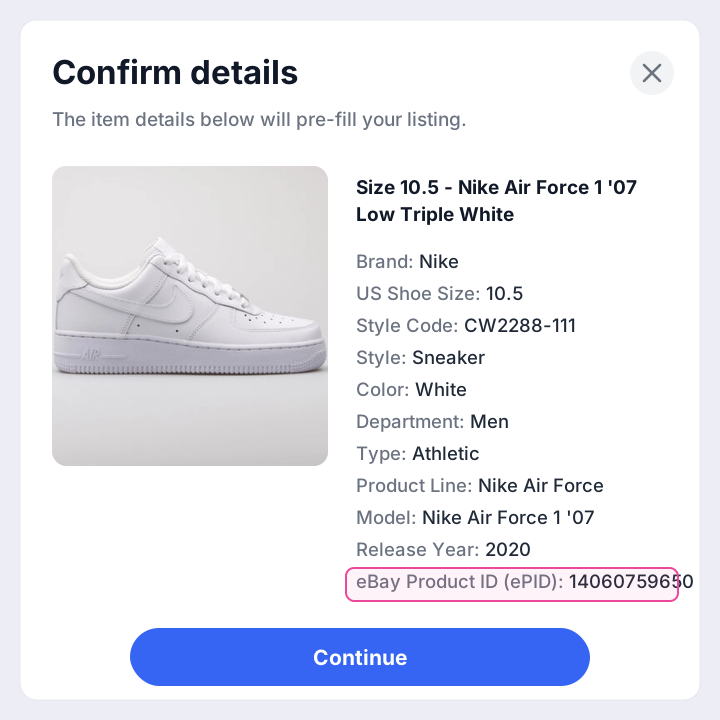
The ePID is eBay’s own number for a product in its catalogue, not something printed on the box. You don’t need to find it: when you start a listing with a barcode or part number and eBay finds the product in its catalogue, picking the match attaches the ePID and fills in details such as brand, model number and photos. Think of it as a behind-the-scenes shortcut, not a number you type.
MPN, GTIN, EAN, UPC, ISBN, ePID at a glance
The whole family in one view:
| Identifier | What it is | Format | Where you find it |
|---|---|---|---|
| MPN | Manufacturer Part Number, set by the maker. Pairs with Brand. | Letters, numbers and symbols; no fixed length | Box label, the product's own label or plate, the maker's spec sheet |
| EAN | European Article Number, the UK and European barcode number (GTIN-13), issued through GS1 | 13 digits | Under the barcode on the packaging |
| UPC | Universal Product Code, the North American barcode number (GTIN-12) | 12 digits | Under the barcode on US and Canadian packaging |
| ISBN | International Standard Book Number, for books only | 13 digits starting 978 or 979; 10 digits before 2007 | Outside back cover and the copyright page |
| GTIN | Global Trade Item Number, the family name for barcode numbers | 8, 12, 13 or 14 digits | It's your EAN, UPC or ISBN |
| JAN | Japanese Article Number, Japan's name for a GTIN-13 | 13 digits | Japanese packaging |
| ePID | eBay Product ID, eBay's own catalogue number | Set by eBay | Attached when you pick a catalogue match |
When eBay UK requires product identifiers
eBay sets item specifics category by category and groups them as required, recommended or additional; the listing form shows which apply to yours. Here’s what eBay’s own pages confirm:
- Many categories require them. eBay’s developer documentation says many categories require a UPC, ISBN, EAN or a Brand and MPN pair, and that most branded products sold on eBay must be tied to at least one recognised identifier.
- Missing required specifics block the listing. eBay UK says item specifics are required in a number of categories, including Fashion, Home & Garden, Toys & Games and Vehicle Parts & Accessories, and that new or revised listings without them are blocked. So revising an old listing can trigger it too.
- Required means accurate. eBay’s item description policy says required item specifics “must be accurate and filled out completely”.
- Watch for “Required soon”. eBay flags item specifics that are about to become mandatory in the listing flow, and the Required soon quick filter on Seller Hub’s active listings page shows which listings need them.
- Recommended ones still pay. Where an identifier is only recommended, eBay still strongly recommends providing as many item specifics as you can, because they feed search and filters (see how identifiers affect search).
Selling to buyers in the EU? New rules from 1 November 2026
From 1 November 2026, the EU requires product identifiers for every item posted to EU buyers from outside the EU, including from the UK, whatever its value. eBay UK’s announcement lists three: your eBay listing number, a code the manufacturer gives the item (such as the MPN) and a standard barcode number (GTIN, EAN, UPC or ISBN), which can double as the manufacturer’s code where one exists. eBay asks you to review your listings and add the manufacturer and barcode numbers where available; that keeps your items eligible for EU buyers if you use eBay International Shipping. If you post orders yourself and don’t give your carrier these details, eBay warns of possible delivery disruption or customs delays.
When to use “Does not apply” (used, handmade, unbranded, bundles)
“Does not apply” tells eBay the item has no such number. eBay’s seller guidance is to choose it when a product has no identifier, and it gives antiques as the example. The limit is in eBay UK’s item description policy, which bans “Does not apply”, unbranded/generic or “N/A” for required product identifiers “when the manufacturer has provided that information for the product”.
So the test isn’t whether the item is new. It’s whether the maker gave it a number:
| What you're selling | What to enter |
|---|---|
| New, branded, in its box | Brand, MPN and EAN exactly as printed on the box or the product. |
| Used, branded (a phone, a console, a power tool) | Brand and MPN from the item itself: its label, plate or settings screen. The EAN from the box if you still have it. If eBay marks a field as required and the maker assigned the number, enter the real one. |
| Handmade, or made by you | Brand: your brand name if you sell under one, otherwise “Unbranded”. MPN and EAN: “Does not apply”, unless you give your products your own codes or have bought GS1 barcodes. |
| Unbranded or generic goods | Brand: “Unbranded”. MPN: “Does not apply”. EAN: “Does not apply”, unless the packaging has a barcode. |
| Antiques and older items made before barcodes | “Does not apply” for the numbers (eBay's own example). Brand: the maker, if you know it. |
| A manufacturer's multipack or kit | The pack's own barcode, not a single unit's. GS1 says a bundle defined by the manufacturer already has a GTIN you must use. |
| A bundle or job lot you've put together | There's no barcode for it: GS1 says a bundle of loose items you've put together is a virtual bundle and doesn't need a GTIN, so “Does not apply” is accurate. Don't borrow one item's barcode: eBay requires catalogue details to match your item exactly. |
Used items: being used doesn’t remove the maker’s numbers, and the part number is often printed on the item itself, so look there before reaching for “Does not apply”. If the field is optional and you genuinely can’t find the number (box long gone, label worn off), “Does not apply” is acceptable; you just lose the search and catalogue benefits.
“Unbranded” is only for unbranded items. eBay allows it in place of a brand name when the product isn’t branded, but the policy bans it on a branded one. eBay’s developer documentation also rules out brand entries such as “Brand new”, “Made in China”, “See the description below” and “100% compatible with listed model”, plus anything made only of special characters.
How to find an MPN, EAN, UPC or ISBN
Check the box first, then the item itself, then the maker’s website.
Finding an MPN
Look for a code labelled MPN, Part No., P/N, Model or Model No. If you buy stock from a manufacturer or wholesaler, the MPN is often in the product file or on the invoice too. Where to look on the item depends on what you’re selling:
| Product | Where to look | Tip |
|---|---|---|
| Phones, tablets and electronics | The box label, the label or plate on the back or underside, and the settings screen. On an iPhone, Settings > General > About shows Apple's part number next to Model Number. | Copy every character, including slashes and suffixes. On an iPhone, tapping the part number shows the separate model number. |
| Car and van parts | The box label, and printed or stamped on the part itself. | Use the part maker's own number. eBay UK's Fitment Plus Auto uses Brand and MPN to add compatible vehicles to parts listings. |
| Washing machines, fridges, ovens | The model number on the rating sticker on the appliance (check inside the door, around the door frame and on the back), or in the user manual. | Hotpoint, for example, tells owners to look for a sticker on the appliance. Use the full code, letters and numbers. |
| Clothing and trainers | The swing tag, the labels sewn inside and, for trainers, the label inside the tongue and the sticker on the end of the box. Look for a style or product code. | No maker's code? “Does not apply” is accurate. eBay calls Brand, Size and Colour critical to the buyer experience, so make sure those are right. |
| Books | Books use the ISBN instead (see below). | Each format (hardback, paperback, ebook) has its own ISBN. |
No box and nothing on the item? Search the maker’s website for the product name: the specification or support page usually lists the part or model number, and many makers publish a “find your model number” guide (Apple and Hotpoint both do). Check it matches your exact version before you use it.
Finding an EAN or UPC
Both are printed as digits directly under the barcode. Count them: 13 digits is an EAN, 12 is a UPC. The last digit is a check digit worked out from the others, which is how a mistyped number gets caught. With stock that comes in sizes and colours, use the barcode for the exact variant you’re selling: GS1 gives every size, colour and combination its own GTIN. No packaging? The maker’s or a retailer’s product page sometimes lists the EAN; make sure it’s for the same variant.
Finding an ISBN
On the outside back cover and on the copyright page (the back of the title page), which is where the UK ISBN agency, Nielsen, tells publishers to print it. A 13-digit ISBN starts 978 or 979; books published before 2007 show a 10-digit one. Very old books may have no ISBN at all, in which case “Does not apply” is accurate.
Finding an ePID
You don’t hunt for an ePID on packaging, you match it inside eBay. Start a listing with the item’s barcode number or part number; if a catalogue product exists, selecting it attaches the ePID and pulls in its details. If nothing matches exactly, your item (or that version of it) isn’t in eBay’s catalogue, and you list it manually.
How to add identifiers to a UK listing
- Start with the number. When you create a listing and eBay asks what you’re selling, enter the barcode number or part number rather than a description. eBay’s UK help says you can enter “the UPC, ISBN, part number or the product name of your item”.
- Check any catalogue match. If your item is in eBay’s catalogue, eBay suggests a match and key details fill in automatically. Accept it only if it’s exactly your item: same model, version, colour and capacity. In eBay’s words, “if the catalogue doesn’t have an exact match, you don’t have to use it”. If your item isn’t brand new, don’t use the catalogue’s stock photo as your main picture.
- Fill Brand, MPN and EAN in Item specifics. The form shows which are required for your category, and you can’t publish without the required ones.
- Do each variation separately. In a multi-variation listing, every size and colour has its own EAN, and eBay takes the EAN and MPN for each variation, not once for the whole listing.
- No number at all? Choose “Does not apply” (or “Unbranded” for Brand) rather than leaving a required field blank or inventing a code.
- Fix older listings in bulk. On the Active listings page in Seller Hub, the bulk listings option updates item specifics across many listings at once, and the Required soon filter shows which need attention. Our Seller Hub guide covers making bulk changes safely.
New to listing? Our guide to creating your first eBay listing walks through the rest of the form.
Where to put the MPN for search
eBay’s UK title advice is to use your 80 characters on the brand, model or type, colour, style “and even the model number”. If buyers are likely to search by the part or model number, put it in the title as well as in item specifics, written the way it’s printed on the product. The EAN belongs in item specifics; eBay’s title advice doesn’t include it.
What happens if you enter the wrong MPN or EAN?
It depends on the kind of mistake:
- A typo in a barcode number. The last digit of an EAN or UPC is a check digit, and eBay checks barcode numbers against the GTIN standard (and ISBNs against the ISBN standard), so a single mistyped digit should be caught.
- A real number for the wrong version. Another colour’s EAN, last year’s model or a single unit’s barcode on a multipack passes the check but describes a different product. If it matches a catalogue entry, your listing can pick up that product’s details and photos. eBay warns that choosing a similar but incorrect version “can mislead buyers”, its policy says product details must match the item exactly when you list from the catalogue, and its seller guidance says using the correct catalogue entry can help reduce return requests.
- Placeholders to get past the form. “Does not apply”, “Unbranded” or “N/A” on a required identifier the maker did provide breaks the item description policy, and eBay’s developer documentation rules out brand entries like “Made in China”.
- Wrong part numbers on car parts. eBay UK’s Fitment Plus Auto adds compatible vehicles to parts listings from your Brand and MPN, so a wrong MPN risks a wrong vehicle list.
Under the item description policy, eBay can remove the listing, issue a warning, restrict your activity or suspend your account. To put it right, revise the listing and correct the item specifics, or use the bulk option in Seller Hub if many listings are affected.
How identifiers affect eBay & Google search
Product identifiers aren’t just a compliance box. eBay’s own pages tie them to visibility in four ways:
- eBay search (Best Match): eBay lists how complete a listing is as a Best Match factor and says “the more we know about your item, the better we can match it to buyer searches”. Its UK listing advice adds that identifiers help listings appear in more relevant search results.
- Search filters: item specifics drive the filters down the left of the results page, and eBay says that once a buyer applies a filter, only listings with matching information are shown.
- Google Shopping: eBay says completed item specifics are essential for being found on external search engines too, and that certain item specifics can make listings more likely to appear in Google Shopping results.
- Car parts compatibility: since 15 September 2026, eBay UK has automatically enrolled sellers in fitment-enabled parts categories in Fitment Plus Auto, which uses Brand and MPN to add compatible vehicles where fitment data is missing.
The practical takeaway: fill every identifier that genuinely applies and use the real values. It’s low effort and it carries across every listing you run.
FAQ
Is the MPN the same as the model number?
Often, but not always. Some makers use one code for both; others keep them apart. On an iPhone, for example, Settings > General > About shows a part number next to Model Number, and tapping it reveals a different model number. Put the maker’s part code in MPN; where your category also has a Model item specific, the model name goes there.
Is an MPN the same as a SKU?
No. A SKU is your own stock code (eBay’s custom label field), which you make up for your own records. The MPN comes from the manufacturer and identifies the product for everyone. Keep each in its own field: eBay’s item description policy doesn’t allow terms in the wrong field. If you need a consistent SKU system, our free SKU generator builds one.
Can I just put “Does not apply” for the MPN?
In two situations: the maker never assigned an MPN (handmade, unbranded, antiques, a bundle you’ve made up), or the field is optional and you can’t find it, which can happen with a used item whose label has worn off. On a required identifier the manufacturer did provide, eBay’s item description policy treats “Does not apply” as inaccurate information, new or used. The table above covers each situation.
Can I use a US UPC on eBay UK?
Yes. eBay accepts a UPC (GTIN-12) as a product identifier as well as an EAN (GTIN-13), so a US import with only a 12-digit barcode is fine. You may see the same digits with a 0 in front in an EAN field: GS1 says leading zeros don’t change a GTIN, so it’s the same number.
Sources
- eBay UK, Item description policy (item specifics rules, “Does not apply”, catalogue matches, consequences).
- eBay UK Seller Centre, Item specifics (required categories, blocked listings, Required soon, bulk editing, Google Shopping).
- eBay UK Seller Centre, Product identifiers (what identifiers are; search filters).
- eBay UK Seller Centre, Listing best practices and Create great listings (catalogue matches, wrong versions, title advice).
- eBay UK, Listing your item with details from our catalogue and Optimising your listings for Best Match.
- eBay UK Seller Centre, eBay Fitment Plus (Fitment Plus Auto uses Brand and MPN).
- eBay Seller Center, Product identifiers (“Does not apply” for items with no identifier; exact matches and returns).
- eBay Developers Program, Product identifiers and Catalog products (valid GTIN types, BrandMPN rules, Unbranded, variations, catalogue matching).
- eBay UK announcement, Product identifiers required for EU shipments from 1 November 2026 and European Commission, low-value imports guidance (product identifiers mandatory from 1 November 2026).
- GS1, Difference between a GTIN, barcode, EAN and UPC, GTINs for sizes and colours and multi-packs and bundles, plus the GS1 General Specifications (leading zeros don’t change a GTIN).
- GS1 UK, Which barcode should I use? and What is a check digit?
- International ISBN Agency, What is an ISBN? and Nielsen UK ISBN Agency FAQ (formats, 978/979, where the ISBN is printed).
- Apple Support, Find the model number of your iPhone and Hotpoint UK, Activate your free labour warranty (where makers print model and part numbers).
eBay’s category-level identifier requirements change over time and by category. Always confirm against the live listing form for your specific item.