What Is Terapeak on eBay? The UK Product Research Guide (2026)
Terapeak Product Research is eBay's own sold-data tool, tucked inside Seller Hub. Here's where to find it, how to read average sold prices and sell-through rates, how to turn the numbers into sourcing decisions, and the one question it can never answer: what you actually keep per sale.

Quick answer
Terapeak Product Research is eBay’s own market research tool, found in Seller Hub under the Research tab. It shows up to 3 years of sold data, including average sold prices, sold price ranges, postage trends and how many sellers sold each item. Sell-through rate is available for searches covering the previous 90 days. It comes at no extra charge with Seller Hub; only the companion Sourcing Insights tool requires an eBay Shop subscription.
Skim mode
If you are skimming this because time is short, do the first checklist above, then return here for the edge-case notes only.
Every sourcing decision on eBay boils down to two questions: will this sell, and at what price? Guessing is expensive, and asking mates in a Facebook group is worse. Terapeak answers both questions with eBay’s own sales history, which makes it the first tool a UK seller should open before spending a penny on stock.
This guide covers what Terapeak is, exactly where it lives on ebay.co.uk, every metric it reports, how to run searches that return usable answers, and a worked example in pounds and pence. It also covers what Terapeak cannot do, because the tool tells you what the market pays, not what you personally keep after eBay’s selling fees, postage and stock costs. The Product research details here are drawn from eBay’s official Product research help page and its Seller Hub documentation, so you’re not relying on folklore.
What is Terapeak?
Terapeak is eBay’s built-in product research suite. It started life as an independent analytics company that sold eBay market data on subscription; eBay acquired Terapeak in 2017 and folded it into Seller Hub, where it now runs as two tools:
- Terapeak product research (eBay’s help pages call it simply “Product research”): search up to 3 years of real eBay sold data by keyword, product or category, across eBay’s marketplaces. This is the part everyone means when they say “Terapeak”, and it’s included with Seller Hub.
- Terapeak sourcing insights: a category-level view of demand versus supply, aimed at deciding what to stock next. eBay makes this one available to business sellers with an eBay Shop subscription, at no extra cost on top of the Shop fee.
The crucial difference from browsing eBay’s public search: Terapeak works from completed sales data, not asking prices. A seller can ask £80 for a Wedgwood teapot while a matching Product research search may show much lower completed-sale prices. Asking prices flatter; sold prices tell the truth.
Where to find Terapeak in Seller Hub
Terapeak has no separate website or app any more; it lives inside Seller Hub on ebay.co.uk. To open it:
- Sign in to eBay and open Seller Hub (from My eBay, choose Selling, or go to Seller Hub directly). Seller Hub is free to use.
- Select the Research tab in the Seller Hub navigation. eBay describes this tab as the home of advice for “improving your listings, sourcing, pricing, and restocking”.
- Choose Product research (formerly Terapeak), type a keyword or product identifier into the search box, and run your first search.
One catch worth knowing before you go looking: eBay’s Seller Hub help page says you need to have had at least one sale to use Seller Hub. If you’re brand new and the Research tab won’t appear, that’s usually why: sell one item (even something from the loft) and the door opens. For a map of the other tabs, see our complete Seller Hub guide.
Delegating research to a teammate
Terapeak works with eBay’s Team access feature, so you can let a colleague or VA run product research on your account without handing over your password. Useful once sourcing becomes a weekly job rather than an occasional one.
What Terapeak Product Research shows
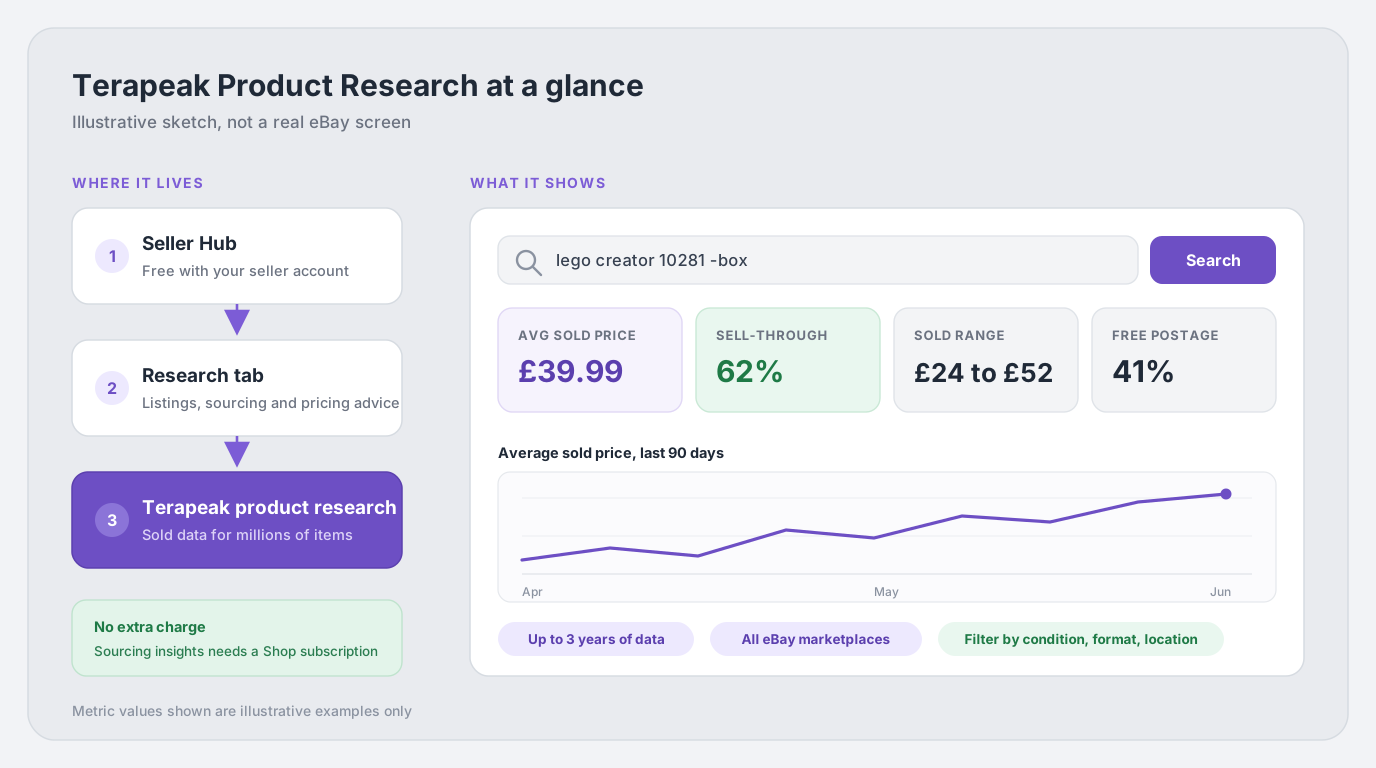
A Terapeak search returns a research dashboard built from the last 3 years of eBay sales data for millions of items. Per eBay’s help page, the core metrics are:
- Sales trends: how sold volumes and prices move over your chosen date range, which is how you spot seasonality and dying fads.
- Average sold price: the mean price items matching your search actually sold for, including sales where a Best Offer was accepted (something public eBay search hides).
- Sold price range: the spread between the cheapest and dearest sales, which tells you how much condition, bundling and listing quality move the price.
- Average postage costs and the share of free-postage listings: what buyers in this niche expect to pay for delivery.
- Sell-through rate: the balance between listings and sales, available for searches covering items sold within the last 90 days. More on this below, because it’s the single most useful number in the tool.
- Total number of sellers who sold the item: a historical competition proxy for the selected period, not a count of every seller listing it now.
- Selling format: whether the item moves via auction or fixed price, so you list the way the market actually buys.
Terapeak vs eBay’s completed listings search
Long before Terapeak, sellers checked sold prices with eBay’s Advanced Search: enter keywords, tick Completed listings, search. That still works, and for a 30-second sanity check it’s fine. But eBay itself documents four ways Product research beats it:
| Aspect | Terapeak Product research | Completed listings search |
|---|---|---|
| Time period | Any range from 1 day up to the last 3 years | Only listings ended in the previous 90 days |
| Best Offer sales | Shows the actual accepted price | The accepted amount isn't revealed |
| Calculated metrics | Averages, price ranges, sell-through rate, seller counts, postage terms, trends | A raw list of results, no calculations |
| Match precision | Results must exactly match your keywords and filters | Often pads results with loosely related items |
How to run a Terapeak search that returns a real answer
Terapeak rewards specific searches and punishes vague ones, because a listing or sale must exactly match your keywords and parameters to be counted. A vague “Nike trainers” search can mix children’s velcro shoes with collector Dunks at very different prices and tell you little. Here’s the routine that works:
- Search the exact product, not the niche. Include the brand, model and key spec, e.g. lego creator 10281 rather than lego bonsai. If the product has a barcode or part number, use the identifier filters instead: Terapeak can filter by MPN, EAN, UPC, ISBN or ePID, which removes keyword ambiguity entirely. (Not sure which code is which? See our guide to MPNs, EANs and eBay product identifiers.)
- Cut the noise with exclusions. Put a minus sign (or “AND NOT”) before any word you want excluded: iphone 13 128gb -cracked -spares -case strips out damaged phones and accessories that would drag your average down.
- Combine variants with OR. A search like iphone 13 AND (128GB OR 256GB) returns listings with either capacity in the title, handy when two variants sell for near-identical money.
- Set the date range to match the question. Ranges run from a single day up to 3 years. Use 90 days for “what’s it worth right now” (and to get the sell-through rate), and 1 to 3 years for “is this seasonal or declining”.
- Filter to your market. Apply Category, then the dynamic filters it unlocks (Condition, Model, Colour and so on), plus buyer and seller location and marketplace. For most UK sourcing decisions, filter to UK seller location: a used DVD sells for different money on ebay.com than on ebay.co.uk.
- Sanity-check the underlying listings. Click into a few actual sales and confirm they really are your item in your condition. One anomalous bundle can distort a small sample’s average. Note that only listings that are active or sold within the previous 90 days open when clicked; older or removed listings still count in the numbers but can’t be viewed.
Condition is a filter, not a footnote
The single biggest cause of misleading Terapeak averages is mixing conditions. A “new with tags” sale and a “used, marked” sale of the same jacket can differ substantially. Always set the Item Condition filter before you trust an average sold price.
Sell-through rate, decoded
eBay describes sell-through rate (STR) as the percentage of similar items sold during the selected period. eBay publishes the metric for searches covering items sold within the last 90 days, but its public UK documentation does not define the exact denominator or formula. Treat the displayed metric as a comparison signal, not a universal pass-or-fail score or a home-made sold-versus-active calculation:
- Compare like with like. Benchmark the result against close substitutes in the same category, condition, price range, marketplace and date window. A rate that looks weak in a fast-moving commodity category may be normal for a specialist spare part.
- Check the sample behind the percentage. A high rate based on a handful of listings is less dependable than a stable pattern across many relevant listings. Open the underlying sales and make sure bundles, damaged items or mixed variants have not distorted the result.
- Read it with price and competition. Pair STR with the sold-price range, seller count and price trend, then decide whether your expected margin can absorb a slower sale or a price cut.
eBay does not publish universal “good”, “average” or “bad” STR bands. Numeric thresholds shared by sellers are heuristics, not platform rules, so use comparable searches to build a category-specific benchmark. Combine Product Research evidence with sold-price, seller-count and trend checks rather than trusting a single percentage.
Using Terapeak for sourcing decisions: a 5-step routine
Here’s the repeatable routine for evaluating any potential buy, whether it’s a car boot find, a retail clearance deal or a wholesale pallet:
- Pin down the exact product. Search by identifier (EAN or MPN) where possible, filtered to your condition and UK sellers.
- Read the last 90 days. Note the average sold price, the sold price range and the sell-through rate. The bottom of the sold range is a historical downside checkpoint, not a guaranteed floor or a realistic worst case: future sales may be lower, and some stock may not sell at all.
- Zoom out to 1 to 3 years. Is the trend line flat, seasonal or falling? Board games peak into December; garden furniture peaks in spring. Buying a seasonal item at its price peak is how resellers end up storing stock for nine months.
- Count the competition and postage norms. Seller count is a historical proxy: it records sellers with a sale in the selected period, not every seller currently competing. The free-postage share and average postage cost tell you whether buyers here expect delivery baked into the price, which matters when a Royal Mail or Evri label is eating £2.50 to £4 of every sale.
- Run the fee maths before you buy. Take the realistic sold price, subtract eBay fees, the postage label, packaging and the buy cost, and see what’s left. Our free eBay fee calculator does this in ten seconds. If the margin only works at the top of the sold range, it doesn’t work.
A worked example in £GBP
Say you’re a UK business seller offered a job lot of a retired LEGO set at £18 per unit, and Terapeak (filtered to new condition, UK sellers, last 90 days) shows an average sold price of £39.99, a sold range of £24 to £52 and a 62% sell-through rate. That may be encouraging relative to comparable searches, but it is not a sourcing decision on its own. Now the part Terapeak doesn’t do, using eBay’s current published business-seller rates for the Toys & Games category and assuming the business is not VAT registered, so VAT charged on eBay fees cannot be reclaimed:
- Sale: £39.99 item + £3.95 postage charged to the buyer = £43.94 total. eBay’s final value fee applies to the whole amount, postage included.
- Final value fee (Toys & Games, 10.9%): £4.79, plus the £0.40 per-order fee for orders over £10.
- Regulatory operating fee (0.35%): £0.15.
- VAT on those eBay fees (20%): £1.07.
- Total eBay fees including VAT: £6.41.
- Postage label: £3.65 for a Royal Mail Tracked 48 small parcel bought online (collection, size, weight and account discounts can change the actual cost).
- Stock cost: £18.00.
Net result: £43.94 − £6.41 − £3.65 − £18.00 = £15.88 before packaging, returns, ads and labour, about 36.1% of the total sale. At the illustrative low of £24 plus £3.95 postage, the same model leaves about £2.05 before those costs. That historical low is a useful stress test, but it cannot guarantee the next unit sells at that price or sells at all.
Two fee caveats for the maths
The example includes fee VAT for a business that cannot reclaim it. A VAT-registered business should instead model output VAT, input VAT and recoverable fee VAT consistently for its own treatment. If you sell as a private seller, the sums differ: Outside Cars, Motorcycles & Vehicles, UK-based private sellers generally pay no final value or regulatory operating fees and get 300 free listings a month. Check the fee page that matches your account type, or see our full UK eBay fees guide.
Terapeak Sourcing Insights: the Shop-subscriber extra
Product research answers “how does this item perform?”. Sourcing insights flips the question to “what should I stock next?”. Per eBay’s help page, it lets Shop sellers:
- Spot out-of-stock opportunities: it surfaces sold single-stock listings so you can see what’s in or out of stock across the market and step in with a competitive offer where supply has dried up.
- Research by category: find categories with high buyer demand but low inventory currently listed on eBay, which is where new stock earns the easiest money.
Sourcing insights comes at no extra cost with a business eBay Shop subscription (every Shop tier includes it; Basic starts at £27 a month excluding VAT, or £32.40 cash cost for a seller unable to reclaim it, on eBay’s current price list). If you’re a private seller or a business without a Shop, you keep Product research but not Sourcing insights. On its own it’s rarely a reason to buy a Shop, but if the free-listing allowance already justifies the subscription, it’s a genuinely useful bonus.
The honest limits of Terapeak
Terapeak is the best free view of eBay’s market data you’ll get, because it’s built on eBay’s own numbers. It still has real limits worth knowing before you bet stock money on it:
- It shows revenue, not profit. Average sold price says nothing about fees, postage, packaging, returns or what the stock cost. Two sellers can sell the same item at the same price and one loses money.
- It describes the past, not the future. Three years of history is superb for seasonality, useless for a licensed product whose hype dies next month. Trends lag turning points by definition.
- Sell-through rate only covers recent sales. The STR figure is available for searches of items sold in the last 90 days, so you can’t compute a clean STR for last Christmas.
- Exact matching cuts both ways. Great for precision, but misspelt or oddly-titled listings that would still compete with yours simply don’t appear in your results.
- Old listings can’t be inspected. Sales older than 90 days (or removed listings) count in the aggregates but often can’t be opened, so you can’t always verify what an outlier actually was.
- It’s eBay-only. No Vinted, Amazon, Etsy or Depop data. Fine for eBay sourcing decisions; blind to everything else.
- Averages hide bad listings. The average includes sellers with poor photos and one-line descriptions. You can beat the average; a lazy listing will undershoot it.
Terapeak vs DashVue: market research vs profit tracking
A question we get asked directly: is DashVue a Terapeak alternative? No, and it’s worth being straight about it, because the two tools do different jobs and work best together.
Terapeak looks outward at the market. It aggregates marketplace sold-listing data across sellers to tell you what to source and roughly what it’ll fetch. DashVue looks inward at your account. It connects to your eBay sales and shows what each item actually netted after every fee: final value fee, per-order fee, regulatory fee, postage label, promoted listings charges, refunds, the lot, in proper profit-and-loss reports rather than a payouts-minus-guesswork spreadsheet.
| Question | Terapeak | DashVue |
|---|---|---|
| What should I source, and what does it sell for? | Yes: 3 years of sold data, STR, price ranges | No: not a market research tool |
| What did MY items net after every fee? | No: it never sees your costs | Yes: per-item net profit from your real sales |
| Which of my products deserve restocking? | Indirectly, via market demand | Directly, ranked by realised margin |
| Whose data is it? | Marketplace sold-listing data across sellers | Your own eBay account |
| Cost | Included with Seller Hub | £19/month or £179/year, 7-day free trial |
The workflow that actually compounds: use Terapeak before you buy, to validate demand and price. Use DashVue after you sell, to check the margin you modelled is the margin you got, and to spot the products where fees and postage quietly ate the spread. The sellers who grow are the ones who close that loop; the illustrative £15.88 pre-packaging contribution above only counts if it survives contact with reality.
Terapeak FAQ
Is Terapeak free on eBay UK?
Product research (formerly Terapeak) comes at no extra charge as part of Seller Hub, which is itself free to use. The exception is Terapeak sourcing insights, which requires a business eBay Shop subscription (it’s then included in the Shop fee at no extra cost).
Why can’t I find Terapeak in my account?
Check you’re in Seller Hub (not the old My eBay selling view) and look under the Research tab. If Seller Hub itself won’t load, remember eBay requires at least one completed sale before you can use it. On the eBay app, research options are more limited, so use a desktop browser for serious sourcing sessions.
How far back does Terapeak data go?
Up to 3 years, and you can set any date range within that, from a single day upwards. That’s the headline advantage over eBay’s completed listings search, which only covers the previous 90 days.
Does Terapeak show profit?
No. Terapeak reports market-level sold prices and averages. It has no idea what you paid for stock, what your postage labels cost, or what eBay charged you in fees on a given sale, so it cannot calculate profit. For that you need the maths in the worked example above, a fee calculator before you buy, and profit-tracking software like DashVue on your actual sales.
What’s the difference between Product research and Sourcing insights?
Product research is item-level: search a product and see its sold history, prices and sell-through. Sourcing insights is category-level: it highlights where demand is high and listed supply is low, and surfaces out-of-stock opportunities, to guide what you stock next. Product research comes with Seller Hub; Sourcing insights needs a business Shop subscription.
Are Terapeak’s numbers accurate?
The underlying data is eBay’s own transaction records, including real Best Offer accepted prices, so it’s as close to ground truth as eBay research gets. Inaccuracy creeps in from how you search: mixed conditions, missing exclusions or a vague keyword will produce a precise-looking average of the wrong things. Filter tightly and spot-check individual sold listings before trusting a number.
Sources
- eBay UK Help: Product research covering the metrics reported, the 3-year data window, filters and search logic, Sourcing insights eligibility, and the differences vs completed listings.
- eBay UK Help: Seller Hub covering the Research tab, Seller Hub being free, and the one-sale requirement.
- eBay UK Help: Fees for business sellers covering final value fee mechanics, category rates, per-order fee, regulatory operating fee, Shop pricing.
- eBay UK Help: Fees for private sellers covering fee-free selling in most categories, the Motors exclusions and the 300 free monthly listings.
- Royal Mail: Tracked 48 covering the public online small-parcel price used in the worked example.
eBay’s tools, fees and eligibility rules change over time, as do Royal Mail prices. Figures here reflect the cited UK pages as checked in August 2026; always confirm current rates before committing to stock.