How to Change Your eBay Username (UK): Steps, Rules and What Happens to Your Feedback in 2026
The exact Account settings route to change your eBay username on desktop and in the app, the naming rules eBay enforces, how often you can change, what happens to your feedback and listings afterwards, and how a username differs from a Shop name and a registered business name.
Quick answer
To change your eBay username, sign in at ebay.co.uk, go to Account settings, select Personal information, then select Edit next to your username, type the new name and save. The change is free and takes effect straight away, and your feedback score, listings and order history all stay with your account. eBay currently limits you to one username change every 30 days, so check the spelling before you confirm.
Skim mode
If you are skimming this because time is short, do the first checklist above, then return here for the edge-case notes only.
Most sellers didn’t choose their eBay username; eBay generated it at sign-up, or 2009-you chose it and it has been quietly embarrassing ever since. The good news: renaming yourself is one of the safest changes you can make on eBay. Your feedback, sales history and live listings are attached to your account, not the label on it. This guide covers the exact steps on desktop and in the app, the naming rules eBay enforces, the 30-day change limit, what buyers see afterwards, and the difference between a username, an eBay Shop name and a registered business name, because changing one does not change the other two.
How to change your eBay username: step by step
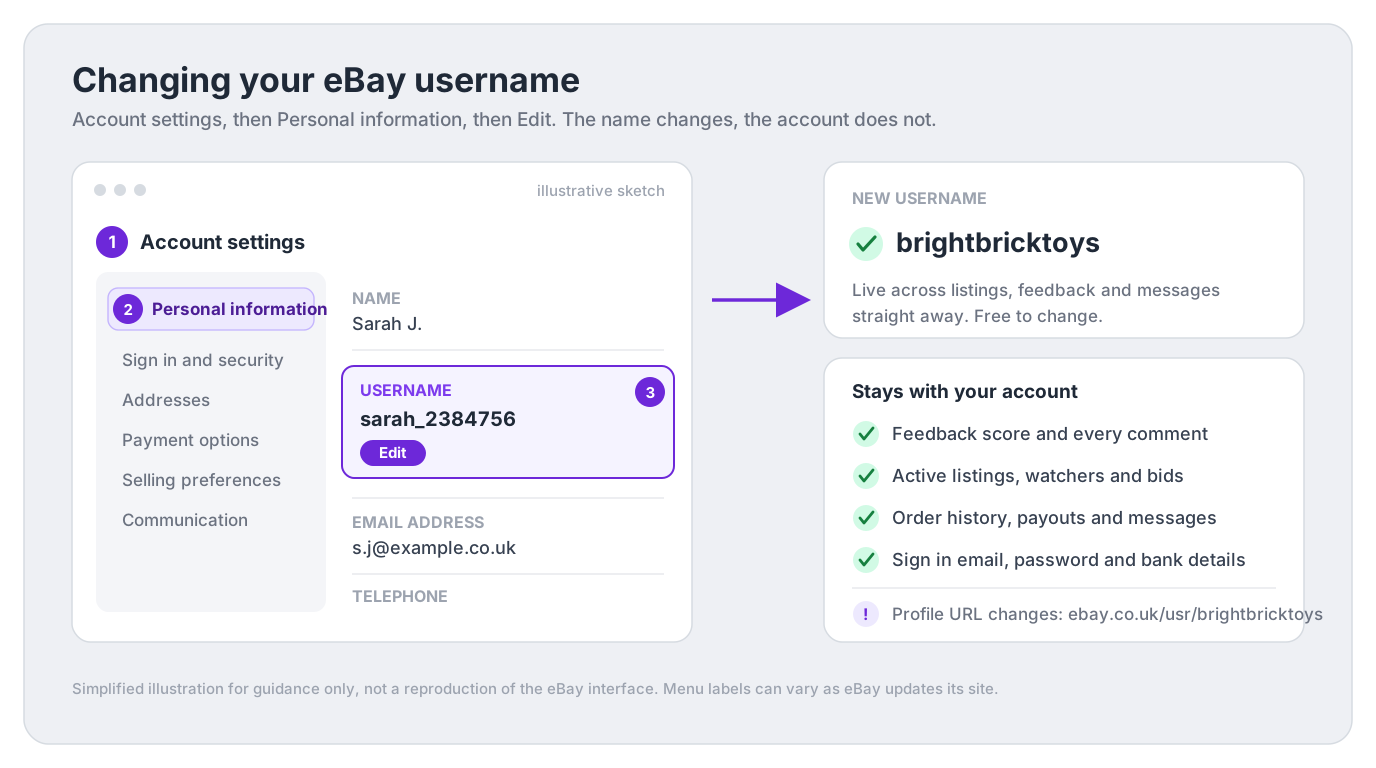
On the ebay.co.uk website:
- Sign in and select your name or profile icon at the top of the page, then choose Account settings. (You can also get there through My eBay, then Account.)
- Under the personal info section, select Personal information.
- Find the Username row and select Edit.
- Type your new username. eBay checks availability and the naming rules as you go, so you’ll know immediately if the name is taken or not allowed.
- Save. The new name goes live across your listings, feedback profile and messages straight away. There’s no fee and no review queue.
eBay does reshuffle its menus from time to time, so if your screen looks slightly different, search “change username” in eBay’s Help pages and the current route will be the first result.
Check it twice before saving
Once you save, eBay locks further changes for a period (currently 30 days). A typo in your shiny new brand name stays on every listing and message until the clock resets, so proofread it, and say it out loud once, before you confirm.
Changing your username in the eBay app
You can do the same job from your phone:
- Open the eBay app and go to My eBay.
- Tap the settings gear, then open your account settings.
- Go to Personal information, tap Edit next to the username, enter the new name and save.
Exact labels vary a little between app versions and between iOS and Android. If you can’t find the option, the mobile browser version of ebay.co.uk uses the same Account settings route as desktop and works fine on a phone.
eBay username rules: what’s allowed
eBay validates your new name against its username rules before it lets you save. At the time of writing, a username:
- Must be unique: no other member can already hold it.
- Needs at least six characters, made up of letters and numbers, with limited punctuation and no spaces.
- Can’t be an email or web address, and can’t contain symbols like @ or &.
- Can’t contain the word “eBay” or otherwise suggest you work for eBay; names imitating eBay are reserved.
- Can’t infringe a trademark or impersonate another member. Calling yourself nike_outlet_uk is a fast route to trouble with eBay’s intellectual property rules, even if the name happens to be free.
- Can’t be offensive: profanity and hateful terms fail eBay’s username policy.
These rules do get tweaked, so treat the list above as the current shape rather than gospel, and let the form on the day be the referee: it tells you instantly whether a name passes. For the definitive wording, see eBay’s official username policy.
Pick a name that also passes the Shop name rules
eBay’s Shop naming rules are stricter than the username rules: a Shop name must start and end with a letter or number, can’t contain the characters <, > or @, can’t contain “www”, and can’t end in .co.uk, .com or another web ending. If your new username would pass those checks too, you can reuse the exact same name for a Shop later, and eBay explicitly allows your Shop name to be your username. One name everywhere is worth planning for.
How often can you change your eBay username?
eBay currently allows one username change every 30 days. There’s no lifetime cap: you could, in theory, rename yourself twelve times a year, though your regular buyers would rightly wonder what you’re running from.
Two practical consequences of the 30-day rule:
- Mistakes are sticky. Save a typo and you wear it for a month. Draft the name somewhere else first.
- Your old name may not wait for you. Once released, a username can eventually be registered by someone else, so don’t change on a whim planning to change back.
eBay also flags recent changes to trading partners: for a period after the change (currently 30 days), a small changed-username icon appears next to your name so buyers and sellers mid-transaction can see you’re the same account they were dealing with. It’s a trust feature, not a penalty, and it disappears on its own.
What happens to feedback, listings and orders after a change
This is the question that stops most sellers from renaming, and the answer is reassuring: everything that matters survives, because it belongs to the account, not the name. After a username change:
- Your feedback score and every comment stay put. The number in brackets next to your name, the percentage of positive ratings, your detailed seller ratings and your original eBay registration date all continue on your feedback profile exactly as before; the profile simply displays the new name. Your star survives too: eBay awards a yellow star at a feedback score of 10, changing colour as the score climbs, all the way to a silver shooting star above 1,000,000, and it tracks the score, not the name.
- Active listings carry on untouched. Item numbers, watchers, bids, Best Offers and sale prices are unaffected; the seller name shown on each listing just updates.
- Orders, messages and payouts are unaffected. Open orders keep moving, Messages threads continue, and your payout schedule and linked bank account don’t change, because none of that verification is tied to your username.
- Sign-in doesn’t change. You can carry on signing in with your email address and existing password.
- Seller standards and selling limits carry over, for better or worse. A username change is not a reset button on defects or a low feedback percentage; the account history is continuous.
If part of the motivation for the rename is a fresh start on reputation, the honest route is fixing the feedback itself: our guide to eBay feedback examples and replies covers how to respond to negatives and request revisions.
What actually changes (and the one link that breaks)
The change list is short but worth knowing before you commit:
- The name, everywhere, including history. Old feedback you left and received now displays under the new name. eBay doesn’t keep a public alias trail beyond the temporary changed-name icon.
- Your profile URL. Your public profile lives at ebay.co.uk/usr/ followed by your username, so the old address stops working the moment you rename. Any link you’ve posted on social media, a personal site, email signatures or printed inserts needs updating by hand.
- Search by seller. Buyers who search eBay by seller using your old username may no longer find the account. Buyers who saved you as a seller stay connected, since the saved list follows the account and shows your new name, but the ones who only remembered the old spelling are relying on you to tell them.
- Nothing off-eBay updates itself. Social handles, your Vinted or Etsy cross-listings, business cards and packaging all still say the old name until you change them.
Announce it before you do it
If you have repeat buyers, drop a line in your listings or Shop description for a couple of weeks: “Formerly trading as sarah_2384756.” It costs nothing and catches the buyers who would otherwise search the old name, find nothing, and assume you’d gone.
Username vs Shop name vs business name
UK sellers regularly conflate three different names, and eBay treats them completely separately. Renaming your account does not rename your Shop, and neither has anything to do with the legal name eBay verified when you registered.
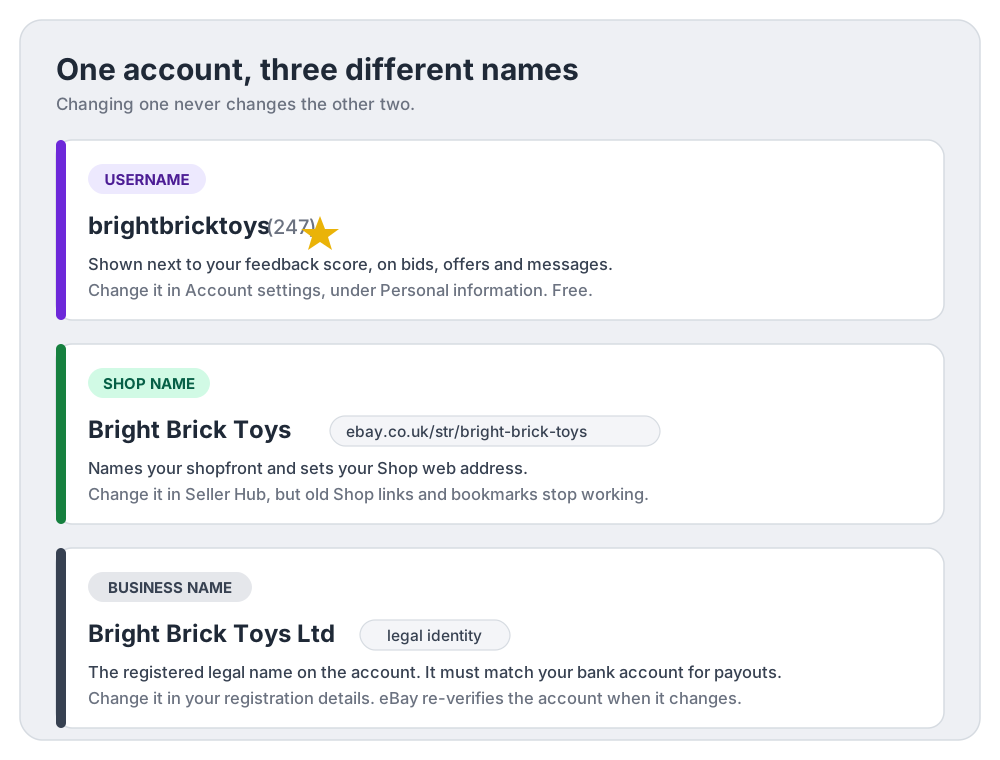
| Username | Shop name | Business name | |
|---|---|---|---|
| What it is | The public handle on your account, shown next to your feedback score | The name of your eBay Shop subscription's shopfront | The legal name your account is registered under |
| Who has one | Every eBay member | Only Shop subscribers (Basic, Featured or Anchor) | Business-registered sellers |
| Where buyers see it | Listings, bids, offers, messages, feedback | Your shopfront and its ebay.co.uk/str/ web address | Business seller details on the account and listings |
| Where you change it | Account settings, Personal information | Seller Hub (eBay advises against renaming) | Account registration details (eBay re-verifies) |
| Cost | Free | Free to rename, but old Shop links stop working | Free, but expect verification checks |
Three details worth pinning down:
- Shop names are riskier to change than usernames. eBay generates your Shop’s web address from the Shop name (spaces become hyphens, everything lowercased, so “Fine Jewellery!” becomes ebay.co.uk/str/fine-jewellery), and eBay itself advises against renaming a Shop because buyers’ bookmarks and marketing links stop working and the Shop can be treated as a new site in some search engine results. A username change has no such search-engine baggage.
- Your legal business name is a verification matter, not a branding one. Business-registered sellers give eBay their legal business name and any trading name at registration, and the name on your linked bank account must match the name on your eBay account or payouts can be blocked. eBay also re-verifies your details when you update relevant account information. So changing a username is cosmetic; changing a registered business name is paperwork. Don’t confuse the two jobs.
- Buyers can see your account type either way. On the website, “Private” or “Business” appears next to the seller’s username on the listing page, whatever the username says. A business-sounding name doesn’t make a private account look like a business, and vice versa.
How to choose a good eBay seller name
Since you get one change per month, aim to choose a name you’ll still like in five years. A practical checklist:
- Say what you sell. eBay’s own naming advice for Shops applies equally here: a straightforward name like “Ben’s Computers” helps buyers (and search engines) more than a creative one like “Zebra Park”. northloftvintage beats sarah_2384756 in every search result and every Messages thread.
- Keep it spellable and sayable. If you’d have to spell it out over the phone, it will be mistyped into search boxes. Avoid double letters at word joins, numbers standing in for letters, and anything with underscores if a clean version is free.
- Drop the birth year. Names like dave1987seller date you, leak personal information, and mean nothing to buyers.
- Check the whole set before you commit. Is the same name free as an eBay Shop name, an Instagram handle, a TikTok handle and (if you’re ambitious) a .co.uk domain for a website of your own outside eBay? Ten minutes of checking now avoids a fragmented brand later. One important caveat: the domain is strictly for off-eBay use. eBay’s username rules do not allow names containing a web address or email address, so brightbricktoys.co.uk would be rejected as a username. Register the domain separately and keep the username as plain brightbricktoys.
- Steer clear of brand names. Even as a genuine reseller of branded stock, a username built on someone else’s trademark invites takedowns. Describe your niche, not their brand.
- Match it to your bookkeeping. If you run consistent SKUs and records across platforms, a single trading name keeps invoices, packaging and spreadsheets coherent. (Our free SKU generator helps if you’re standardising stock codes at the same time as the rebrand.)
Should you change an established username?
The change itself is free and reversible in spirit (you can rename again after 30 days), so the real question is commercial: does the upside beat the small, manageable disruption?
A worked example. Suppose you turn over £1,500 a month and, looking through your orders, around £300 of it comes from repeat buyers. A rename risks none of the on-eBay portion by itself: those buyers’ purchase histories, saved-seller lists and message threads all still point at your account. What’s genuinely at risk is the off-eBay plumbing. If you’ve printed 500 thank-you cards at, say, £40 a batch with ebay.co.uk/usr/your-old-name on them, that link dies the moment you save the new name; if even two £15 repeat orders a month arrived through it, that’s £30 a month quietly gone until the cards are reprinted. The fix costs less than the worry: update the links first, rename second, and add a “formerly known as” line to your listings for a fortnight.
Change it when:
- You’re moving from casual clear-outs to a proper side business and the auto-generated name undermines trust.
- You’re about to open an eBay Shop and want the username, Shop name and social handles to match.
- The current name leaks personal details (full name, birth year, old town) you’d rather not broadcast.
Think twice when:
- You’re mid-dispute or mid-return with a buyer; a name change during a fraught transaction reads badly even with the changed-name icon explaining it.
- It’s your peak season. Do it in a quiet week, not the run-up to Christmas.
- The old name has real off-eBay equity (printed on packaging, quoted in a local Facebook group) that you haven’t yet migrated.
A rename is also a useful point to benchmark the business behind the branding. Compare sales, fees and net profit before and after the change instead of assuming the new name improved performance. DashVue tracks those figures and starts from £19/month or £179/year with a 7-day free trial, and our free eBay fee calculator is there either way.
eBay username change FAQ
Is changing your eBay username free?
Yes. There’s no fee, on any account type, however many times you change (within the one-change-per-30-days limit).
Do I lose my feedback if I change my eBay username?
No. Your feedback score, every comment, your detailed seller ratings and your original registration date stay on your profile; only the name displayed changes. The same goes for your purchase history and any active listings.
Why won’t eBay let me change my username?
The usual reasons: you changed it within the last 30 days, the name you want is already taken, or it breaks a naming rule (too short, contains a blocked symbol or the word “eBay”, looks like an email or web address, or trips the trademark and offensive-name filters). The edit form tells you which rule you’ve hit.
Can buyers tell that I changed my username?
Briefly, yes. eBay shows a small changed-username indicator next to your name for a period after the change (currently 30 days) so people mid-transaction know you’re the same member. After that, nothing on your profile advertises the old name.
Does changing my username change my eBay Shop name?
No. The Shop name and its ebay.co.uk/str/ address are managed separately in Seller Hub, and eBay actively advises against renaming a Shop because existing links and bookmarks break. If you want the two to match, choose a username that passes the Shop naming rules and update both deliberately.
Will I still be able to sign in after changing my username?
Yes. Your email address and password are untouched, and signing in with your email always works. Your linked bank account, payout schedule and seller verification are also unaffected, since those hang off your registered legal name, not your username.
Can I get my old username back if I regret the change?
Only by changing again once the 30-day window reopens, and only if nobody else has registered the name in the meantime. Released usernames can be claimed by other members, so treat a rename as one-way unless you’re relaxed about the outcome.
Is it better to just open a new eBay account instead?
Almost never, if the only goal is a new name. A new account starts with zero feedback, fresh selling limits and full re-verification of your identity and bank details, and it forfeits the trust your history has earned. A username change keeps all of that for free. Start fresh only if you genuinely need a separate account (for instance, to split a business line out from personal selling, which eBay permits with separate registration details). And never open a new account to get around selling limits, a restriction or a suspension on your existing one: eBay treats that as circumventing its rules and can take action against both accounts.
Sources
- eBay Help: Changing your username - the current change route, 30-day limit and what happens after a rename.
- eBay Help: Username policy - the allowed characters, length and restrictions on usernames.
- eBay Help: Feedback profiles - what a feedback profile shows (score, positive percentage, detailed seller ratings, registration date) and the feedback star thresholds.
- eBay Help: Opening an eBay Shop - Shop naming rules and how Shop URLs are generated from the Shop name.
- eBay Help: Managing your eBay Shop - why eBay advises against renaming a Shop.
- eBay Help: Registering as a seller - business name registration and the bank-name matching requirement for payouts.
eBay updates its account settings and policies over time. The steps and limits above reflect eBay’s published guidance at the time of writing; the live edit form and eBay’s Help pages are always the final word.