eBay Selling Limits UK: Where to Check Yours & How to Get an Increase (2026)
eBay selling limits cap items and value per account. Here is where to find yours in Seller Hub or My eBay, what counts towards it, how the automatic monthly review works, how to request more, and what eBay says makes an account eligible for an increase.
Quick answer
eBay selling limits cap how much you can list and sell each month, measured as both a number of items and a total value in GBP. After your first sale, you can see yours in Seller Hub: open the Overview tab and scroll to the Monthly limits section. Before Seller Hub activates, check the Monthly selling limits section in My eBay’s All Selling view. eBay reviews every account automatically each month and adjusts limits based on your sales volume and buyer feedback, and you can also request an increase yourself from that same Monthly limits area.
Skim mode
If you are skimming this because time is short, do the first checklist above, then return here for the edge-case notes only.
Reaching your monthly selling limit can stop new stock going live even when it is ready to sell. eBay says limits are designed to help accounts grow at a manageable pace, reviews them monthly, and may offer an increase when selling performance and sales metrics are strong. The outcome is account-specific; eBay does not publish a utilisation target or a guaranteed timetable.
This guide covers the whole system for UK sellers: what selling limits are, exactly where to check yours, what counts against it (including the sold items most sellers forget), how the monthly automatic review works, how to request a selling limit increase, category and brand restrictions, and how to prepare an evidence-based request. Everything policy-related is drawn from eBay’s own selling limits help page and its published seller standards.
What eBay selling limits are
A selling limit is a monthly ceiling eBay places on your account. eBay’s own framing is that limits are “designed to help you grow your business in a manageable way” and to make sure you can give buyers great service; as sales demand increases, eBay may increase the limit. In practice it works as a cap with two parts:
- An item cap: the number of items you can list and sell in the month.
- A value cap: the total GBP value those items can add up to.
Whichever you hit first is the one that stops you. A seller shifting £2 phone cases will run out of item slots long before value; a seller listing £300 golf clubs will burn through the value cap with item slots to spare.
Two things selling limits are not. They’re not the same as your free listing allowance: eBay is explicit that selling limits still apply even if you have free listings remaining. And they’re not removed by paying for an eBay Shop, since selling limits may also apply to Shop subscribers. (If you’re weighing up a Shop anyway, our eBay Shop tier calculator works out whether the subscription pays for itself at your volume.)
What limits new UK sellers start with
eBay doesn’t publish a universal starting figure for new UK sellers. Limits are set per account, so a forum screenshot or another seller’s allowance is not a reliable guide to yours. What eBay’s published guidance supports:
- Your displayed allowance is the source of truth. Check My eBay before your first sale, then Seller Hub once it becomes available.
- Registering as a business or opening a Shop does not remove selling limits. If eBay offers account linking when you request higher limits, an established seller account may help (covered below).
- eBay reviews limits monthly. That does not guarantee fresh headroom at the start of a new period: active listings continue to count, as do items sold in the current month. Use the live allowance meter before creating or relisting stock.
Don't buy stock past your limit
The most expensive new-seller mistake isn’t an eBay fee, it’s capital locked in stock you can’t list yet. Check your Monthly limits figure in Seller Hub before a big sourcing trip, and buy to roughly one month of listable inventory until your limit is comfortably ahead of your buying.
Where to see your selling limit (Seller Hub or My eBay)
After you have made at least one sale, your current limit is available in Seller Hub:
- Sign in and go to Seller Hub (Selling > Seller Hub, or ebay.co.uk/sh).
- Open the Overview tab.
- Scroll down to the Monthly limits section. It shows your current cap and how much of it you’ve used this month, for both items and value.
Before Seller Hub activates, or if you use the classic My eBay view, the same information sits in the Monthly selling limits section of the All Selling view, along with the option to request higher limits. eBay will also message you proactively when you’re getting close to your monthly limit, so keep an eye on your eBay Messages rather than finding out at the listing form.
What counts towards your monthly limit
This is where most sellers misjudge their headroom. Per eBay’s selling limits page:
- Active listings count. Every live listing eats into the month’s allowance, whether or not it sells.
- Sold items count too. Your limit is not just about what’s live right now: items you’ve already sold this month still occupy their share of the cap.
- Good ’Til Cancelled listings count, and if you’ve reached your maximum, they won’t renew automatically at the end of their cycle.
- Free listings don’t override it. Having free listing allowance left doesn’t mean you can list past your selling limit.
- Quantity matters, not just listings. The cap is measured in items, so a multi-quantity listing typically uses as many item slots as the quantity you list. If you rely on multi-quantity listings, watch the Monthly limits meter after listing to see exactly how eBay has counted it.
The practical consequence: near your cap, an unsold £150 listing that’s been sitting for three weeks is blocking a slot that a faster-selling item could fill. Ending stale listings doesn’t refund the allowance they’ve already consumed this month, but it does stop Good ’Til Cancelled renewals dragging the same dead weight into next month’s allowance.
How the automatic monthly review works
You don’t have to ask for every increase. eBay states plainly that it reviews your account every month and adjusts your limits automatically based on two inputs:
- Your volume of sales recorded on the account.
- The feedback you’ve received from buyers, which is why service quality is not optional if you want to scale.
Limits can also decrease. Separately from the monthly review described above, eBay’s seller standards policy lists a decrease in selling limits as a possible consequence of being rated Below Standard. eBay does not say that its seller-standards evaluation is the same mechanism as the automatic monthly limit review.
eBay doesn’t publish the size of automatic increases or the exact day of the month they land, and sellers report different patterns, so don’t plan stock purchases around a predicted rise. What you can control is the inputs: sales volume and feedback.
How to request a selling limit increase
If you don’t want to wait for the automatic review, you can ask. There are three routes, all free:
- From eBay’s own message. When you get close to your monthly limit, eBay sends you a message letting you know. You can request a limit increase directly from within that message, which is the lowest friction route.
- From the Monthly limits section. Use the Request a limit increase button in Seller Hub’s Monthly limits section (or Request higher selling limits in the Monthly selling limits section of My eBay’s All Selling view).
- By linking an established account. If you have more than one seller account, you may be able to raise limits on the newer one by linking it to your other, more established account. If your accounts are eligible to be linked, you’ll see that option when you select Request higher selling limits.
When you request an increase, eBay may ask for more information, such as contact or business details, and in some cases it verifies these before deciding. Have your details consistent and up to date before you apply so you can answer any account-specific request accurately.
A request is not a promise of an increase. eBay says you may be eligible when your selling performance and sales metrics are strong; check those in Seller Hub or the Seller Dashboard, then use the request route eBay makes available to your account.
Eligibility: what eBay says before raising limits
eBay does not publish an approval formula or promise an increase at a particular level of allowance use. Its official guidance says you may be able to have your limits increased if your selling performance and sales metrics are strong, and directs you to Seller Hub or the Seller Dashboard to check your performance.
- Check the account eBay will review. Resolve any tasks or performance warnings shown in Seller Hub and the Seller Dashboard before requesting more capacity.
- Keep contact and business details current. eBay may ask for this information when you request an increase.
- Use an established account only through eBay’s linking option. If eligible accounts can be linked, eBay shows that option in the Request higher selling limits flow.
Separately, the monthly automatic review uses your sales volume and buyer feedback. Those are the only inputs eBay names publicly for that review, so treat anyone claiming a secret utilisation percentage or guaranteed increase timetable with caution.
Use the official request route
eBay does not tell sellers to fill an allowance simply to trigger an increase. Only list stock you genuinely intend to sell and can fulfil. When eBay messages you that you are close to the limit, request an increase from that message; otherwise use the request button shown in your Monthly limits area and follow the account-specific prompts.
Category and brand limits
Your account-level cap isn’t the only limit you can meet. eBay also applies category limits when you’re new to selling in a particular category. The logic is the same as account limits: give you time to manage inventory in that category and learn any rules that apply there before you scale into it.
The good news is that category limits mostly look after themselves. eBay says that once you’re comfortable fulfilling orders and have a good track record with customers and with following its policies, most specific category limits are removed automatically. Separately, some sensitive categories and frequently faked brands carry extra restrictions that don’t simply age away; if a listing is blocked for a specific brand or category, check the message eBay shows in the listing flow and the relevant policy page rather than assuming it’s your monthly cap.
Never dodge a category limit by miscategorising
If you’ve hit a monthly limit in one category, listing the item in a different, wrong category violates eBay’s Search and browse manipulation policy. That trades a temporary cap for a policy strike on the exact account you’re trying to build trust on.
Skim mode
If you are skimming this because time is short, do the first checklist above, then return here for the edge-case notes only.
How the three kinds of restriction compare:
| Monthly account limit | Category limit | Below Standard restriction | |
|---|---|---|---|
| Who gets it | Every account, from day one | Sellers new to a specific category | Accounts failing minimum seller standards |
| What it caps | Items listed and sold per month, plus their total value | How much you can sell in that category | Selling activity broadly: limits may decrease, funds may be held, fees may rise |
| How it lifts | Automatic monthly review, or a requested increase | Mostly removed automatically once your track record is good | Return to Above Standard at a later monthly evaluation |
| Where to check | Seller Hub > Overview > Monthly limits | The listing flow for that category | Seller Dashboard / Seller Hub performance tabs |
What happens when you hit (or go over) your limit
When you reach the cap, three things follow from eBay’s stated policy:
- You can’t list more items until your monthly allowance renews or your limit is increased.
- eBay may end any listings created over your existing limit. You can list them again when the monthly allowance renews or after an increase.
- Good ’Til Cancelled listings stop renewing automatically while you’re at your maximum.
One important distinction: hitting a selling limit is not a restriction or a suspension. It is a normal monthly cap that lifts by itself when your allowance renews. If instead you received a message with a code like MC011, that is a different situation, a selling restriction, and our guide to eBay restriction codes explains what it means.
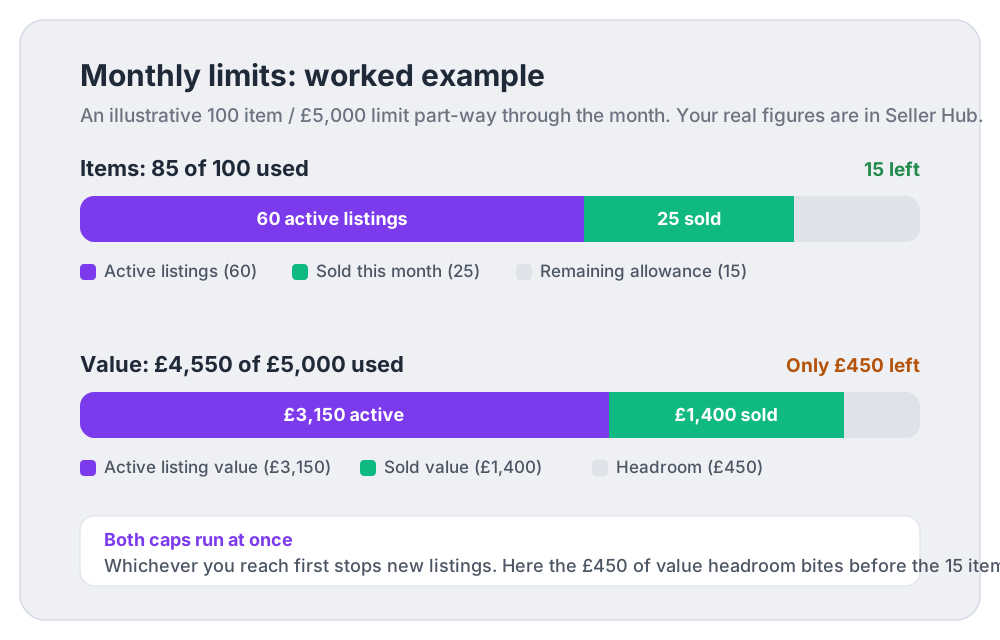
Here’s the trap in numbers. Say your limit is 100 items or £5,000 a month (illustrative figures; yours are in Seller Hub). Mid-month you have 60 active listings worth £3,150 and you’ve sold 25 items for £1,400:
- Items used: 60 active + 25 sold = 85 of 100. Feels like 15 slots of headroom.
- Value used: £3,150 + £1,400 = £4,550 of £5,000. Only £450 of headroom.
- Result: you can’t list a £500 item at all, and two £250 items would need both remaining caps to cooperate. The value cap bites first even though the item meter looks healthy.
When slots are rationed like this, prioritisation is everything: every listing slot should go to the item with the best expected profit after fees, not just the highest sale price. A £40 item with £28 net profit deserves a slot ahead of a £120 item that nets £15 after fees and postage. If you don’t know those net figures per item, our free eBay fee calculator works them out one at a time, and DashVue tracks real net profit per sale automatically across your whole account (£19/month or £179/year, 7-day free trial needed), which makes “what fills my limited slots” a sorting exercise instead of a guess.
How to build a stronger selling-limit increase request
There is no published shortcut or guaranteed timetable. These steps keep the account ready for eBay’s automatic review or an increase request without creating artificial listings simply to use up the allowance:
- Check Seller Hub and the Seller Dashboard first. Review the performance and sales metrics eBay points to, and address any account tasks before you ask for more capacity.
- Dispatch on time, every time. Set a dispatch time you can genuinely hit, and hand parcels over within it. If a one-working-day dispatch means a nightly Royal Mail or Evri drop-off you can’t always make, set two days and beat it.
- Upload tracking promptly. Tracking uploaded as soon as the parcel is handed over protects you on late delivery metrics (a carrier scan within your dispatch time is your defence) and in disputes. Labels bought through eBay upload tracking automatically.
- Never cancel for stock reasons. Cancelling because you oversold or lost the item is a transaction defect. Keep quantities accurate and use eBay’s out-of-stock option so a sold-out listing hides rather than oversells.
- Resolve issues inside 3 business days. Check for item-not-received reports and return requests every working day, and sort them before the buyer can ask eBay to step in. Cases closed without your resolution are the single most damaging metric, with an allowance of just 2 (or 0.3% of transactions).
- Earn feedback deliberately. Feedback is the other named input to the limits review. Accurate descriptions, honest photos and fast dispatch earn it; a polite follow-up doesn’t hurt. (See our eBay feedback examples guide for wording that works.)
- Use the prompt eBay sends. When eBay messages you that you’re close to your limit, request the increase from that message, or use the request button in the Monthly limits area.
- Link an established account if you have one. It’s the one legitimate shortcut eBay offers, and it’s built into the Request higher selling limits flow.
One thing you should not do: open extra accounts to stack allowances or get around a limit. Using another account to dodge limits or restrictions placed on your account is against eBay’s rules, and it fails on its own terms anyway: each new account starts with its own limit and none of your history, and unresolved problems can follow you, since eBay can restrict related accounts when one falls Below Standard for an extended period. (The official account-linking route above is the way eBay provides to use an established account when requesting higher limits.)
As the limit grows, so does the admin: more sales, more fees, more postage, and eventually HMRC’s trading thresholds to think about. Understanding exactly what eBay charges per sale before you scale means the bigger limit grows your profit, not just your turnover.
eBay selling limits FAQ
What is the selling limit for new eBay sellers in the UK?
eBay sets it per account and doesn’t publish one universal starting figure on its UK help pages. Check the Monthly selling limits section in My eBay; after your first sale, you can also use Seller Hub’s Overview tab and its Monthly limits section.
How often does eBay increase selling limits?
eBay reviews every account monthly and adjusts limits automatically based on your sales volume and buyer feedback. If the request option is available to your account, use the Request a limit increase button or the message eBay sends when you’re close to your cap.
Do sold items count towards my eBay selling limit?
Yes. Both your active listings and the items you’ve sold this month count towards the monthly limit. That’s why the headroom shown in Seller Hub is often smaller than your live listing count suggests.
I still have free listings left, why can’t I list?
Free listing allowances and selling limits are separate systems. eBay is explicit that selling limits still apply even if you have free listings remaining, so a remaining free listing quota doesn’t let you list past your cap.
Does opening an eBay Shop or business account remove selling limits?
No. Selling limits may also apply to eBay Shop subscribers, and a new business account builds its track record the same way as any other. What a business registration can help with is the verification step when you request an increase, since eBay may ask for business details at that point.
What happens if I list over my limit?
eBay may end any listings created over your existing limit. You can relist them when your account shows enough headroom, for example after earlier sold-item usage leaves the current monthly period or your limit is increased. Existing active listings still count, and Good ’Til Cancelled listings stop auto-renewing while you’re at your maximum.
Can eBay reduce my selling limit?
Yes. eBay’s seller standards policy lists a decrease in selling limits among the consequences of being rated Below Standard, alongside lower search placement, payment holds and potentially higher final value fees. eBay does not state that this evaluation and the automatic monthly selling-limit review are the same mechanism.
Do selling limits change what I pay in fees?
Not directly: the limit caps volume, not the fee rates on each sale. Indirectly there is a link, because Below Standard sellers can face higher final value fees as well as reduced limits. For what a normal sale actually costs, see our UK eBay selling fees guide or run a sale through the fee calculator.
Sources
- eBay UK Help: Selling limits : where limits appear in Seller Hub, what counts, the monthly automatic review, increase requests, account linking and category limits.
- eBay UK Help: Seller standards policy : the 20th-of-the-month evaluation, defect and case thresholds, and Below Standard consequences including decreased selling limits.
- eBay UK Help: Monitoring and improving your seller performance : the dashboards, metrics and the practices that improve them.
- eBay UK Help: Seller Hub : Seller Hub tabs and the one-sale activation requirement.
eBay adjusts limit mechanics and starting allowances over time and per account. Treat the figure in your own My eBay or Seller Hub view as the source of truth, and check eBay’s live help pages before making stock decisions that depend on a limit.