How to Change, Remove or Revise eBay Feedback: UK Buyer & Seller Guide (2026)
Nobody can edit eBay feedback directly, but there are three real routes: the feedback revision request, removal by eBay for policy-breaking comments, and the public reply. Here is exactly how each one works in the UK in 2026, for buyers and sellers.

Quick answer
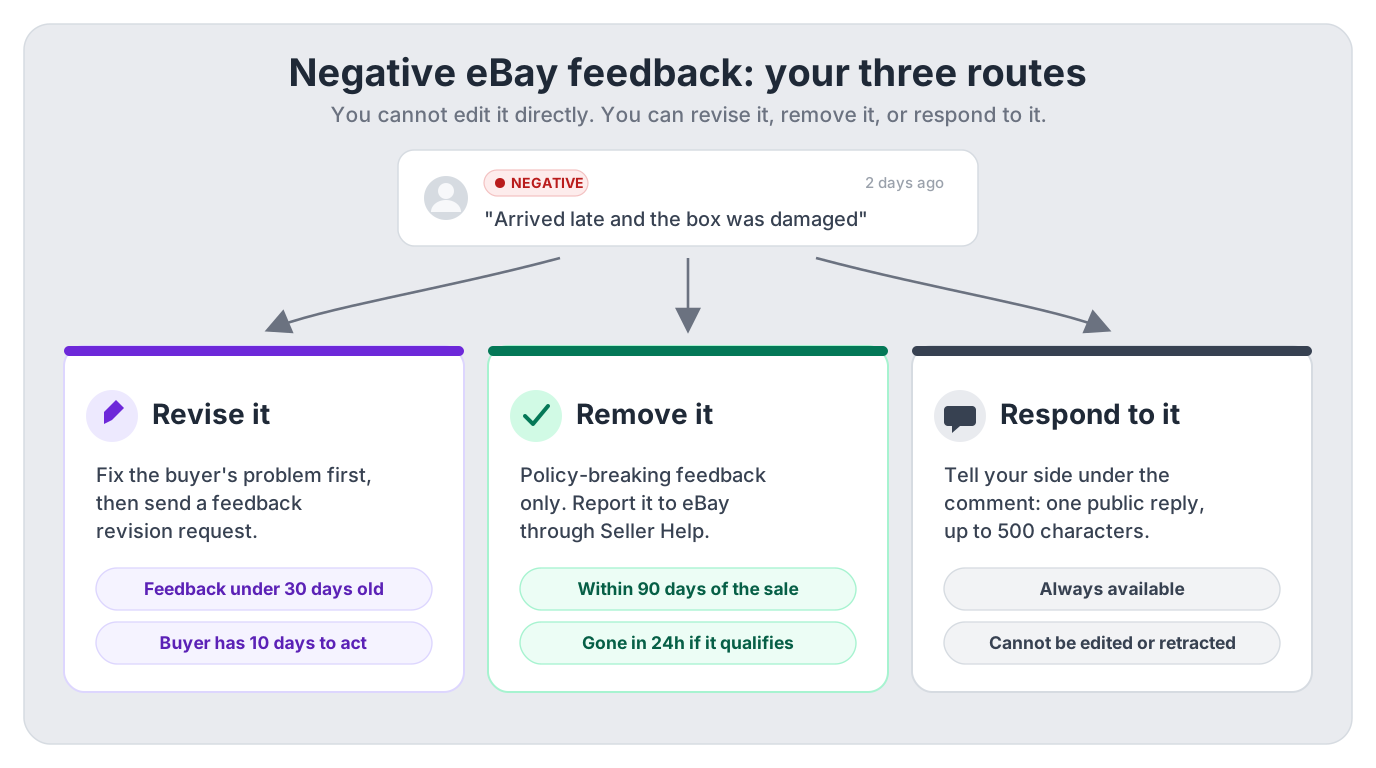
You cannot directly edit eBay feedback once it has been posted. A buyer can change negative or neutral feedback only if the seller sends a feedback revision request, which is possible while the feedback is less than 30 days old, and the buyer then has 10 days to act. Separately, sellers can ask eBay to remove feedback that breaks the feedback policy (extortion, abusive comments, issues eBay or the courier caused) through Seller Help within 90 days of the transaction.
Skim mode
If you are skimming this because time is short, do the first checklist above, then return here for the edge-case notes only.
Every eBay seller eventually stares at a negative comment thinking “that’s not fair”, and every buyer has at some point left feedback in a hurry and regretted it. The good news: eBay has a proper machinery for changing, revising and removing feedback. The bad news: it is spread across four different help pages, the time limits are easy to miss, and most of the advice repeated in seller forums is out of date. This guide covers all of it for eBay UK in 2026: the buyer-side revision flow, the seller-side feedback revision request, every situation where eBay will remove feedback for you, feedback extortion, and the public reply, with the rules taken from eBay’s feedback policy and its official seller help pages.
TL;DR: every route to changing eBay feedback
- Nobody edits feedback directly. Not buyers, not sellers, not even for a typo. Everything goes through one of the routes below.
- Buyers: to change negative or neutral feedback you left, the seller must send you a feedback revision request. You then have 10 days to revise it. If they can’t send one, your only option is a follow-up comment.
- Sellers, route 1: fix the buyer’s problem, then send a revision request while the feedback is under 30 days old. You get 5 requests per calendar year, plus 5 more for every 1,000 feedback ratings you receive during the year.
- Sellers, route 2: if the feedback breaks eBay’s feedback policy, report it through Seller Help within 90 days of the transaction. Qualifying feedback is removed within 24 hours.
- Sellers, route 3: reply publicly. One reply per comment, and you can’t edit or retract it, so draft it carefully.
- Perspective: eBay’s own policy states that receiving negative or neutral feedback does not impact your seller performance level. It does lower the positive percentage buyers see, which is why it is still worth acting on.
Who can change or remove eBay feedback
A piece of eBay feedback has up to three parts: a rating (positive, neutral or negative), a comment, and optionally up to 5 images. Feedback left after a purchase carries a “verified purchase” label, and it all rolls up into the feedback score and positive percentage shown on your profile. Who can touch it after posting breaks down like this:
- The buyer can revise negative or neutral feedback they left, but only in response to a seller’s revision request. Otherwise they can add a follow-up comment under the original.
- The seller can reply publicly (once), send a revision request (limited allowance), report the feedback to eBay for removal, and add a follow-up to feedback they left for buyers. Sellers can only ever leave positive ratings for buyers, so there is no “retaliation” route, and a positive rating paired with a negative comment gets removed by eBay because it confuses other members.
- eBay can remove the whole thing or just the offending part: the comment, the rating, or the images. It does this proactively with automation, and on request via Seller Help.
Everything below walks through each of those levers in the order you should actually use them.
eBay may add positive feedback automatically
For an eligible tracked order, eBay adds automated positive feedback 7 days after tracking confirms on-time delivery if the buyer has not left feedback and has not reported a problem. This does not close the buyer’s feedback window: their own positive, neutral or negative feedback replaces eBay’s automated entry. eBay can also remove its automated feedback if the buyer later reports an issue, such as a damaged item or a return. See eBay’s current automated-feedback rules.
Buyers: how to change feedback you left on eBay
This is the single most-asked question in this topic, so here it is straight: in most cases you can’t change feedback once you’ve submitted it. eBay’s help pages are explicit about that. The exception is negative or neutral feedback you want to improve: the seller can send you a feedback revision request, and that request is the only door into editing what you wrote.
The working sequence, if you’re the buyer:
- Message the seller from your purchase history. Explain what changed: the parcel turned up, they refunded you, the fault turned out to be your own charger. Sellers cannot revise anything themselves, so this step is how you trigger the process.
- Ask them to send a feedback revision request. Most sellers know the feature; if they don’t, point them to eBay’s “Viewing and responding to feedback from buyers” help page.
- Watch for eBay’s email. When the request is sent, eBay emails you the details with a link into the revision flow.
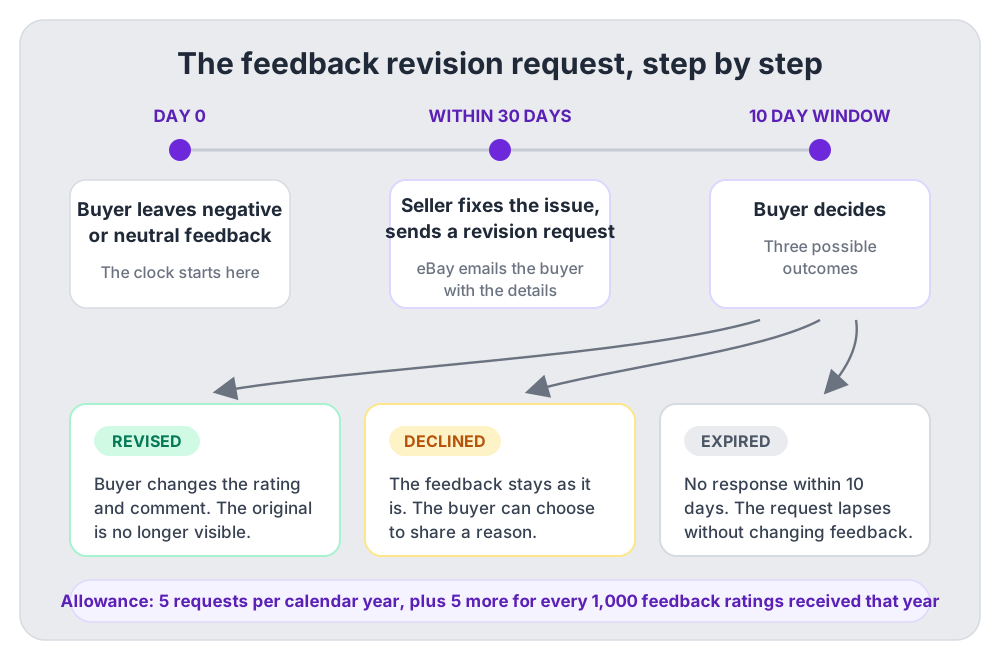
- Revise within 10 days. You choose a new rating and comment, and once revised, the original comment is no longer visible on eBay. You can also decline the request (with an optional reason), and if you do nothing for 10 days it simply expires.
When the revision door is closed
A seller can only send a revision request while your feedback is less than 30 days old, and they have a limited yearly allowance of requests. If the feedback is older, if the seller has used up their allowance, or if you left a positive rating with a comment you now regret, revision is off the table and your option is a follow-up comment (next section).
When you can’t revise: follow-up comments
When revision isn’t available, eBay’s fallback is the follow-up comment: a clarifying note that appears directly beneath your original feedback. The original rating and comment stay visible, so it doesn’t repair a seller’s percentage, but it does set the record straight for anyone reading. A follow-up like “Update: seller refunded me in full the same day, great service” changes how the negative above it reads.
Sellers get the same mechanism for feedback they left for buyers: find the feedback you left, select Follow up on the right side of the page, and add your note. Two constraints on follow-ups, whichever side you’re on: you get one follow-up per comment, and you can’t edit or retract it once posted. Treat it with the same care as the original.
Sellers: how to send a feedback revision request
The revision request is the most powerful tool you have, because it is the only route that ends with the negative genuinely replaced rather than just answered. It is also rationed, so the order of operations matters.
- Fix the actual problem first. eBay’s guidance is to contact the buyer, resolve the issue, and then ask whether they’d revise. A revision request landing before you’ve done anything reads as “please delete your honest opinion” and gets declined.
- Check the age. The feedback must be less than 30 days old when you send the request. Diarise the deadline, but do not use a formal request as a substitute for addressing the buyer’s concern. If the problem is still unresolved when the window closes, your remaining options are a policy-based removal request or a measured public reply.
- Check they are open to revising, then send the request. Where time allows, ask in eBay messages after you have resolved the issue. If the buyer is willing, open your Feedback profile and use the Request a feedback revision flow linked from eBay’s official revision guide. Choose the eligible feedback and send the request; eBay then emails the buyer with all the details.
- Wait out the 10 days. The buyer can revise (original disappears from eBay), decline (optionally telling you why), or ignore it, in which case the request expires without changing the feedback.
How many revision requests do you get?
You can make 5 feedback revision requests per calendar year. For every 1,000 feedback ratings you receive during the year, you get 5 additional requests.
Worked example: say you run a Growth-sized store shifting around 250 orders a month at a £18 average, roughly £54,000 a year through eBay, and about 2,100 of those buyers leave feedback during the calendar year. Your allowance is 5 base + 10 extra (two full thousands) = 15 revision requests for the year. A small seller with 300 feedback ratings a year has just the base 5. Either way the maths says the same thing: you have a limited number of revision requests, so reserve them for negatives where you’ve genuinely resolved the issue and the buyer is still talking to you, not for buyers who have gone silent.
Gauge before you spend
Message the buyer first. A reply such as “thanks for sorting the refund so quickly” shows they may be open to revising; silence does not. There is no rule requiring you to send a request, and asking whether they would reconsider before using one helps you protect your limited allowance.
When eBay removes negative feedback for you
The second route doesn’t need the buyer’s cooperation at all. eBay’s feedback policy commits to removing feedback in a specific set of situations, and it enforces this both proactively with automation and manually when you request a review through Seller Help. If your case qualifies, eBay emails you and the feedback is removed from your account within 24 hours; if it doesn’t, they explain why it stays. Depending on the situation eBay may remove the comment, the rating, the images, or all of them, and where only part of a comment breaks policy, eBay may invite the buyer to revise it instead.
The removable categories, with UK-flavoured examples:
Harmful, inappropriate or irrelevant content
eBay removes all feedback containing any of the following:
- Hate, violence, discrimination, threats or intimidation
- Profane, obscene, adult or illegal content
- Opinions on political, religious or social issues
- Personally identifiable information (your home address, phone number, real name)
- Links, URLs or anything encouraging sales off eBay
- Meaningless content, or images that aren’t of the item purchased
- Comments clearly intended for a different item or seller (the classic: “shirt was very poor quality” left on your photo frame listing)
- Negative comments paired with positive ratings, or the reverse
- Personal attacks that could harm your business and can’t reasonably be read as constructive criticism
Problems the buyer caused
eBay removes neutral or negative feedback where its own records show the buyer was the source of the problem:
- The buyer asked to cancel after committing to buy or winning an auction
- The order was cancelled because the buyer didn’t pay, or over an address issue
- The complaint is about something correctly disclosed in the listing. eBay’s own example: a pre-loved dress described as having a stain inside, negged for having a stain inside. Removable. If you hadn’t disclosed the stain, it stays.
- The buyer demanded a change to the order after paying, and the feedback is about that
- The buyer has been actioned under eBay’s abusive buyer policy
Delivery problems that weren’t yours
This is the category UK sellers under-use most. eBay removes neutral or negative feedback about:
- A delivery issue where tracking shows you met your handling and delivery expectations. Example: you sold a £24.99 hoodie on Tuesday with 1-day handling, your Royal Mail Tracked 48 scan shows acceptance Wednesday morning, and Royal Mail then took six days. A neg saying “slow delivery” is removable, because the tracking proves the delay wasn’t yours. This only works if the tracking is uploaded to the order, which is one more reason to buy labels through eBay or upload numbers religiously.
- A carrier delay caused by a natural disaster or unexpected event
- A customs or import-charge issue outside your control. eBay’s example is a buyer negging over import duties on an international order. Not your fees, not your feedback.
Returns you were entitled to decline
- You declined a change-of-mind return on a listing that didn’t offer returns. eBay’s policy is explicit that “wouldn’t take it back after I changed my mind” feedback is removable when your listing said no returns.
- The buyer changed their mind and was liable for the return label cost, and the feedback is a complaint about paying it.
Things eBay or its programmes caused
Feedback gets removed when the problem sits with eBay’s own machinery rather than with you:
- Complaints about not being able to retract a bid
- A technical issue on the eBay site that eBay can identify
- An eBay Money Back Guarantee case or payment dispute that closed with you having met your obligations
- Items posted on time with eBay International Shipping or the Global Shipping Programme where the problem was delivery-related
- Items sent with Simple Delivery where the issue was caused by the eBay-provided label, or the item arrived damaged (see our Simple Delivery guide for how that protection works in practice)
- eBay Fulfilment shipping issues outside your control
- Authenticity Guarantee items that shipped on time and passed authentication, and Assured Fit returns where you met your obligations
Beyond the feedback policy itself, eBay’s seller protections page adds automatic removal in adjacent cases: abusive buyers (feedback, defects and open service-metric cases all removed), buyers who retracted a bid or never paid before you cancelled, buyers whose in-message demands for extras you can evidence, and weather or carrier disruptions listed on eBay’s announcement board.
What eBay will not remove
An honest opinion, even a harsh one. eBay’s policy says plainly that it isn’t in a position to contradict buyers’ opinions or judgment of items, and that buyers don’t expect to see 100% positive feedback. If the buyer’s complaint is real (“seam split first wear”, “smaller than the photos suggest”), removal requests fail. Your tools there are the revision request, after you’ve fixed the problem, or a good public reply.
Feedback extortion and manipulation
Feedback extortion is the clearest-cut removal of all: eBay removes all feedback used as a means to extort another member. Extortion is any variation on “do X or I leave a negative” where X is something you never offered. eBay’s own example is a camera buyer demanding a free upgraded memory card and case under threat of negative feedback.
A realistic UK version: you sell a jacket for £34.99 with free Evri delivery. After paying, the buyer messages: “I’ve seen this cheaper elsewhere, refund me £10 or I’ll be leaving you negative feedback.” That message is the evidence. What to do:
- Don’t pay. Caving teaches the buyer the tactic works, and eBay’s seller protections mean you never have to agree to changes to your listing’s terms.
- Keep everything in eBay messages. eBay removes related feedback “when we can see the buyer’s demands in eBay messages”. A WhatsApp threat is invisible to them; an eBay message is evidence.
- Report the buyer and, if feedback lands, request removal through Seller Help. Extortion-based feedback is removable whether or not the buyer follows through politely.
The same policy section bans feedback manipulation: creating, soliciting or using fake, misleading or manipulated feedback. That includes the tempting-but-toxic stuff on the seller side, like offering a partial refund in exchange for a positive, or buying feedback. Feedback must reflect the actual experience, in both directions, and manipulation risks action against your account, up to suspension.
How to request feedback removal (step by step)
- Check the deadline. You can request removal through Seller Help within 90 days of the transaction. Note that’s measured from the transaction, not from when the feedback appeared.
- Match your case to a policy category from the sections above before you open the request. “It feels unfair” is not a category; “tracking shows I dispatched within my handling time” is.
- Open Seller Help (signed in as your selling account), find the feedback item, and submit the removal request with the reason that matches your category.
- Make sure the evidence is on eBay. eBay says it makes sure it has “factual evidence to support removal” in every case: uploaded tracking for delivery claims, the listing text for disclosed-condition claims, eBay messages for extortion and demands.
- Watch your email. If the feedback qualifies, eBay emails you and removes it within 24 hours. If it doesn’t, they explain why it is allowed to stay, which at least tells you whether a revision request or a public reply is your next move.
Clear-cut cases are often gone before you ask
eBay uses automation to proactively remove policy-breaking feedback, so profanity, personal information and obvious wrong-item comments frequently vanish on their own. Manual review through Seller Help exists for the cases that are not clear-cut, which is exactly where matching your request to the right policy category earns its keep.
Responding publicly to negative feedback
When feedback can’t be revised or removed, the public reply is what’s left, and it is more valuable than most sellers give it credit for. The reply isn’t really for the buyer who negged you. It is for the hundred future buyers who will read that negative while deciding whether to trust you.
- Go to your feedback profile, find the comment (the search bar under the All received feedback tab covers the last 12 months by buyer username, item number or title), and select Reply on the right side of the page.
- Write your reply. It appears directly below the buyer’s comment. Keep it short and factual; eBay allows up to 500 characters, but a concise response is easier for future buyers to scan.
- Check it twice before submitting: you get one reply per comment, and it cannot be edited or retracted.
Tone decides everything here. eBay’s own model reply, from its feedback policy page, is worth copying wholesale: “I’m sorry to hear you weren’t happy with the dress, I love making my customers happy. Please open a return on eBay and we can arrange for a refund.” Calm, warm, solution-shaped. Compare that to the defensive replies you see in the wild (“buyer never even messaged me!!”), which read worse than the negative they sit under. If you want a library of ready-made replies for common situations, our eBay feedback examples post has a full set you can copy and adapt.
Revision vs removal vs reply at a glance
The four levers side by side. In practice you work top to bottom: revision first where the buyer is reachable and the problem is fixed, removal where policy is on your side, reply when neither applies.
| Route | Who starts it | Time limit | What happens | Best for |
|---|---|---|---|---|
| Feedback revision request | Seller (buyer then acts) | Feedback under 30 days old; buyer has 10 days to respond | Buyer changes the rating and comment; the original is no longer visible | Genuine problems you have already fixed for the buyer |
| Removal via Seller Help | Seller (eBay decides) | Within 90 days of the transaction | eBay removes the comment, rating and/or images if the feedback breaks policy | Extortion, policy-breaking comments, and issues eBay caused |
| Public reply | Seller | None stated, but sooner reads better | Your reply appears under the buyer's comment; one reply, no edits | Honest negatives that will not qualify for revision or removal |
| Follow-up comment | Whoever left the feedback | None stated by eBay | A clarifying note appears under the original comment; the rating stays | Buyers who cannot revise, and sellers updating feedback they left |
One more distinction worth internalising: the revision request needs the buyer to say yes, removal needs eBay to say yes, and the reply needs nobody’s permission at all. That is why the reply is the floor you always have, and the other two are the routes you escalate through when the facts support it.
Tracking feedback damage across your listings
Everything above is reactive: one comment, one fix. The bigger win is noticing patterns, because three negatives spread across 400 orders is noise, but three negatives on the same SKU is a listing problem: a misleading photo, an optimistic condition description, packaging that doesn’t survive the courier. eBay shows you feedback one comment at a time, which makes those patterns easy to miss.
This is the part DashVue was built for. The Feedback Overview pulls your eBay feedback into one view: your net score, positive percentage, and negative and neutral counts. The Feedback Analysis tab shows the distribution over the last 30, 90 and 365 days, with a ranked list of the items attracting the most negative feedback. When a reply is needed, the reply drawer lets you draft and trim it to eBay’s limit, copy it across, and mark the comment handled so nothing slips. To be clear about the boundaries: DashVue can’t remove feedback or post replies to eBay for you. What it does is make sure you spot the negative inside the 30-day revision window rather than after it, and see which listing keeps generating them. DashVue costs £19/month or £179/year with a 7-day free trial.
FAQ: changing and removing eBay feedback
Can I change feedback I left on eBay?
Not directly. If you left negative or neutral feedback for a seller, the seller can send you a feedback revision request and you can change it that way, with 10 days to act on the request. Otherwise, your option is a follow-up comment under the original.
How long does a seller have to send a revision request?
The feedback must be less than 30 days old when the request is sent. After that, the revision route is closed for that comment, though the 90-day Seller Help removal window may still be open if the feedback breaks policy.
Can a seller remove negative feedback themselves?
No. Sellers can’t delete feedback. They can ask the buyer to revise it (via a revision request), ask eBay to remove it (via Seller Help, if it breaks the feedback policy), or reply to it publicly. Anyone selling a “guaranteed feedback removal” service is selling something eBay doesn’t offer.
Does negative feedback affect my seller performance level?
eBay’s feedback policy states that receiving negative or neutral feedback doesn’t impact seller performance, which is measured on defects, late dispatch and cases. It does reduce the positive percentage displayed on your profile, which buyers see and weigh, so it still has a real commercial cost.
Can I offer a buyer a refund in exchange for removing feedback?
Refunding a buyer to fix a genuine problem, then asking whether they’d revise, is exactly how eBay intends the system to work. Making the refund conditional on positive or revised feedback crosses into feedback manipulation, which eBay prohibits and can action your account for. Fix first, ask second, never bargain feedback for money.
How quickly does eBay remove feedback?
If your request qualifies, eBay emails you and removes the feedback from your account within 24 hours. Clear-cut policy breaches are often removed proactively by eBay’s automation before you even report them.
Can a seller leave me negative feedback as a buyer?
No. Sellers can only leave positive feedback for buyers, and they have up to 90 days from the transaction to leave it. A positive rating with a negative comment hidden inside it gets removed because it confuses other members.
How long do buyers have to leave feedback in the first place?
Buyers can leave feedback for up to 60 days from the date the item was received or from the estimated delivery date, whichever comes first. If eBay provides no estimated delivery date, the buyer has up to 90 days from completing the purchase. Sellers have up to 90 days from the completed transaction to leave positive feedback for a buyer. Check eBay’s current buyer-feedback window before relying on the deadline for a specific order.
Can I just hide my feedback instead?
Buyers can make their feedback profile private, but sellers can’t: to sell on eBay, your feedback must be visible to everyone. Making feedback private as a workaround would end your selling, not your negatives.
Sources
- eBay UK: Feedback policy covers every removal category, the 90-day Seller Help window, the 24-hour removal commitment, and extortion/manipulation rules.
- eBay UK: Viewing and responding to feedback from buyers covers the reply mechanics, the 30-day revision request rule, the allowance, and the buyer’s 10-day response window.
- eBay UK: Feedback profiles covers what feedback contains, follow-up comments, and public/private profile rules.
- eBay UK: Seller protections covers automatic feedback removal for abusive buyers, non-payers, in-message demands, and carrier or programme issues.
- eBay UK: Leaving feedback for sellers covers the buyer’s 60-day delivery-based deadline, the 90-day fallback when no estimated delivery date is provided, and eBay automated feedback and its replacement by buyer feedback.
- eBay UK: Leaving feedback for buyers covers the positive-only rule, the 90-day seller window, and follow-up comments.
eBay revises its feedback mechanics periodically. The rules above reflect eBay UK help pages as captured in mid-2026; always confirm against the live pages before acting on a specific deadline.