Free eBay Listing Templates (UK): Copy-Paste HTML Descriptions That Work in 2026
Three free, eBay-safe listing description templates you can copy and paste today, plus the active content rules that break most templates on mobile, how to save reusable templates in Seller Hub, and an honest look at whether templates sell more at all.
Quick answer
A free eBay listing template is a reusable layout for your listing: either plain text or simple HTML you paste into the description box, or a saved listing template in Seller Hub (eBay lets you store up to 50). The three copy-paste templates below are mobile-first and eBay-safe: no JavaScript, no active content, nothing eBay will strip or hide.
Skim mode
If you are skimming this because time is short, do the first checklist above, then return here for the edge-case notes only.
Most “free eBay template” downloads are a wall of dated HTML built before eBay banned active content, so they arrive broken, or break the moment a buyer opens your listing on a phone. This guide does it properly: what a listing template actually is (there are two different things people mean), what eBay’s active content rules still allow in 2026, three ready-to-use templates you can copy and paste today, and the exact steps to save reusable templates in Seller Hub. Plus an honest answer to the question template sellers never answer: do templates actually increase sales?
What is an eBay listing template?
An eBay listing template is a pre-built structure you reuse for every listing instead of starting from a blank box each time. eBay’s own help pages put the case simply: templates mean you no longer start from scratch, and they help you give buyers consistent information across all your listings.
Consistency is the underrated half of that. eBay’s listing guidance says a good description is “clear enough to tell your buyer what they need to know at a scan”: the item’s key selling points, exactly what is included in the sale (down to which cables come with used electronics), and full sentences with correct spelling. A template turns that from something you remember on a good day into something every listing gets by default.
The catch is that “listing template” means two different things on eBay, and mixing them up is why so many sellers end up frustrated.
Description HTML vs Seller Hub templates: two different things
When people search for free eBay listing templates they are usually thinking of the first of these, but eBay’s official feature is the second:
- A description template is the text or HTML layout inside the item description box: your headline, condition notes, what’s included, delivery and returns. It controls what the buyer sees. This is what the copy-paste templates further down this page are.
- A Seller Hub listing template is eBay’s built-in feature that saves an entire listing setup: category, item specifics, format, postage options, returns policy and the description itself. It saves you time. You can create up to 50 of them, free, inside Seller Hub.
The two work best together: design one good description layout, then save it inside a Seller Hub template per product type (“Used electronics”, “Womens clothing”, “Car parts”), so a new listing starts 80% finished. The item specifics and product identifiers saved in the template are what eBay’s search actually reads; the description HTML is what convinces the human who clicks through.
eBay’s active content rules: what HTML is allowed in 2026
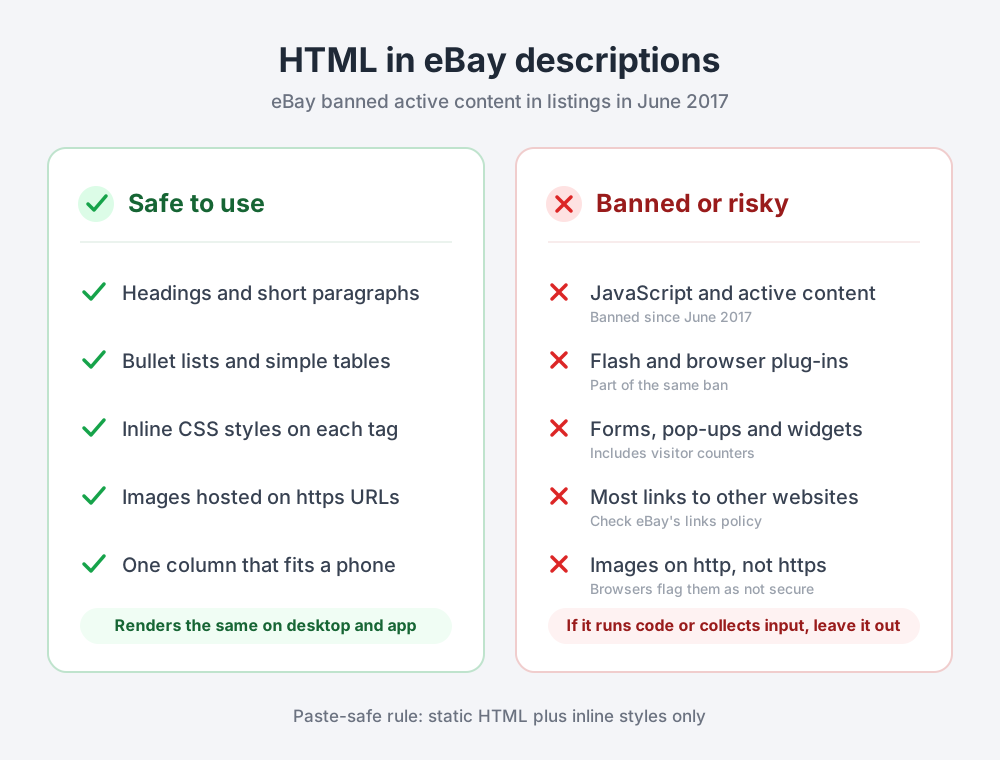
This is the section that makes or breaks every free template you find online. eBay banned active content in listings in June 2017: JavaScript, Flash, plug-ins and form actions. eBay’s stated reasons were mobile buying, page load times and security. Any template still circulating with scrolling galleries, tabbed sections, visitor counters or “see my other items” widgets relies on exactly the code eBay strips or blocks, which is why those templates render as a broken mess.
What still works, and works reliably:
- Standard, static HTML: headings, paragraphs, bold, lists and simple tables.
- Inline CSS (a
style="..."attribute on each tag). Inline styles are the safe choice because they survive being pasted between tools and cannot be separated from the content they style. - Images hosted on https URLs. Browsers flag http content inside a secure page as not secure, so anything you embed should be served over https. In practice you rarely need embedded images at all: the eBay photo gallery is where buyers look.
Two more constraints worth knowing before you design anything elaborate. First, eBay restricts most links to outside websites from listings, so treat external links as off the table and check eBay’s current links policy if you think you have an exception. Second, on the mobile app eBay may show a shortened summary of your description with the full version behind a tap; eBay’s developer documentation describes generating a brief description summary for mobile. The heavier and more decorative your HTML, the more likely the version most buyers see is a truncated one. Short, front-loaded descriptions win on the device where the majority of buyers are.
Test the template you have, not the template you pasted
eBay’s editor and third-party tools can silently rewrite pasted HTML. After publishing, open your own listing in a private browser window on your phone. If sections are missing or collapsed, your template is carrying something eBay removed.
What makes a good eBay listing template (the honest version)
Template vendors love big numbers: 30% more sales, 300% more conversions. Here is the uncomfortable truth: no independent study has ever isolated the effect of a listing template on eBay sales. Those percentages trace back to the template sellers’ own marketing, with no methodology behind them, and they contradict each other.
What the evidence does support is the mechanism underneath: presentation quality. eBay’s own study of 6.8 million listings found that better photo quality made a listing 4.5% more likely to sell, with price held constant. That is a photo finding, not a template finding, but it points the same way as eBay’s listing guidance: clear beats clever. eBay’s own mobile advice pushes simple, uncluttered listings because “the clearer your listing is, the better the chances of a successful sale”.
So a good template optimises for clarity and repeatability, not decoration:
- One column, max 640px wide, 16px text. It reads perfectly on a phone without pinching.
- The same sections in the same order on every listing: what it is, condition, what’s included, delivery, returns. Buyers who have seen one of your listings can scan the next.
- Front-loaded first sentence, because on mobile that may be most of what shows before the tap.
- No prices, stock levels or dates in the description. They go stale, and stale descriptions cause disputes. The structured fields handle all of that.
- Honest condition wording baked in. A placeholder that says “point to the photo that shows the flaw” forces the habit that prevents “item not as described” returns.
The other genuine, measurable win is time. Say you list 20 items a week and a saved template plus a reusable description saves a conservative 4 minutes per listing. That is 80 minutes a week, roughly 69 hours a year. Value your time at even £12 an hour and the template is worth about £830 a year, before any effect on buyers at all. That arithmetic is the honest reason every high-volume seller uses templates.
Three free eBay listing templates to copy and paste
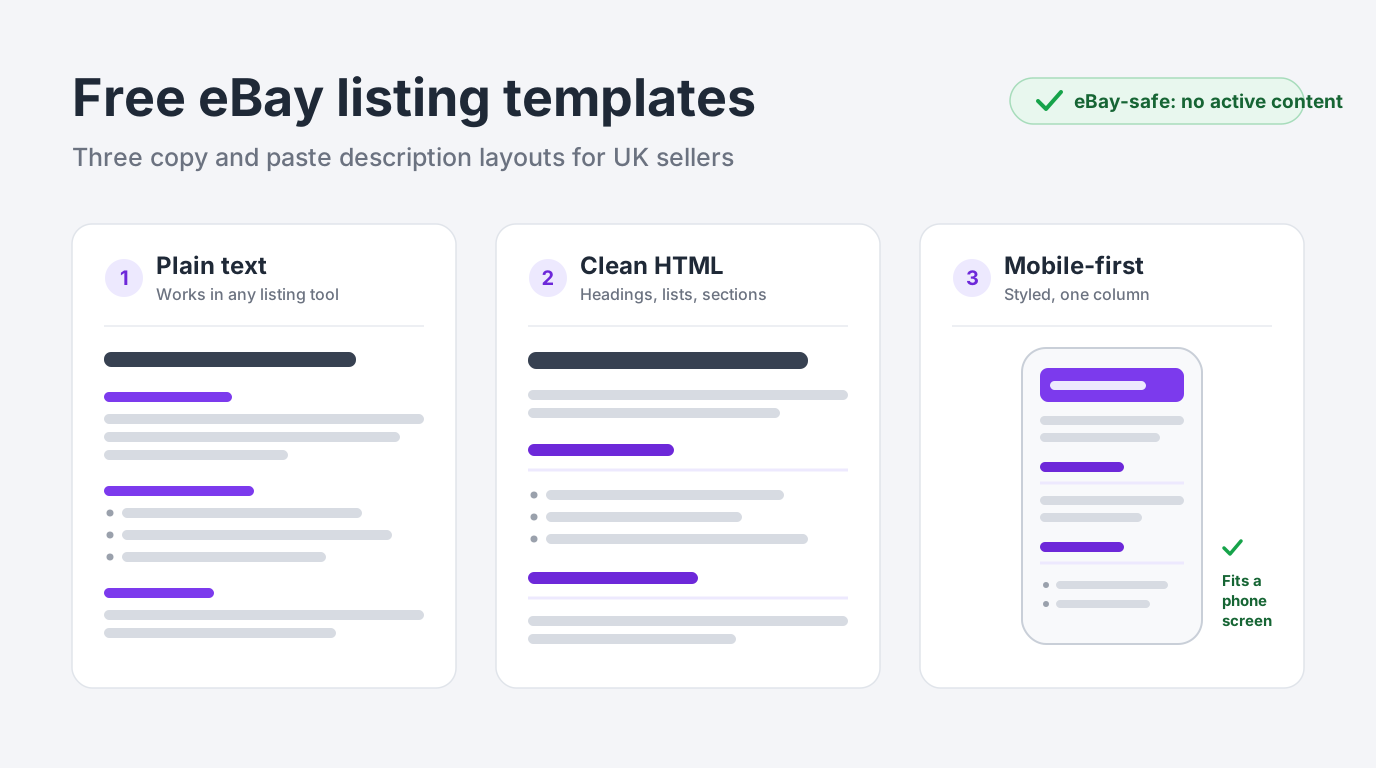
All three templates below are free to use, contain no active content, no external links and no scripts, and follow the mobile-first rules above. Copy the one that fits how you sell, replace the placeholder text, and delete any section you don’t need.
Template 1: plain text (works everywhere)
No HTML at all, which means nothing can strip it, no tool can mangle it, and it pastes cleanly into the quick listing tool, the app, or a bulk upload CSV. The capitalised headers do the structural work. This is the template to start with if HTML makes you nervous.
ITEM NAME - brand, model, size or key detail

WHAT YOU ARE BUYING
One [item], exactly as photographed.

CONDITION
[New / Used. Describe wear honestly: marks, scratches,
box or no box. Point to the photo that shows any flaw.]

WHAT IS INCLUDED
- [Main item]
- [Cables, accessories, manuals: list everything in the sale]
- [If something is NOT included, say so here]

SIZE / SPECS
- [Measurements, capacity, colour, weight]

POSTAGE
Posted within [1] working day of payment
via [Royal Mail Tracked 48 / Evri].

RETURNS
[30-day returns accepted / returns as stated on this listing.]

Questions? Message me and I will reply as soon as I can.
Best for: casual sellers, app-first sellers, and anyone listing one-off used items where speed matters more than styling.
Template 2: clean HTML with sections
The same structure expressed in semantic HTML: an <h2> headline, <h3> section headings and a proper bullet list. eBay’s description box renders these with sensible default styling, so you get visible hierarchy without writing a line of CSS. Shown filled in with a real example so you can see the intended level of detail:
<h2>Sony WH-CH520 Wireless Headphones, Black</h2>

<p>Genuine Sony WH-CH520 Bluetooth headphones in black.
Bought new, lightly used, fully working.</p>

<h3>Condition</h3>
<p>Used, excellent condition. Light wear on the headband,
shown in photo 4. No scratches on the ear cups.</p>

<h3>What is included</h3>
<ul>
  <li>Headphones</li>
  <li>USB-C charging cable</li>
  <li>Original box</li>
</ul>

<h3>Delivery</h3>
<p>Posted within 1 working day of payment, tracked service.</p>

<h3>Returns</h3>
<p>30-day returns accepted. Please return the item in the
condition it was sent.</p>
Best for: regular private sellers and small business sellers who want structure and scannability with close to zero maintenance.
Template 3: mobile-first styled template
A lightly branded layout using inline styles only. The wrapper caps the width at 640px and centres it, the 16px body text stays readable on a phone, and the underlined section headings give it a finished look without a single image, script or external font. Change the two hex colours to match your shop branding if you like, and nothing else needs touching.
<div style="max-width:640px;margin:0 auto;font-family:Arial,Helvetica,sans-serif;font-size:16px;line-height:1.5;color:#222222;">

  <h2 style="font-size:22px;margin:0 0 12px 0;">ITEM TITLE HERE</h2>

  <p style="margin:0 0 16px 0;">Opening line: what it is and why
  it is worth buying, in one or two sentences.</p>

  <h3 style="font-size:18px;margin:20px 0 8px 0;border-bottom:2px solid #eeeeee;padding-bottom:6px;">Condition</h3>
  <p style="margin:0 0 16px 0;">Honest condition notes. Refer to
  your photos for any marks or wear.</p>

  <h3 style="font-size:18px;margin:20px 0 8px 0;border-bottom:2px solid #eeeeee;padding-bottom:6px;">In the box</h3>
  <ul style="margin:0 0 16px 0;padding-left:20px;">
    <li>Item one</li>
    <li>Item two</li>
    <li>Item three</li>
  </ul>

  <h3 style="font-size:18px;margin:20px 0 8px 0;border-bottom:2px solid #eeeeee;padding-bottom:6px;">Delivery</h3>
  <p style="margin:0 0 16px 0;">Dispatched within 1 working day
  of payment. Tracked delivery.</p>

  <h3 style="font-size:18px;margin:20px 0 8px 0;border-bottom:2px solid #eeeeee;padding-bottom:6px;">Returns</h3>
  <p style="margin:0;">30-day returns accepted. Please return
  the item in the condition it was sent.</p>

</div>
Best for: business sellers listing similar items repeatedly, where a consistent branded description across the whole shop is the goal.
Bonus block: a simple spec table
Drop this above the Delivery section of template 2 or 3 when an item has specs worth tabulating (electronics, car parts, appliances). Keep it to the facts a buyer compares; duplicate the row markup for extra rows. Remember the table supplements your item specifics, it never replaces them: eBay’s search reads the structured fields, not your description.
<table style="width:100%;max-width:640px;border-collapse:collapse;font-family:Arial,Helvetica,sans-serif;font-size:15px;color:#222222;">
  <tr>
    <td style="padding:8px 12px;border:1px solid #e5e5e5;background:#f7f7f7;width:40%;"><strong>Brand</strong></td>
    <td style="padding:8px 12px;border:1px solid #e5e5e5;">Sony</td>
  </tr>
  <tr>
    <td style="padding:8px 12px;border:1px solid #e5e5e5;background:#f7f7f7;"><strong>Model</strong></td>
    <td style="padding:8px 12px;border:1px solid #e5e5e5;">WH-CH520</td>
  </tr>
  <tr>
    <td style="padding:8px 12px;border:1px solid #e5e5e5;background:#f7f7f7;"><strong>Colour</strong></td>
    <td style="padding:8px 12px;border:1px solid #e5e5e5;">Black</td>
  </tr>
  <tr>
    <td style="padding:8px 12px;border:1px solid #e5e5e5;background:#f7f7f7;"><strong>Condition</strong></td>
    <td style="padding:8px 12px;border:1px solid #e5e5e5;">Used, excellent</td>
  </tr>
</table>
Keep one master copy outside eBay
Save your filled-in template as a plain .txt or .html file (or a note) and always paste from that master copy. Editing descriptions inside old listings and re-copying them is how typos, stale postage promises and broken tags spread across a whole shop.
How to add an HTML template to an eBay listing
Using any of the HTML templates above takes about a minute per listing:
- Start your listing as normal and scroll to the Item description box.
- Switch the description editor to HTML view (the editor has a standard/HTML toggle; in the quick listing tool you may need to enable more options via Change listing preferences first).
- Paste the whole template, replacing anything already in the box.
- Switch back to the standard view and replace every placeholder with your item’s details. Delete sections that don’t apply rather than leaving them half-filled.
- Preview the listing, then check it again on your phone after publishing. The mobile rendering is the one that matters.
One honesty check before you publish: make sure the description matches the structured fields. If the returns block in your template says 30 days, your listing’s actual return policy needs to say 30 days too. When the two disagree, the dispute lands on you. And whatever your template says, it sits on top of buyers’ existing rights: eBay’s Money Back Guarantee still lets a buyer return an item that does not match the description even on a “no returns” listing, and a UK business seller cannot use description wording to remove a buyer’s statutory rights. Online cancellation rights generally apply but have exceptions, while faulty or not-as-described goods have separate refund protections.
How to save and reuse templates in Seller Hub
Once your description template is dialled in, stop pasting it manually. eBay’s Seller Hub (free to use, though you need at least one sale before you can access it) lets you save complete reusable listing templates. Per eBay’s help page, you can create up to 50 templates.
To create one:
- In Seller Hub, go to Listing templates (under the Listings tab) and choose Create new template.
- Name the template after the type of item it covers, e.g. “Used electronics, tracked 48, 30-day returns”, so future-you picks the right one instantly.
- Fill in the listing details you want repeated every time: category, condition wording, item specifics that stay constant, postage options, returns policy, and paste your description template into the description box.
- Preview or Save the template.
To list from it:
- Go back to Listing templates in Seller Hub.
- Select Create listing from the Actions dropdown next to your template.
- Fill in what changes per item (title, photos, price, the item-specific parts of the description) and publish.
The same Actions dropdown lets you edit, copy and delete templates, so the fastest way to build a set is to perfect one template, then copy it and change only what differs per category. If you run at volume, eBay’s Bulk Listing Tool (which handles up to 2,000 listings) also has an Edit templates entry point from the Inventory section of Seller Hub.
Free HTML vs Seller Hub vs template tools: which do you need?
An honest comparison, because the right answer depends on your volume:
| Approach | Cost | Effort per listing | Best for | Watch out for |
|---|---|---|---|---|
| Copy-paste text/HTML (this page) | Free | 1-2 min: paste, fill placeholders | Casual and regular sellers | Keep a master copy; check mobile rendering |
| Seller Hub listing templates | Free (need 1+ sale) | Seconds: whole listing pre-filled | Anyone listing the same item types repeatedly | 50-template cap; description still manual per item |
| Old-school template downloads | Free to ££ | Varies | Honestly, nobody in 2026 | Often carry pre-2017 active content eBay strips |
| Template/designer tools (incl. DashVue) | Subscription | Seconds: design applied automatically | Business sellers wanting a branded look at volume | Verify output is eBay-safe and mobile-friendly |
The uncomfortable truth for the paid end of that table: if you list a handful of items a week, the free templates on this page plus Seller Hub’s built-in feature cover you completely. Paid tools earn their keep on volume, branding consistency, and the bits templates can’t do, like filling themselves in.
When a free template stops being enough
The failure mode of every copy-paste template is the placeholder. You still retype the title, condition and specifics into the description for every single item, and on a busy day the placeholders survive into live listings (search eBay for “ITEM TITLE HERE” sometime if you want a laugh).
That is the specific problem DashVue’s Listing Designer was built for. It ships with 30+ category-tuned, eBay-safe description themes (fashion to car parts), all static HTML with inline styles, so there is no active content for eBay to strip and the layout holds up on mobile. A visual editor lets you rearrange blocks and match your branding without touching code, and the AI Listing Helper fills the template from your photos, title and item specifics rather than leaving placeholders for you to chase. AI features are billed in AI actions, and every account includes 250 free AI actions to try them. It never publishes anything itself; you review and click publish.
DashVue is a profit dashboard first, so the same listings feed real net-profit tracking after eBay fees and postage. DashVue costs £19/month or £179/year with a 7-day free trial required, and the dashboard and tools are included on every tier. If the free templates above are all you need today, use them; they will genuinely serve you well.
Free eBay listing template FAQs
Are eBay listing templates really free?
Yes, twice over. The copy-paste description templates on this page are free to use with no attribution needed, and eBay’s own Seller Hub listing templates feature is free too (Seller Hub itself is free, you just need at least one sale to access it).
Does eBay allow HTML in listing descriptions?
Yes. Standard, static HTML (headings, paragraphs, lists, tables) and inline CSS are fine. What eBay banned in June 2017 is active content: JavaScript, Flash, plug-ins and form actions. Stick to static markup and your description renders as designed.
How many listing templates can I save in Seller Hub?
Up to 50, per eBay’s help page on selling templates. From the Actions dropdown next to each template you can create a listing, edit, copy or delete it, so most sellers keep one per product category rather than one per product.
Do listing templates increase sales?
There is no independent evidence that a template by itself lifts sales, and you should treat any “30% more sales” claim from a template vendor as marketing. What research does support is that presentation quality matters: eBay’s study of 6.8 million listings found better photos made a listing 4.5% more likely to sell at the same price, and eBay’s guidance links clearer, simpler listings to better chances of a sale. A template’s reliable wins are consistency, fewer mistakes and saved time.
Can I use CSS animations or embedded videos?
Avoid CSS animation: movement and extra styling add weight without helping most buyers, and animation is a poor fit for an accessible mobile description. Embedded product video is not automatically prohibited. eBay’s Links policy allows a listing-specific video embedded from one of its approved services over HTTPS, provided the video follows every other eBay policy. eBay’s own listing video feature, where available, is another option; check the current listing form and Links policy before publishing.
Can I use these templates in the eBay app?
The plain text template pastes perfectly into the app. The HTML templates are best applied from a desktop browser where the description editor has an HTML view; the resulting listing then displays correctly for app buyers, which is the part that matters.
Sources
- eBay UK Help: Selling templates : creating templates in Seller Hub, the 50-template limit, and the Actions dropdown.
- eBay UK Help: Create a listing : official description guidance (key selling points, what’s included, full sentences) and the listing tools.
- eBay UK Help: Seller Hub : Seller Hub is free, requires at least one sale, and manages listing templates from the Listings tab.
- eBay Seller Centre: Active content policy : the June 2017 ban on JavaScript, Flash, plug-ins and form actions in listings.
- eBay UK Help: Links policy : the approved hosts and conditions for embedding listing-specific product videos.
- GOV.UK: Accepting returns and giving refunds : statutory refund rights, distance-selling cancellation rights and their exceptions.
- eBay: Photo tips : the 6.8-million-listing study behind the “4.5% more likely to sell” photo-quality finding (price held constant).
- eBay Developers Program: Mobile-friendly listings : how eBay summarises and renders descriptions on mobile.
eBay’s listing policies and category requirements change over time. Always confirm the current rules against the live listing form and eBay’s official help pages before relying on a specific limit or behaviour.